So how to DIY a bootable multi-functional bootable USB flash drive? In fact, it is not difficult. The method introduced by the editor below is the method of USB flash drive with WinPE, veket, DOS, Linux LiveCD and other systems. Using this method, you can add or improve it at any time according to your own needs.
In the first step, we need to download several required tools and software:
grub4dos and grubinst, grub4dos is a transplantation of grub under DOS, and it also contains the grldr file needed to support Chinese. Grubinst can boot the disk under win32 and does not need to be run under pure DOS, which is convenient for Windows users. grub4dos can be downloaded from SourceForge.
WinPE. Because there are many versions of WinPE, and the functions, sizes, and files of different versions are very different, so here we only take the fifth anniversary version of Deepin WinPE as an example. The usage of other versions of PE is similar (some old versions of WinPE cannot install Win7).
GHO file or Windows system installation file, used to install Windows, optional.
Veket, taking the latest version 5.29 as an example, other versions of veket and other Linux portable systems should be similar and can be modified according to relevant documents.
Linux LiveCD, generally use ubuntu or DeepinLinux, just download the corresponding ISO file from the official website. Then prepare a USB flash drive and format it in FAT32 format. If the USB flash drive is originally in FAT32 format, the formatting step can be omitted. During the production process, the original data on the USB flash drive will not be deleted. However, you need to leave enough space to store files. The size of the space is related to the required functions. If you only need the WinPE function, it is about 170M; veket requires 400M, and 32M-512M optional user data space; the size of Linux LiveCD is the size of the ISO file, usually 700M; DOS is the smallest, generally 10M is about the same. Calculated in this way, a 1G USB flash drive can hold WinPE and veket. If you want to add Linux LiveCD, a 2G USB flash drive is required.
The second step is to install grub
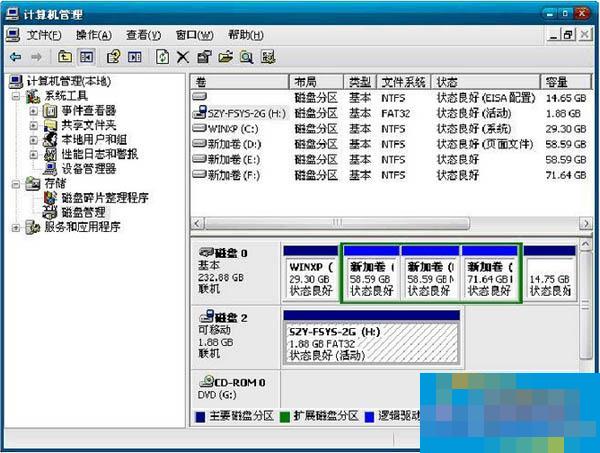
Insert the U disk into the USB of the computer, and then use the disk management function of Windows to find the disk corresponding to the U disk. Be sure not to make the wrong choice here, otherwise the MBR of the hard disk will be overwritten. From the picture below, you can see that the U disk here is disk 2.
Okay, the above is all the content brought to you by the editor of Huajun. Isn’t it very simple? Have you learned it? If you want to know more related content, please pay attention to Huajun information at any time. Welcome to Huajun to download!