



- Green versionView
- Green versionView
- Green versionView
- Green versionView
Software features
1. Minimum steps
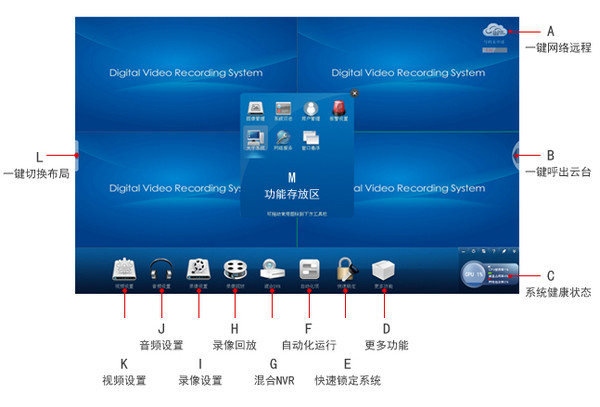
Open network remote service with one click (A): Click to open network remote service
Call out the PTZ with one click (B): Click to call out the PTZ control panel
One-click switching layout (L): Click to switch the screen layout at will
2. Humanized design
Function icons can be placed arbitrarily: The function icons at the bottom of the screen can be dragged to different positions or stored in more functions (M).
Automated operation (F): Click to enable it. It can automatically run the software recording and minimize it when it is turned on. It saves you the trouble of running the monitoring software every time you turn on the computer and allows your capture card to run like a DVR.
Quickly lock the system (E): Click to lock the system to prevent others from changing your settings at will.
Quickly modify OSD: You only need to click on the OSD information displayed in the monitoring image and enter new OSD content.
3. Real-time control of system status
System health status display (C): The real-time status of your system's current CPU and disk can be displayed here.
Repair system (C): When your system's CPU or disk usage is too high, you can adjust and repair your system by clicking on the relevant progress bar.
4. Hybrid NVR (G)
The most affordable solution in the era of network high-definition: This function can integrate real-time analog surveillance images and network high-definition images, relieving you from the embarrassment of choosing between analog surveillance solutions and network high-definition solutions. (This function supports access to the full range of Zhongwei security products)
Change log
1. Add the software top function in the video settings; (for example, cancel the top function to control the web page and word interface to be displayed at the front of the monitoring interface).
2. Add the function of registering an alias for the Cloud Vision number; (For example, if the Zhongwei digital surveillance system client Cloud Vision master registers an alias as "Zhongwei Century" or other customized names, then enter: "Zhongwei Century" or other custom names on the client to replace the complicated and difficult to remember numbers. Currently, only customers in this board software installation package support this function. The official client software and mobile phone software will be updated one after another, so please pay attention to the Zhongwei official website.).
3. The software is compatible with JVS-HC8000Q board.
4. Optimize the intelligent analysis function.






Useful
Useful
Useful