If you are looking for software to use, go to Huajun Software Park! software release AI product list

Hello, if there is a need for software inclusion, please package the software and attach the software name, software introduction, software-related screenshots, software icon, soft copy, business license (if you do not have a business license, please provide the front and back of the corresponding developer ID card and a photo of yourself holding the ID card), and send it to email http://softwaredownload4.com/sbdm/user/login

Close >>

Send to email:news@onlinedown.net

Close >>

Location: Home pagePC softwareSystem softwareSystem assistance Ghost Internet Cafe Auxiliary Tools
Ghost Internet Cafe Auxiliary Tools

Ghost Internet Cafe Auxiliary Tool Green Version

QR code
  • Software licensing: free software
  • Software size: 0.86MB
  • Software rating:
  • Software type: Domestic software
  • Update time: 2024-12-26
  • Application platform: WinAll
  • Software language: Simplified Chinese
  • Edition: Green version

Download the service agreement at the bottom of the page

Software introduction Related topics FAQ Download address

Basic introduction
Ghost Internet cafe auxiliary tool segment first LOGO
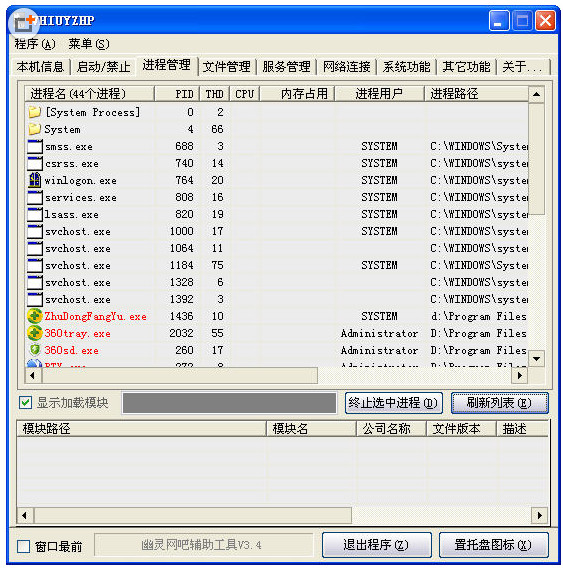
Ghost Internet Cafe Auxiliary ToolsIt is a small software that can lift some cumbersome restrictions in Internet cafes and provide daily maintenance and analysis for network administrators. The updated version adds the Vientiane/PUBWIN/E cartoon tray icon menu, and increases the system startup time, IE version information viewing, etc. It is a very practical software.
Similar software
Release Notes
Software address

Screenshot of ghost Internet cafe auxiliary tool

Change log

V3.4 update instructions:
>floating window
>Local information
>Add external network IP and game console IP reading
>Add custom hotkey settings.
>Extended functions
>Increase local traffic viewing
>Process management
>Add process user name to view
>Add TASKKILL management process
>Optimize process/module reading function
>File management
>Add hard reading file function
>Increase memory operation function
>Add file directory permission settings
>Corrected that copy and delete can be processed in batches, and added directories that can be deleted and copied.
>Service management
>Icon changed to file icon
>Switch to operation service mode, which is more stable.
>Optimize service reading function
>Network connection
>Add UDP protocol reading
>Add sorting function
>Add close connection function
>System functions
>Add one button to disable/enable local area connection
>Added one-click initialization, closing and opening of firewall
>Add system auxiliary functions
>Add common optimizations to the registry
>Add file association viewing and repair
>Add IE plug-in management
>Add key registry location view management
>Schedule
>Add program timing plan. View and manage system scheduled tasks
>Monitoring operations
>Add process end monitoring
>Add the function of saving logs

FAQ

Ghost Internet Cafe Auxiliary Tools

Ghost Internet Cafe Auxiliary Tool Green Version

close