



- Green versionView
- Green versionView
- Green versionView
- Green versionView
- Green versionView
new features in photoshop8.0
1. Full support for 16-bit images
2. ImprovedFile browser
3. Customized shortcut keys
4. Place text along the path
5. Shadow/highlight correction
6. Support the raw mode of digital cameras
7. Histogram palette
8.LayerComps
9. Match color command
10. InputFlashFile
photoshop8.0 precautions
What this site provides you isAdobe Photoshop CS green version, the downloaded compressed package is only 20MB, and it is only 51MB after decompression. Adobe Photoshop CS green version can be opened and used without user installation. It removes unnecessary auxiliary files such as example patterns and other images, and its functions are not reduced at all. Click "Green Installation.bat" to install the necessary files, and then you can open PS 8.0.
photoshop8.0 installation steps
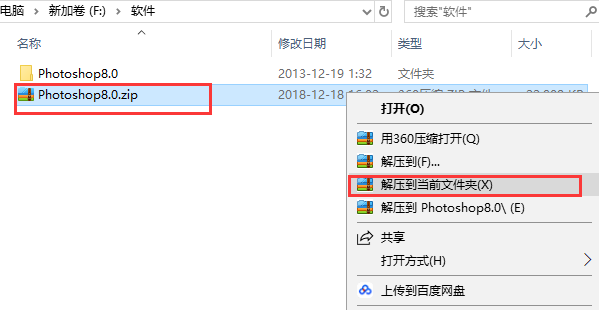
1. First we need to download the Photoshop 8.0 green streamlined version installation package from this site. After the download is completed, we will get the compressed package in zip format. We right-click the compressed package and select Extract to the current folder in the pop-up menu bar to get the folder named Photoshop 8.0.
2. We open the decompressed folder, as shown in the figure below, you can see the Photoshop.exe file and the green installation .bat file. Here we need to double-click the green installation .bat file first.
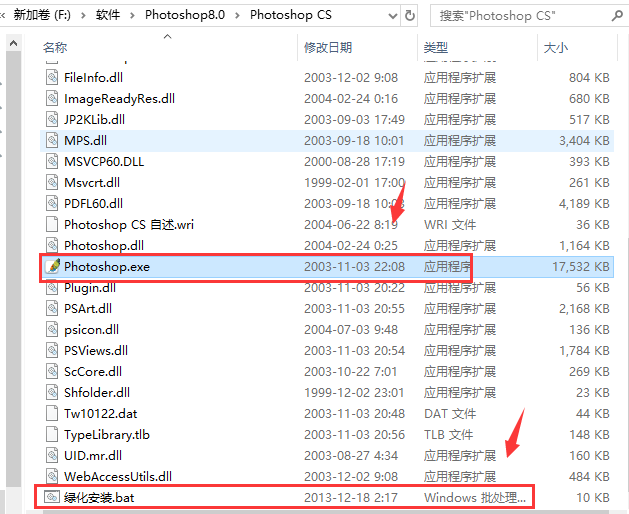
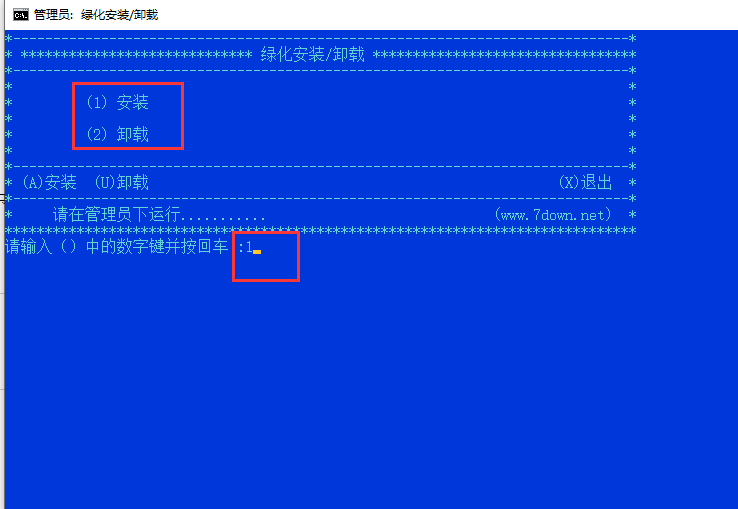
3. Enter the interface in the picture below. We can see that 1 is installation and 2 is uninstallation. There are also options A for installation and B for uninstallation below. We enter 1 or A below, and then click the Enter key on the keyboard.
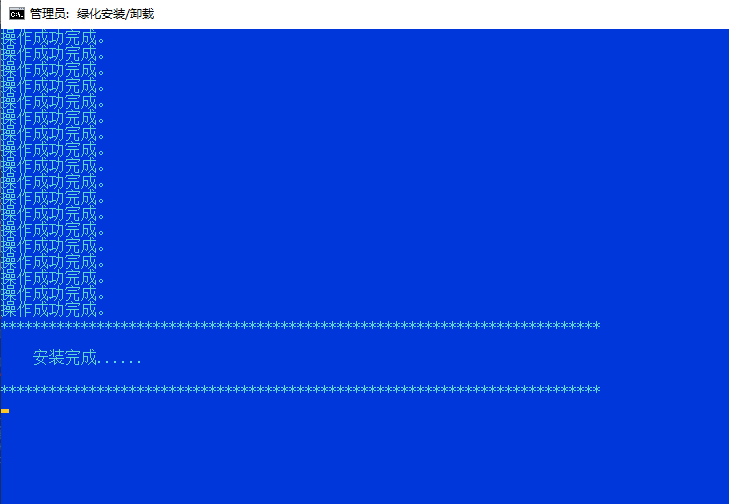
4. As shown in the picture below, the operation is successful and the Photoshop 8.0 software has been installed. We can close the interface.
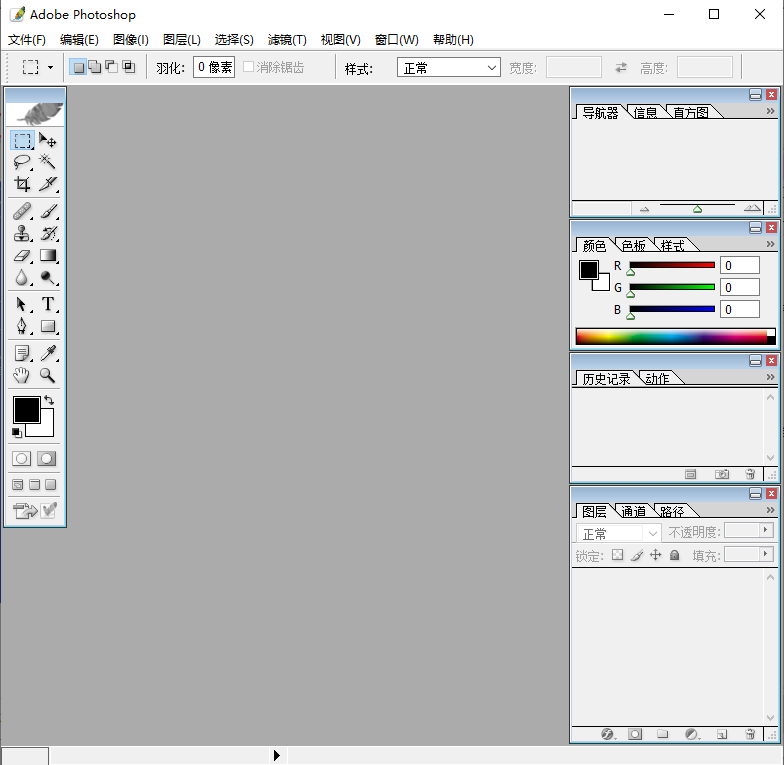
5. Finally, we double-click the Photoshop.exe file to enter the main interface of the Photoshop 8.0 green streamlined version software and start using it. It is very simple, so come and try it.
photoshop8.0 shortcut keys
1. Restore/redo the previous operation [Ctrl]+[Z]
2. Undo more than two steps of operation [Ctrl]+[Alt]+[Z]
3. Redo more than two steps [Ctrl]+[Shift]+[Z]
4. Free transformation [Ctrl]+[T]
5. Apply free transformation (in free transform mode) [Enter]
6. Start transformation from the center or symmetry point (in free transformation mode) [Alt]
photoshop8.0 FAQ
1. How to use Photoshop8.0 to convert multiple pictures into PDF files?
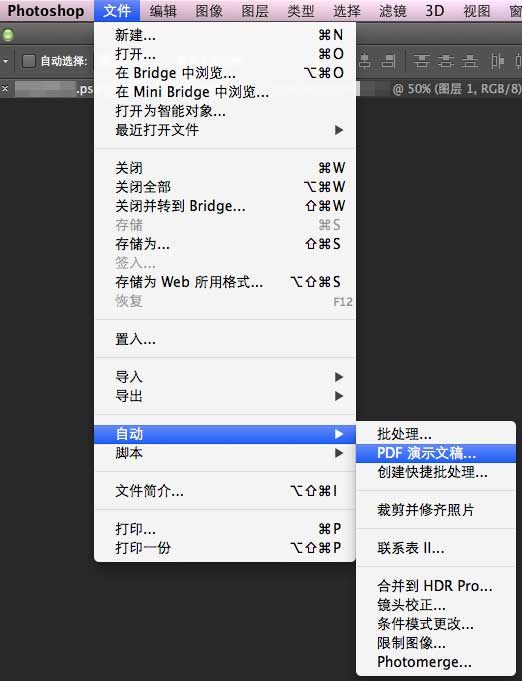
1. First, we need to open the Photoshop 8.0 Green Lite software. After opening it, we enter the main interface of the software. We click the "File" option at the top of the interface, and then the drop-down option will pop up, as shown in the figure below. We click the "Automatic" option, select the PDF presentation option in the menu bar that appears on the right, and proceed to the next step.
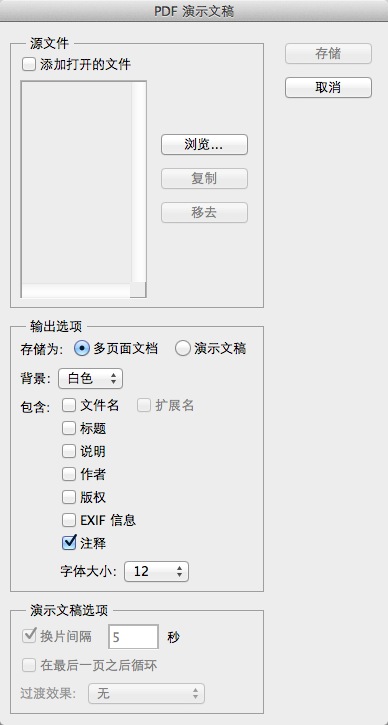
2. Enter the PDF presentation interface, we click the "Browse" option on the interface, and then add the required image files. Once completed proceed to the next step.
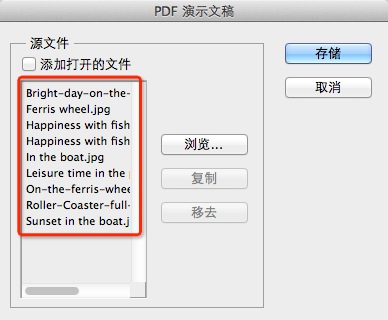
3. As shown in the figure below, after we add the required picture files, we need to set their sorting. You can directly drag the pictures up or down. This will affect the order when outputting the PDF later.
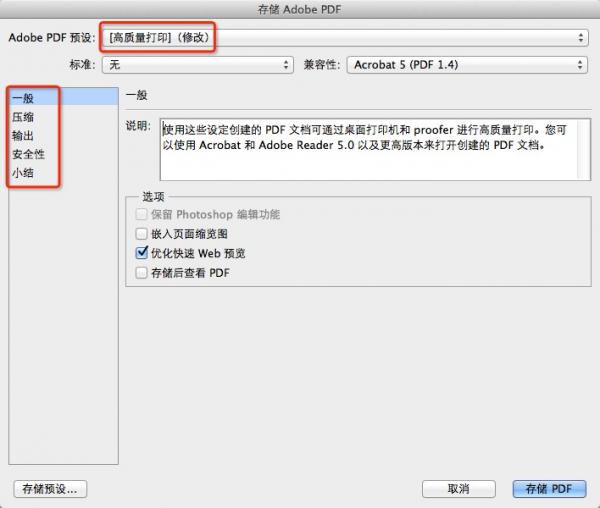
4. After we set the order, click the storage option on the interface to enter the storage setting interface. We can set the parameters of the PDF, as shown in the figure below. After completing the settings according to your needs, click the storage option at the bottom of the interface.
5. After we click Save, the Photoshop software begins to automatically process these images. After the processing is completed, we can see the output PDF file.
2. How to combine two pictures into one in Photoshop 8.0?
1. First, we open the computer and install the Photoshop software, then enter the main interface and click the "File" option, click Open in the drop-down selection to import the two pictures into the software.
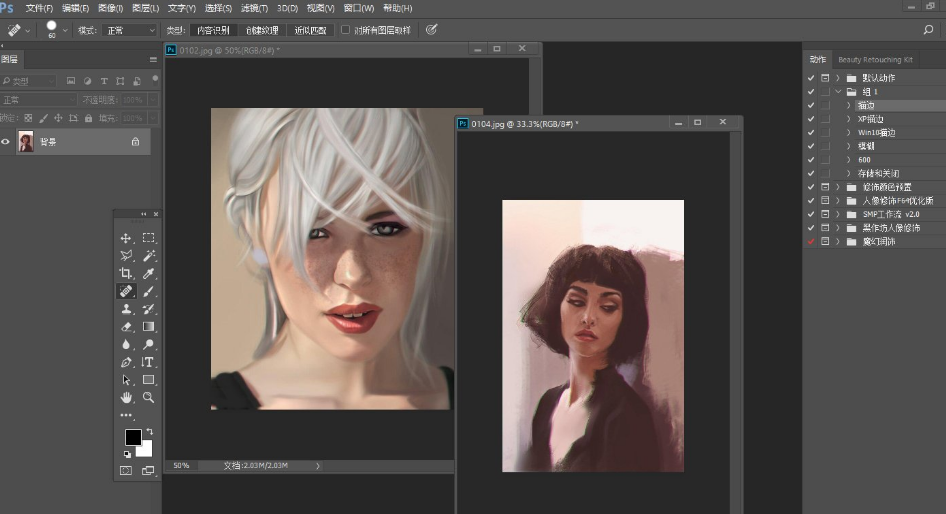
2. Next, we click the selection tool and drag the picture to move the picture to another picture, as shown in the picture below. After the drag is successful, we will proceed to the next step.
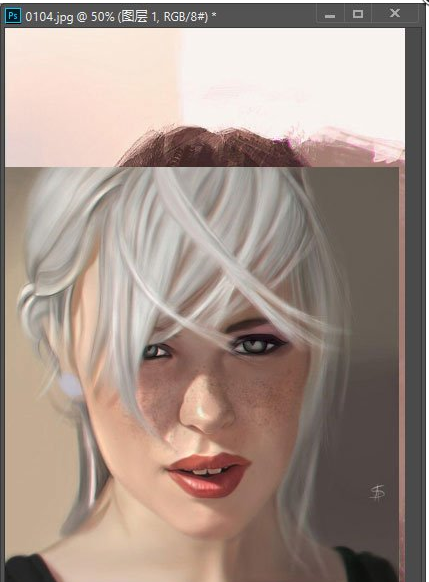
3. We drag the picture to the position we like, as shown in the picture below. The editor places the picture in the upper left corner of a picture as a background or hanging on the wall.
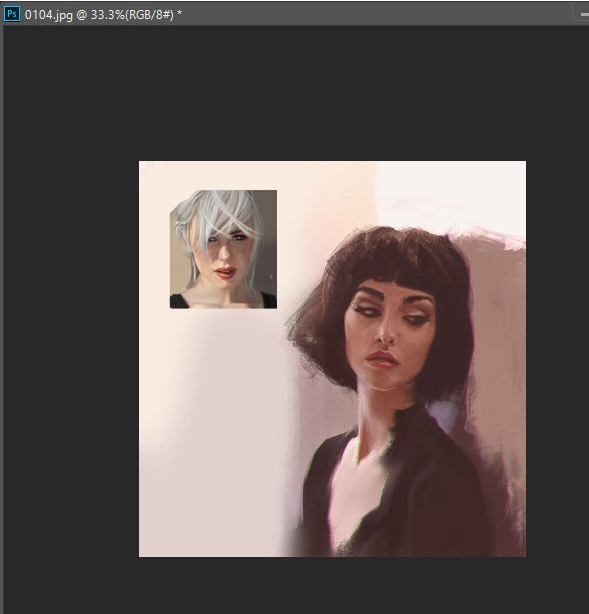
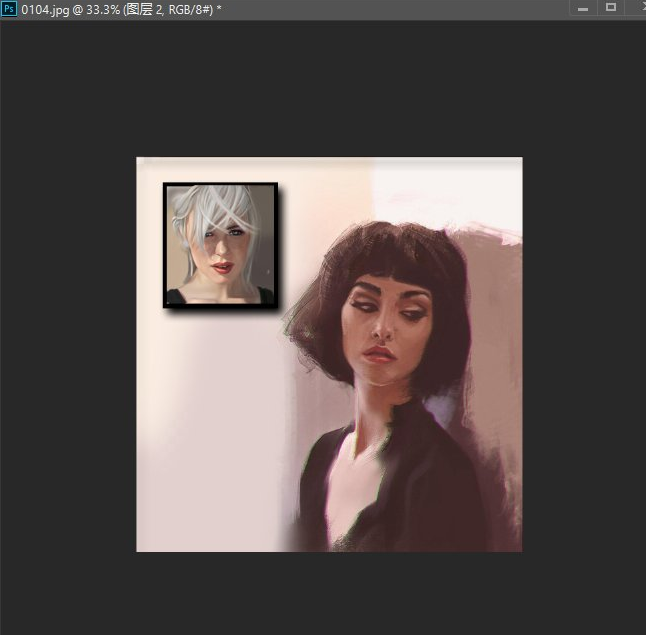
4. Next, we can make appropriate edits and modifications to this picture, so that it can be naturally integrated into this picture. The above is the detailed introduction that the editor has brought to you about merging two pictures into one. Friends in need can quickly download and use it.
3. How to cut out pictures in photoshop8.0?
Many friends use ps software to create pictures in their daily life, but some friends don’t know how to cut out pictures through ps software. In fact, there are many ways to cut out pictures in ps software. The editor will give you a detailed introduction. Friends who need it can click on the link at the back.http://softwaredownload4.com/sbdm/news/it/267289.htmlCome check out the detailed tutorial on cutout and learn it quickly.
4. How to remove watermark in photoshop8.0?
Many friends will encounter the problem of watermarks on pictures when using Photoshop software to process pictures, so how to quickly and accurately remove the watermarks? This is a problem that many friends have. The editor brings you six tips to quickly remove picture watermarks. What are you waiting for? Click on the link below.http://softwaredownload4.com/sbdm/news/it/208717.htmlCheck out the detailed tutorial, I believe it can help you.
What is the difference between PS and AI?
When using AI software, you can create multiple drawing boards at the same time if you have needs. PS software can only create one, which is relatively inconvenient.
If you make a mistake using ai software, you can always undo it by pressing the shortcut key Ctrl+Z until you return to the previous place. PS software can only retract one step. If you still want to retract, you need to hold down the shift key to do so.
When using ai software, you can always enlarge the picture without worrying about blurring the picture. Use PS software to enlarge the picture to a certain extent, and the picture will be blurred.
Generally speaking, most people use AI software to design logos, vector illustrations, etc. Most of the use of PS is to modify and edit pictures, and it is suitable for different groups of people.
Compared with AI software, ps software has richer colors, which is very convenient for users of image processing and production.
The editor concluded: AI and PS each have their own characteristics, and the combined use of AI and PS can complete the design quickly and well. So you can choose the appropriate software to download according to your needs. Friends who like AI can click the link below to download.
AIDownload address:http://softwaredownload4.com/soft/578049.htm
photoshop8.0 update log
being further being improved and the functions of the software being improved and the bugs being fixed.
Due to copyright and manufacturer requirements, Huajun Software Park provides the official download package of Photoshop CS software.
|
Recommended by Huajun editor
PS8.0 Chinese free version is a very good image software. The software is simple to operate, and its functions are practical and convenient. You can use ps software to do some image processing, which is simple, fast and efficient. Friends in need can download and use it. This site also provides: Smart Draw, Adobe Photoshop cs5,Finalize design,Magicexif and more are available for you to download. |










Useful
Useful
Useful