




Geekbench official version
The official version of Geekbench is a system testing tool that is compatible with multiple platforms. Geekbench (performance test) can mainly examine the computing power of the CPU and memory system. Geekbench can also be used to test the performance level of a computer's single-core and multi-core processors and calculate the stability and performance of the computer. Huajun Software Park provides Geekbench software download service. To download other versions of Geekbench software, please go to Huajun Software Park!
Geekbench software features
1. CPU benchmark test
Geekbench 5 measures your processor’s single-core and multi-core performance, from checking email to taking photos, playing music or doing it all at once. Geekbench 5's CPU benchmarks measure the performance of new applications, including augmented reality and machine learning, so you'll see how close your system is to the cutting edge.
2. Calculation basis
Benchmark your system for gaming, image processing or video editing potential. Test the capabilities of your GPU with support for OpenCL, CUDA and Metal APIs. Geekbench New in 5 is support for Vulkan, the next generation cross-platform graphics and computing API.
3. Cross-platform
Comparing apples and oranges. Or Apple and Samsung. Geekbench 5 is designed for cross-platform comparisons, allowing you to compare system performance between different devices, operating systems, and processor architectures. Geekbench 5 supports Android, iOS, macOS, Windows, and Linux.
4. Geekbench browser
Upload your results to Geekbench Browser to share with others, or let the world know how fast (or slow) your device is! You can track all your results in one place by creating an account and easily find them from any device.
Geekbench software advantages
Crypto: Crypto workloads measure a computer’s cryptographic instruction performance by performing a large number of cryptographic tasks that use cryptographic instructions.
Integer: Integer workloads measure a computer's integer instruction performance by performing a large number of processor-intensive tasks that use integer instructions.
Floating point: Floating point workloads measure floating point performance by performing a variety of processor-intensive tasks that make extensive use of floating point operations.
Memory: Memory workloads measure memory latency and bandwidth.
It measures computing performance using multiple workloads:
Every Compute workload has an implementation of every supported Compute API. It currently supports the following Compute API: OpenCL, CUDA, Metal and RenderScript.
Geekbench software features
1. A more professional running score application, allowing everyone to better conduct running score reference.
2. Comprehensive data acquisition allows you to understand more data.
3. The world’s most authoritative benchmarking application, eliminating the possibility of cheating.
4. It can effectively feedback the parameter level of each hardware, allowing you to know more real information.
5. The professional running score function brings you more reference data.
6. Rich model comparisons allow you to better understand the performance.
Geekbench installation steps
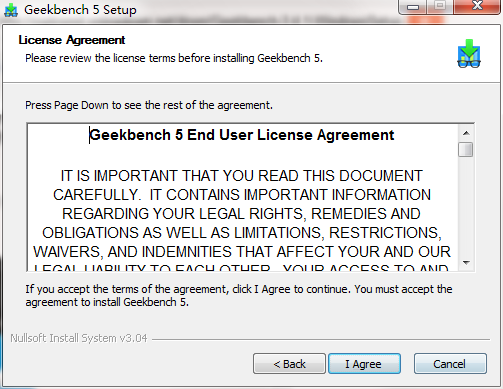
1. Download Geekbench in Huajun Software Park and unzip it to the current folder. Click on the geekbensetup_5.1.1.exe application to enter the license agreement interface. After reading in detail, click I Agree.
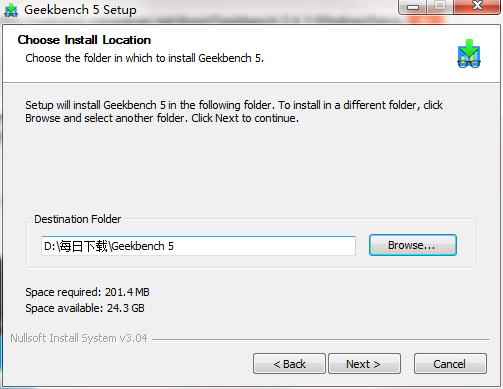
2. Select the software installation location interface. Huajun editor recommends that users install it on the D drive, select the installation location and click Next.
3. The Geekbench installation is completed, click Finish.
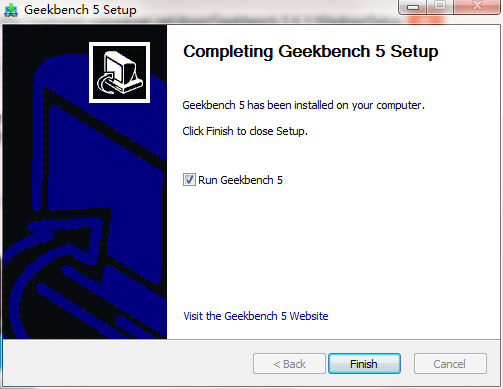
Geekbench Instructions
1. Run the program
2. When preparing to run, just click Run Benchmark. The rest is to wait. The waiting time will be different depending on the computer performance.
3. The stress test function needs to be activated in the menu bar in the upper left corner, select Run Stress in the Benchmarks menu Test. In the stress test interface, we can select the time and number of stress tests. The so-called stress test is to run the processor at full load. At this time, the fan will dissipate heat like crazy, which is the so-called copy test.
4. The results are very user-friendly. If you only care about the score, you can directly see the single-core and multi-core performance scores of the computer.
5. If you want to see more detailed performance and scores, scroll down on the results page to see more detailed content, including processor cache, encryption performance, floating point operations and memory performance, etc.
Geekbench FAQ
Q: What should I do if Geekbench cannot correctly identify the processor (CPU)?
Answer: There are currently several known device identification models in Geekbench's device identification.
OnePlus 3T device is identified as a OnePlus 3 device
Samsung Galaxy S8 models with Exynos processors are identified as having Snapdragon processors.
The Xiaomi Redmi Note 4X Mediatek model is confirmed to have a Snapdragon processor.
The Xiaomi MI Max Prime model is confirmed to have a Snapdragon 650 processor.
The Xiaomi Redmi 4 Prime model is identified as the *Xiaomi Redmi 4 model
The ZenFone 3 Deluxe model is confirmed to have a Snapdragon 625 processor.
Q: How does Geekbench export test results?
Answer: export-csv exports the results to a CSV file.
export-html Export the results to an HTML file.
Export-json exports the results as a JSON file.
export-text Exports the results to a plain text file.
Q: How to uninstall Geekbench?
Answer: Method 1: Install and open the computer manager software, select the software management option, click the uninstall option, find Geekbench in the list, and click uninstall
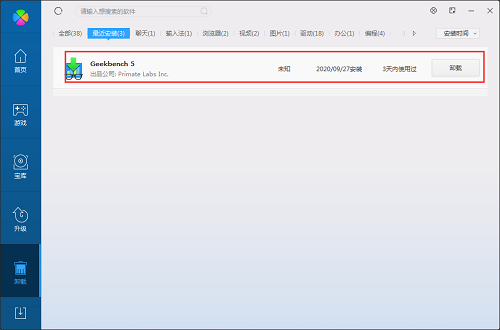
Method 2: Install and open360 software manager, find Geekbench in the list of uninstall options, and click Uninstall.
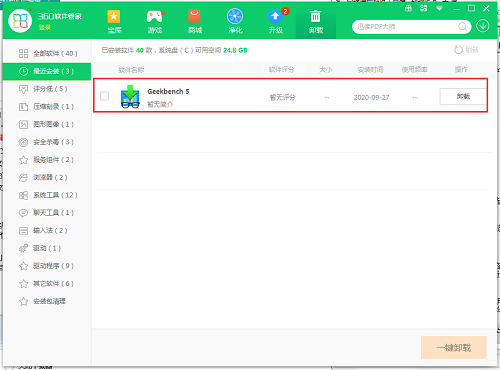
Comparison of similar software
Real-time performance monitoringThe latest version is a professional and practical real-time computer performance monitoring and management software. The official version of the real-time performance monitoring software can monitor the running status of the computer in real time and grasp the running status of various computer hardware and processes at any time. At the same time, the real-time performance monitoring software provides memory monitoring, CPU monitoring, GPU monitoring, temperature monitoring and other functions, and can also make the computer slim down with one click.
DIY computer performance testing softwareIt is a lightweight, compact and practical computer performance testing tool. The DIY computer performance testing software is simple to operate, takes up little memory, and is green. Friends in need can download it and try it! Huajun Software Park provides you with DIY computer performance testing software downloads. Welcome to download.
Huajun editor recommends:
Geekbench (performance test) can mainly examine the computing power of the CPU and memory system. Geekbench can also be used to test the performance level of a computer's single-core and multi-core processors and calculate the stability and performance of the computer. I believe that as long as you dare to use it, you will definitely fall in love with it.












Useful
Useful
Useful