
If you are looking for software to use, go to Huajun Software Park! software release AI product list

Hello, if there is a need for software inclusion, please package the software and attach the software name, software introduction, software-related screenshots, software icon, soft copy, business license (if you do not have a business license, please provide the front and back of the corresponding developer ID card and a photo of yourself holding the ID card), and send it to email http://softwaredownload4.com/sbdm/user/login

Close >>

Send to email:news@onlinedown.net

Close >>

Location: Home pagePC softwaredesktop softwaredesktop assistance DesktopOK Unicode
DesktopOK Unicode

DesktopOK Unicode 4.35

QR code
  • Software licensing: shareware
  • Software size: 0.12MB
  • Software rating:
  • Software type: foreign software
  • Update time: 2024-12-26
  • Application platform: Winxp/vista/win7/win8/2000/2003
  • Software language: English
  • Edition: 4.35

Download the service agreement at the bottom of the page

Software introduction Related topics FAQ Download address

Recommended for you:- Desktop software

Basic introduction
DesktopOK Unicode segment first LOGO
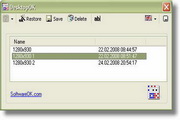
Desktop Icon Restoration (DesktopOK) is a small tool for saving desktop icon layout. DesktopOK can be set to automatically save, which is convenient for straightening out an untidy desktop. DesktopOK does not need to be installed. You can easily execute it from the desktop and use a small USB flash drive or other storage device.

When there are many icons on the desktop and the positions are manually moved, you don't know what will happen at what time. The desktop icons will be arranged in a row, and it is difficult to find the shortcut you need among a bunch of icons without partitions. DesktopOK exists to solve this problem. After automatic saving is turned on, it will be saved every once in a while. Even if the pictures are arranged in a row, you can easily restore them and find the icon you need.

DesktopOK (restore desktop icons) features:

1. Save your most familiar icon positions for each screen resolution.

2. Each user can have his or her own desktop icon arrangement.

3. Start when Windows starts.
Related topics

  • UNICODE code encyclopedia

    UNICODE code encyclopedia

  • UNICODE coding encyclopedia

    UNICODE coding encyclopedia

FAQ