





Deep Flash Master Features
1. Just one click to flash the phone
No need to download ROM in advance,
No need to worry about finding a suitable ROM,
Intelligent ROM matching, enjoy the pleasure of automatic flashing!
With a cup of coffee and a click of the mouse, you can flash your phone!
2. System backup, worry-free flashing
Worried about flashing failure?
Are you worried that the new system is not the style you want?
It doesn’t matter, system restore, so easy!
3. Massive ROM resources, easy to flash your phone!
Massive ROMs selected by the Flash Master technical team...
No need to look around, you will find what you want here!
Continuously updated every day...
4. Intelligent driver matching, considerate flashing tools
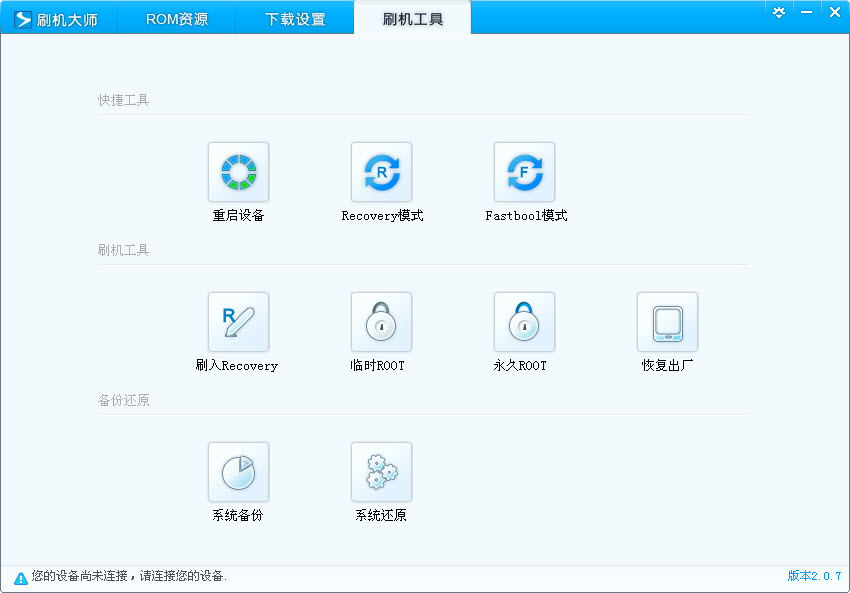
ROOT, backup, restart, flash recovery...
With a flashing tool, DIYers no longer need to perform cumbersome operations
out of mobile phone keys, saves time and effort.
More thoughtful gadgets are being developed...
Deep Flash Master supports models
1. HTC: HTCG6, HTCG7, HTCG8, HTCG9, HTCG10, HTCG11, HTCG12, HTCG13, HTCG14, HTCG18, HTCRuby, HTC Thunderbolt, etc.;
2. ZTE (ZTE): ZTE-U880, ZTE-V880, ZTE-N880, ZTE-N760, ZTE-X850, etc.;
3. Huawei (HUAWEI): C8650+, C8650, U8800Pro, C8500, etc.;
4. LG: LGP990, LGP970, etc.;
Deep Flash Master User Tutorial
HTCG14sensation flashing tutorial, one-click flashing, one-click ROOT, recovery tutorial:
Preparation work before flashing:
1. One HTCG14 (it doesn’t matter if it has been brushed before or not)
2. One data line (requires a stable data line connection, there is a risk of disconnection from time to time)
3. One computer (windowsXP/7/8 is acceptable)
Specific requirements:
-S-OFF
-HBOOT1.27 and above
-RADIO11.68 and above
-3.32 and above firmware, otherwise it will restart indefinitely
-4EXTRecoveryControl touch screen version
-The flashed mobile phone must have sufficient battery (recommended to be above 70%)
G14 unlocking,
Start flashing:
1. Download the Deepin Flash Master software and install it;
2. Please connect your phone to the computer using a data cable and turn on the USB debugging mode;
3. Deepin Flash starts to automatically load the driver. When the download is complete, click Next to complete the installation (if you have used it beforeWandoujia, 91 Assistant, 360 Assistant and other software, the driver has been automatically installed)
Deep Flash Master FAQ
Q: The device has been connected with a data cable, but it cannot be recognized?
A: Close other mobile phone auxiliary software running on the computer, unplug the data cable and re-open the USB debugging mode.
Q: How to turn on USB debugging mode?
A: Open Settings>Applications>Development>USB Debugging Mode. Different versions of Android may differ slightly, see more.
Q: What should I do if I fail to root using deep flash?
A: This means that your phone does not currently support one-click flashing. You can click here and enter keywords such as model + root to view the root methods shared by other phone friends.
Q: How to clear the phone lock screen password?
A: Connect your phone and start deep flashing, open the flashing tool, choose to clear the screen saver password, and then follow the prompts (you need to obtain root permissions to clear the password).
Q: What is ROOT?
A: ROOT means obtaining the highest management authority of an Android phone. After ROOT, we can modify and delete the system software and files of the phone.
Q: What is ROM?
A: ROM is readonlymemory, read-only memory. The Android system is installed in flash memory, which is read-only memory. Flashing the machine means flashing the ROM. The ROM is like the system disk used when installing the computer. When flashing the machine, the ROM is flashed into the read-only memory to complete the purpose of replacing/updating the system.
Q: What is Recovery?
A: Recovery is like the WinPE system on a computer. After entering Recovery mode, you can install the system, backup and restore, etc.
Deep Flash Master Update Log
3.5.0.4 update log
1. Add a precision drive engine to enhance mobile phone connection capabilities;
2. Optimize the one-click root tool and greatly improve the root capability of Android 4.3 version;
3. Add the interaction to identify that mobile phones require authorization to connect, so as to be better compatible with higher version connections;
4. Add cocoa theme function;
5. Add event promotion function;


















Useful
it works
Useful