
If you are looking for software to use, go to Huajun Software Park! software release AI product list

Hello, if there is a need for software inclusion, please package the software and attach the software name, software introduction, software-related screenshots, software icon, soft copy, business license (if you do not have a business license, please provide the front and back of the corresponding developer ID card and a photo of yourself holding the ID card), and send it to email http://softwaredownload4.com/sbdm/user/login

Close >>

Send to email:news@onlinedown.net

Close >>

Location: Home pagePC softwareSystem softwareBackup software Laojiu one-click system restore
Laojiu one-click system restore

Laojiu one-click system restore 3.0

QR code
  • Software licensing: free software
  • Software size: 5.2MB
  • Software rating:
  • Software type: Domestic software
  • Update time: 2024-12-26
  • Application platform: Winxp/vista/win7/win8/2000/2003
  • Software language: Simplified Chinese
  • Edition: 3.0

Software introduction Related topics FAQ Download address

Basic introduction
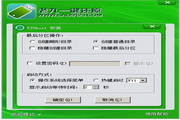
Laojiu one-click system restores segment first LOGO
One-click system restore v3.0 update instructions:

1. Improve some details and solve known problems

2. Update GRUB module to improve software compatibility

3. The advanced item "Search" allows custom suffixes, and can search for GHO restoration of any suffix.

4. Some function positions and variable adjustments

5. Improve 1:1 judgment and make it more humane

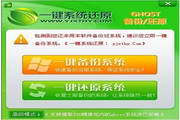
6. Adjust the simple window main interface and add "one-click system reinstallation"

7. Adjust and add some control locations and functions in the advanced window

With just one click, you can recreate yesterday. Quickly restore optimal system status.

One-click system restore is specially designed for computer novices.

Three major features: simple, easy to use, and safe!

1. The main program of one-click system restoration is compatible with Win2003, Winxp, Win7 and WinPE systems. In order to avoid false alarms from some anti-virus software, please try to exit the anti-virus software before running the main program or trust this program to run when the security software prompts whether the operation is allowed. When you run the program for the first time, you will be prompted to perform an initial backup. Click the one-click backup system button and choose to restart according to the program prompts.


Related topics

  • Computer system restore encyclopedia

    Computer system restore encyclopedia

  • system restore software

    system restore software

FAQ

close