





Features of foxmail email software
Just the right amount of simplicity
Simplicity lies in appearance and experience. So you will definitely like the new Foxmail, which will give you a simple and smooth using experience without requiring too much thinking pressure. Just the right amount of simplicity, you'll know it as soon as you use it.
Built from the ground up for performance
We value performance above all else. The reason why you choose Foxmail must be because it is fast enough, stable enough, and trustworthy. Now the new Foxmail has to challenge the storage of millions of massive emails, and it has done it.
Notepad function
Using Foxmail’s notepad function, you can record while working and easily organize useful information. Foxmail will synchronize it to the QQMail notepad on the web page and mobile phone for you, so that you can use it anytime and anywhere.
foxmail installation tutorial
1. First, you need to find the download address on this page and select any address to download the foxmail email client software package to your local. After downloading, double-click and decompress the .EXE format program in the package to run.
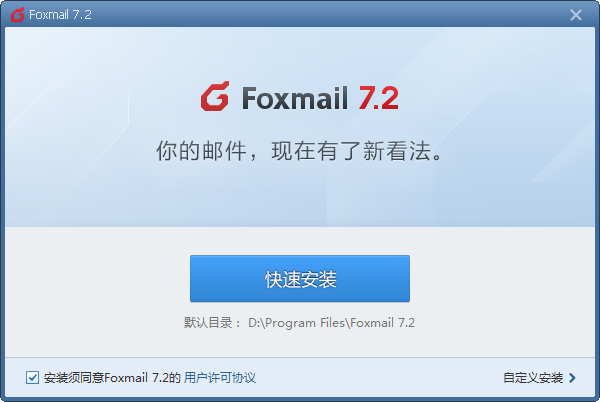
2. Please do not choose quick installation directly when entering the foxmail installation program. Please understand the installation agreement in the lower left corner and agree to it before continuing the installation. To continue the installation, you can choose [Quick Installation] and [Custom Installation]. In custom installation, you can choose some configurations by yourself. The editor recommends that you choose [Custom Installation].
3. After selecting foxmail custom installation, enter the setting path. Please select [Change Directory] to set the specific storage path.
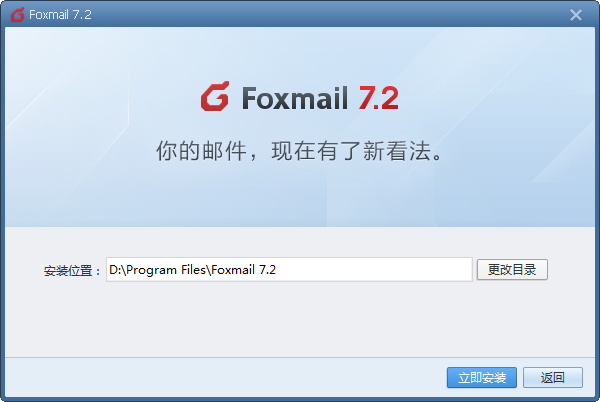
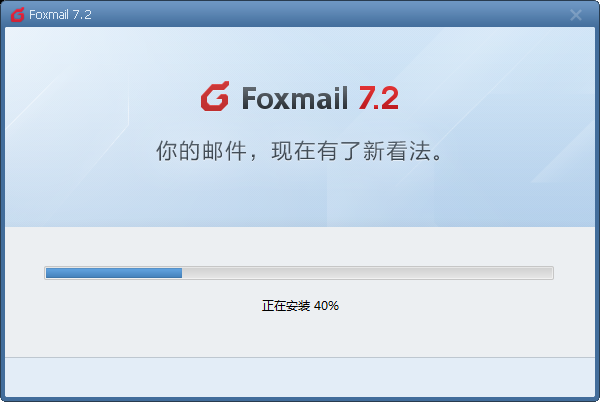
4. After setting the foxmail installation directory, enter the foxmail installation progress bar interface and wait patiently for the installation to complete.
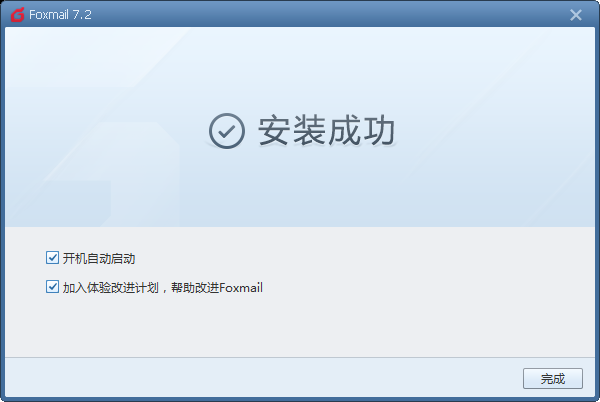
5. Finally, after foxmail is installed, click [Finish] to select the two options in the interface. If you think it is necessary, you can check it and then [Finish].
foxmail mailbox usage tips
1. First, after installing foxmail, we need to run and open the program and follow the following tips:
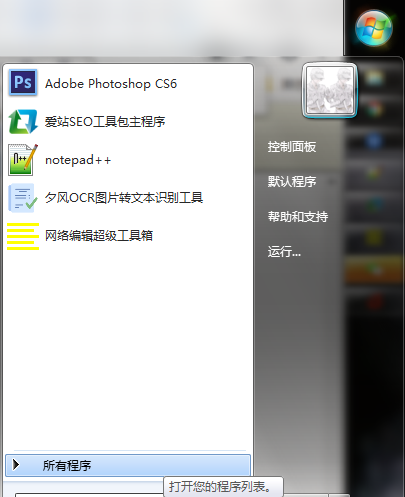
2. Find the [Start] menu bar and select Open, find [All Programs] and select Enter.
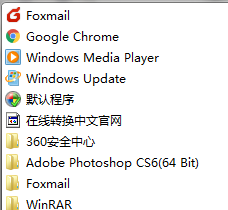
3. Select the [Foxmail] option you installed and double-click to open it. (If you have created a foxmail quick start portal on the desktop, you can directly double-click the startup icon on the desktop to enter the program)
4. Open the foxmail client login portal normally and fill in the account and password according to the prompts.
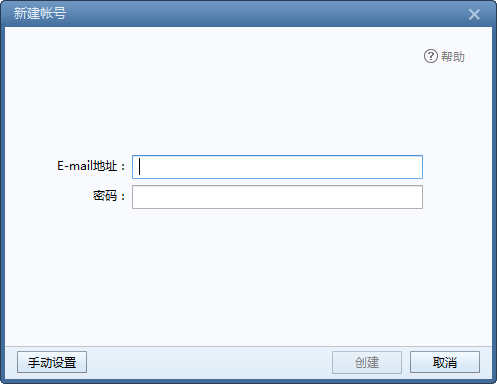
5. If you feel that the login configuration settings do not meet your requirements, you can also select [Manual Settings] in the lower left corner of the interface to reset.
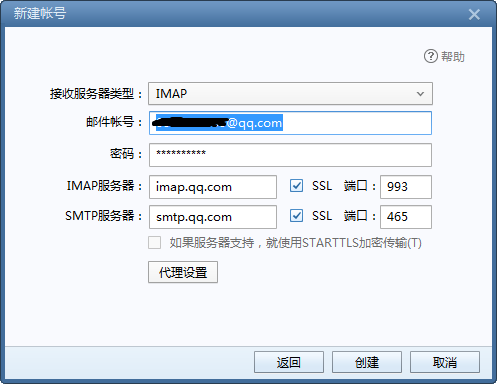
6. After entering the foxmail setting interface, friends can choose to set up the server type, server, port and other information in the interface.
7. Finally, you can choose to create after the setting is successful.
foxmail mailbox FAQ
How to set up foxmail automatic reply?
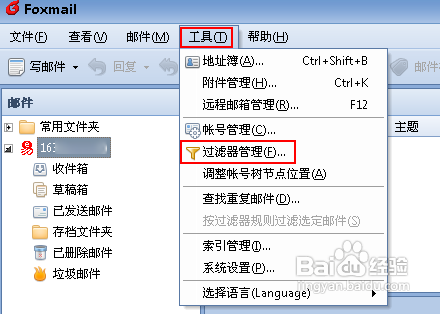
1. First, you need to run and open Foxmail, then select the [Tools] option on the menu bar and open it, select [Filter Management] to select filter settings.
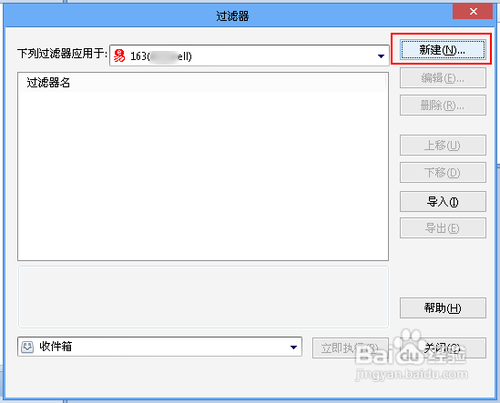
2. After entering the foxmail filter setting interface, select the [New] option to enter the "New Filter Rule" interface.
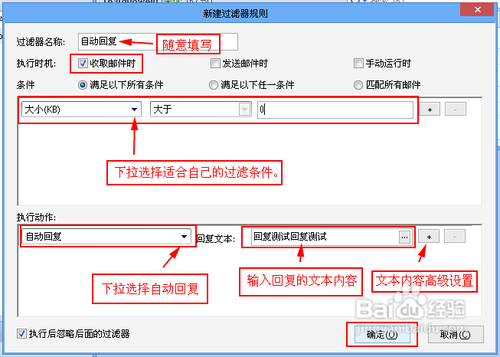
3. After entering the new filter rule interface, fill in the filter name (fill in as you like), execution time (when selecting to receive emails), and set filtering conditions that meet your needs. For example: if you set a value greater than 0kb, please select the execution action to perform the corresponding action, such as "automatic reply", and enter the corresponding reply text. After setting, save and [OK].
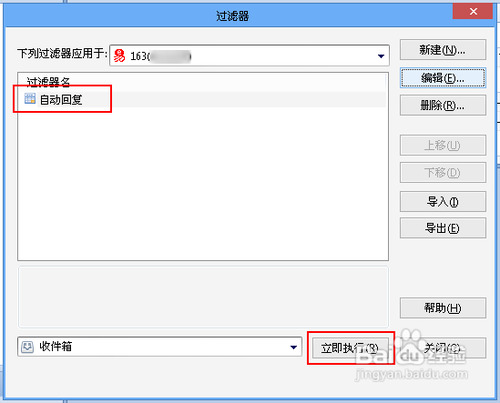
4. Then after we save it, you can see the conditions you just set in the filter setting interface. If you need to automatically reply to the currently received emails, select [Execute Now].
Foxmail email storage location?
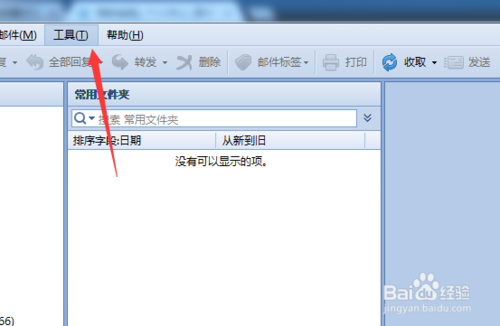
1. First we need to run and open foxmail, then select the [Tools] option in the menu bar and open and select [System Settings]
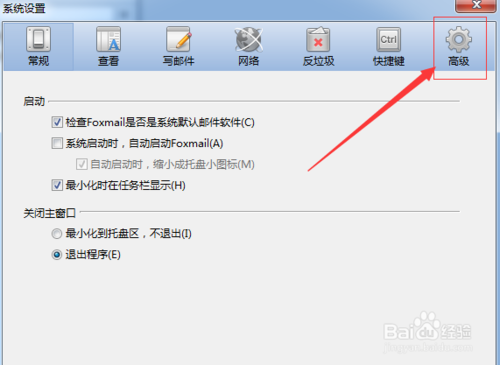
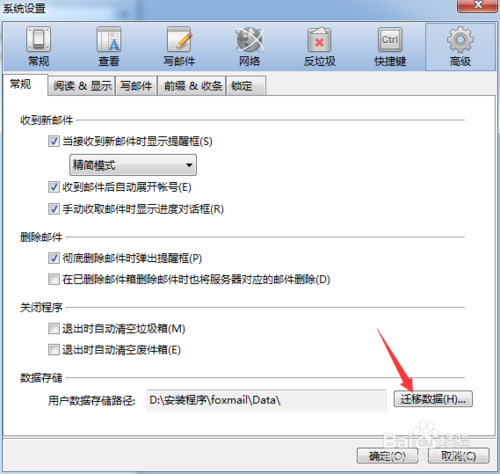
2. After entering the foxmail system setting interface, select the [Advanced] option and select [Migrate Data]
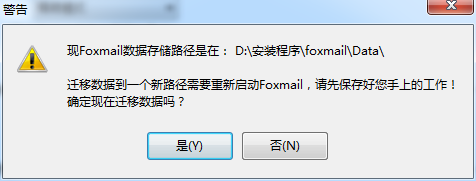
3. After choosing to migrate foxmail data information, a pop-up window will appear. Just select Yes.
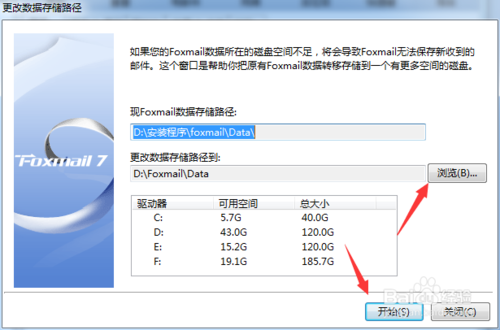
4. Then enter the foxmail data migration interface, please set the specific path you need to migrate and [Start]
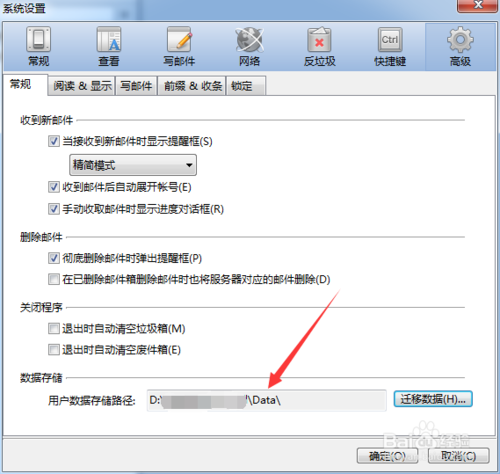
5. Finally, we can see in the foxmail system settings interface that the user data storage path has been changed to the path we set.
Foxmail suddenly cannot receive emails?
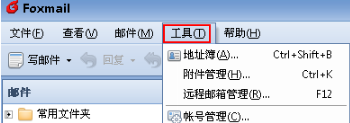
1. Please run and open foxmail and select [Tools]-[Account Management] in the menu bar and enter.
2. After entering the foxmail account management interface, select the server option to find the server backup, and change the selected "Permanent retention" to "Delete immediately".
3. Then we need to go back and find the previous mail server and delete it. If we don’t have permission, we can ask the administrator to delete it.
Comparison of advantages and disadvantages of Outlook Express and foxmail
1. Comparison between developers
Outlook Express and Foxmail are two email clients with two different backgrounds. Outlook Express is produced by the foreign Microsoft company, while Foxmail is developed by Zhang Xiaolong in China. The former is simple to operate and does not require installation, and can support many foreign software. The advantage of foxmail is that it takes up less system resources and is easy to carry (a small USB flash drive can be packed away).
2. Comparison of interface styles
In terms of style, compared to a single Outlook Express, foxmail can be said to have an advantage. Foxmail can support four different styles for conversion, and the operation interface is simpler.
If you need to use Outlook Express software, please get the link address here:http://softwaredownload4.com/soft/1152626.htm
foxmail mailbox update log
New: Tags support synchronization with Tencent corporate mailboxes
Optimization: Optimize part of the sending and receiving experience
Optimization: Fixed some bugs
|
Huajun editor recommends: Looking for a useful email tool? The editor recommends you the domestic foxmail. Foxmail’s main function is that it takes up less device resources and supports anti-spam, which allows us to avoid the trouble of all kinds of spam. Foxmail client has four interface styles for you to choose from. I feel that one interface style is too boring for a long time, so I occasionally choose to change it to another one. In addition, the editor of Huajun has also collected and compiled other [email client] tools for you to choose and download, such as: Mail Master, FastMail Express Mail Delivery, etc. |






















Useful
Useful
Useful