




Baofengyingyin 5 function introduction
Through Flying Screen, you can watch large-capacity high-definition videos stored in your computer directly on your smart TV or Baofeng Magic Mirror, completely getting rid of the constraints of your computer and experiencing an unprecedented pleasure in watching movies.
Feiping currently only supports video functions, but will support games, pictures, and music functions in the near future. In other words, in the future you can play large-scale PC games directly on smart TVs or magic mirrors and experience the same gaming experience as Xbox and PS4.
How to use Baofengyingyin 5
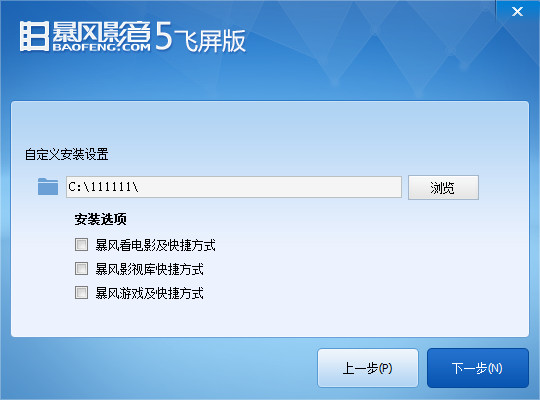
1. Download and install Baofengyingyin flying screen version on your computer
2. Install the client with the flying screen function on your smart TV or Baofeng Mirror.
Install "Baofeng Video TV Edition" on smart TVs or TV boxes based on Android 4.0 and above systems.
Method 1: Enter bf01.cn in the browser address bar of the smart TV or TV box to enter the download page.
Method 2: Download the Baofeng Video TV version installation package on your computer and copy it to a mobile storage device such as a USB flash drive, then connect the storage device to a smart TV or TV box to complete the installation.

|
|
|
Method 3: Directly search for "Baofeng Yingyin" in the third-party app store that comes with the smart TV or TV box (such as Dangbei Market), download and complete the installation.

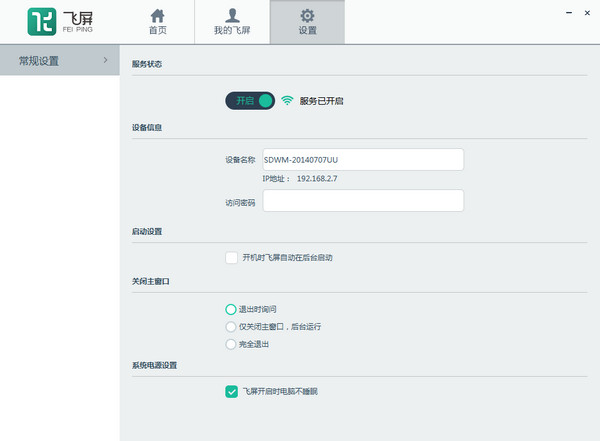
3. Open the Flying Screen client on your computer, and follow the instructions in the client to add the video resources on your computer to the Flying Screen list.
4. Make sure the computer, smart TV or Baofeng Mirror is connected to the same network.
5. Open the Flying Screen client on your smart TV or Baofeng Mirror.
Smart TV:Open the Baofeng Video TV version on your smart TV, enter the Flying Screen column, search for a list of computers under the same network, select and connect, you can see the videos you added on this computer, select a video and open it to watch.
Storm Mirror:Open the Magic Mirror app on your smartphone, and then put your phone into the Magic Mirror. After using the Bluetooth remote control to enter the flying screen column, search for a computer under the same network, select it and connect, you can see the videos you added on this computer, select a video and open it to watch.
Things to note about Baofengyingyin 5
During the use of flying screen, the computer must be turned on and not sleeping. Otherwise, there will be a situation where the computer cannot be searched or the screen will be interrupted.


















Useful
Useful
Useful