





Group Ping latest version
The latest version of Group Ping is a practical and powerful batch ping tool. Deep Blue Group Ping not only supports users to detect the current status of websites or IPs in the form of IP and domain names, but also supports display of delay time, average values, disconnection statistics, detection ports and other information. Group Ping can also monitor the PING of all your Internet cafes in batches on the external network or whether a certain server port is open. Huajun Software Park provides Qunping download service. To download other versions of Qunping, please go to Huajun Software Park!
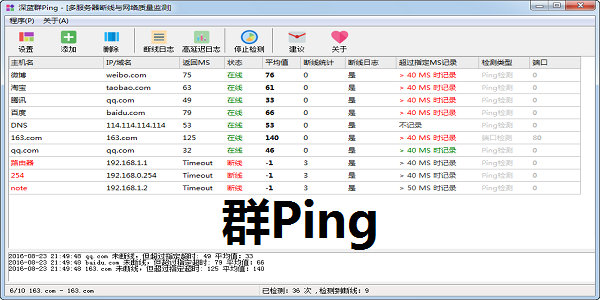
Group Ping software function
1. Multi-threaded Ping will not be stuck for a while due to network failure.
2. There is an intuitive interface display, which makes it convenient for people who don’t understand to view the responses to technicians who understand.
3. Logs can be recorded for disconnected servers.
4. You can specify different timeout TTL values for different servers. Logs exceeding this value are recorded (used to record servers with slow networks.), and all Ping values can be logged.
5 Can display disconnection logs in real time
6. You can detect the port timeout. Ping bans can also be detected.
7. Pop-up window prompt when disconnected.
8. Voice prompt for disconnection.
9. Send emails while disconnected.
10, statistics on the total number of disconnections.
Features of group ping software
You can set different servers to record ping timeout logs, or logs that exceed the user-specified timeout;
You can set up different server detection port timeout logs, or record logs that exceed the user-specified timeout;
You can set up different servers to send emails when they are disconnected, and administrators can receive emails on their mobile phones;
You can set up prompt windows to pop up when different servers are disconnected;
You can set separate voice prompts when different servers are disconnected;
It is a good helper for you to troubleshoot network faults and comprehensively monitor your own servers;
How to use group ping
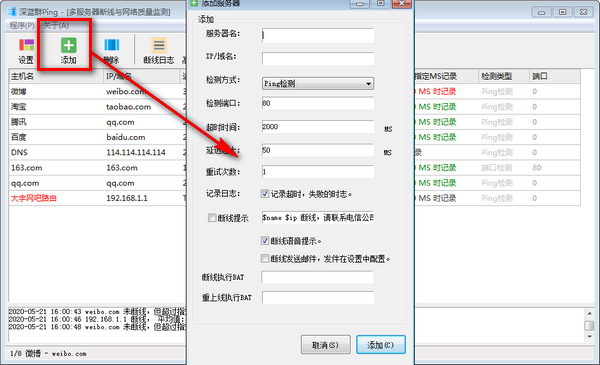
1. Download and open the software, click Add to add a new site.
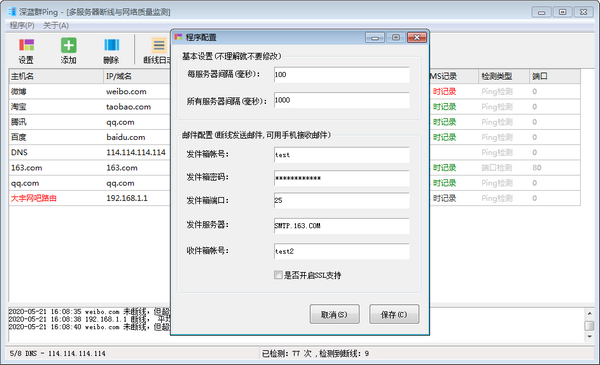
2. In the settings, users can set the interval and the email address for receiving logs.
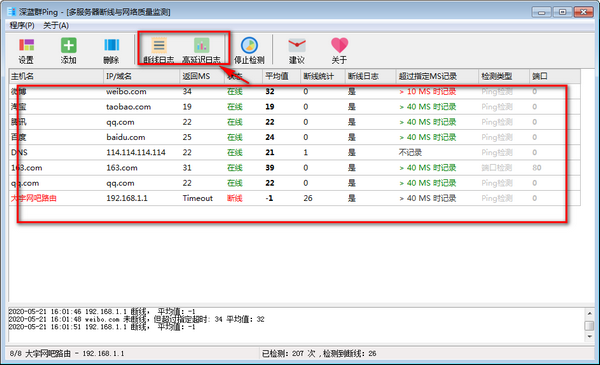
3. Click the log to see the problem more intuitively.
Comparison of similar software
Super PingThe official version is a set of software that enables real-time monitoring of network status of multiple hosts, analysis of monitoring results, and network disconnection alarms. , network status reporting and other functions of network management software. Super Ping PC version can detect network link anomalies in real time and issue alarms in a variety of ways. It is easy to use and has practical functions.
Quick Ping Monitor (graphical IP monitor)It is an excellent graphical IP monitor. If you need an excellent IP monitor, download this excellent and all-Chinese Quick Ping immediately. Use Monitor (graphical IP monitor).
Group Ping update log
1. Fix some BUG;
2. The program allows multiple openings;
3. Add window title customization;
4. Multi-threading robustness enhancement;
5. Automatically remember the window size and restore the last size when you open it next time.
Huajun editor recommends:
Deep Blue Group Ping not only supports users to detect the current status of websites or IPs in the form of IP and domain names, but also supports display of delay time, average values, disconnection statistics, detection ports and other information. The editor personally tested it and can use it with confidence. If necessary, you may wish to download and try it! The editor is waiting for you in wind and rain!













Useful
Useful
Useful