
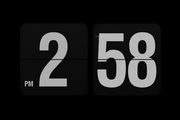



Isn’t it boring to use the system’s built-in screensaver every day? Today, the editor brings you a different screensaver. The Fliqlo clock screensaver is different from traditional screensavers. It does not have brilliant colors. It only uses white numbers displayed on a black background. It is a retro page-turning clock that displays the time in 12-hour or 24-hour format. The Mac version of Fliqlo Clock Screensaver is simple and elegant, bringing you a more fashionable and elegant feeling. If you like this kind of page-turning clock screensaver, then come to Huajun Software Park to download the Fliqlo Clock Screensaver program.
- Green versionView
- Green versionView
- Green versionView
- Green versionView
- Green versionView
fliqlo clock screensaver features
Minimal and easy to use
The size, style and color of the clock can be freely set
Simple and fashionable, standby personalized large-screen clock display
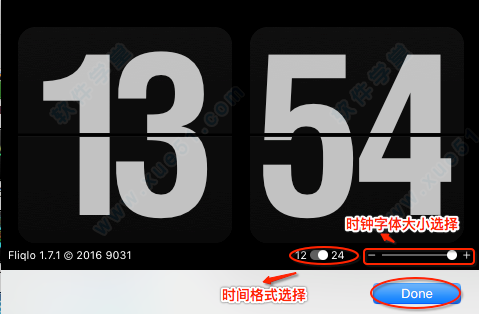
Zoom in/out to any size
Switching between 12/24 hour clock (*without leading zeros)
How to install Fliqlo clock screensaver
1. Download the Fliqlo clock screensaver compressed package from this site and unzip it, open the dmg image file, and then double-click "fliqlo.saver" to install;
2. Select "Install for this user only" and click "Install";
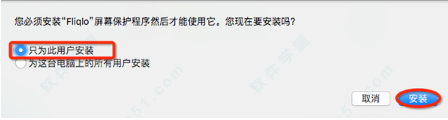
3. After installation, you can set it on the desktop and screen saver.

How to use fliqlo clock screensaver
1. Find “Desktop & Screen Saver” in System Preferences
2. Select fliqlo, click screen saver option settings, you can set your favorite clock size and format according to your needs, and then click "done";
fliqlo clock screensaver FAQ
How to uninstall fliqlo for mac?
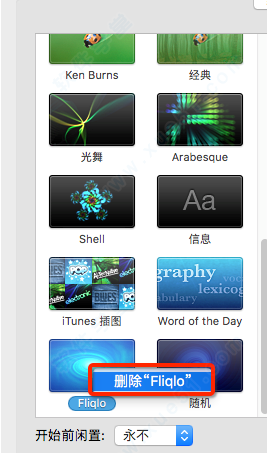
Open "Desktop & Screensavers" in "System Preferences", right-click on the thumbnail "fliqlo" and select "Remove "fliqlo" from the context menu.
Comparison between fliqlo clock screensaver and similar software
Dream Aquarium Screensaver is an aquarium screensaver that extremely restores the aquarium and makes your computer look like an aquarium. It has the most realistic fish movement trajectories and truly reproduces the aquarium scene.
Monroe Desktop is a dynamic desktop software that contains many high-quality dynamic wallpapers to make computer wallpapers lively and interesting. It provides everyone with video resources such as cartoons, game videos, automatic landscapes, cute pets, and film and television stars.
The editor recommends:Fliqlo clock screensaver allows you to experience a different desktop screensaver, which is simple and fashionable. Users can adjust the format and size arbitrarily. In addition, this site also provides downloads of desktop wallpapers such as Baidu wallpapers, Sogou wallpapers, and dynamic wallpaper shows. Come and choose your favorite wallpapers.











Useful
Useful
Useful