




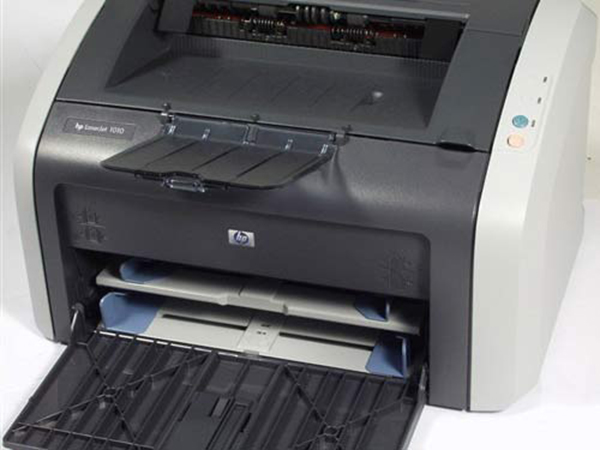
HP LaserJet 1010 printer basic parameters
Resolution 600*600dpi
HP LaserJet 1010 (standard version) printing performance printing speed 12 ppm
Printing capacity: monthly printing load of 5,000 pages
Printing language Host-based (GDI)
Printing memory 8MB memory
Input capacity Input tray - up to 150 pages
Output capacity Output tray - up to 125 pages, 15 envelopes and 10 slides
Printing media Plain paper, envelopes, slides, cardstock, postcards, labels
Interface type USB 2.0
HP LaserJet 1010 laser printer driver installation method
1. Close all programs running in your computer, download the HP LaserJet 1010 laser printer driver compressed package from this site and unzip it.
2. First select the decompression path, click "Browse" to customize the file installation location, then click uxzip in the upper right corner, and decompress the print driver file to the path

3. Open Control Panel->Printers and click "Add Printer".
4. When prompted, please follow the instructions for adding a printer to find the location of the .inf file.
5. The installation is complete, please print a test page to confirm. If necessary, restart your computer.
Windows 7 is not compatible with printer HP Laserjet 1010 solution
HP LaserJet 1010打印机无需驱动win7直接安装方法,以下是USB线连接时安装驱动的方法。
1. Connect the USB cable to the computer, win7 will automatically recognize the installation, and the 1010 icon will appear in the printer and fax (the port is the dot4 port at this time). This driver can print normally without installing additional drivers.
2. However, the dot4 port will print slowly. Please do the following to update the driver port:
a. Right-click "My Computer"-Manage-Device Manager, find the ieee1284.4 device-click the plus sign in front-find "dot4 usb printing support"-right-click "DOT4 usb printing support" and select update driver.
b. The following interface pops up, select "Browse my computer for driver software" (click directly without the next step)
c. Select "Choose from your computer's device driver table" - Next
d. Select “usb printing support” and click Finish.
e. After the port update is completed, go back to the driver to change the port. The method is as follows: Start-Devices and Printers, right-click the 1010 printer icon, select Printer Properties-Port-Select the USB port-OK-Print Test.
HP LaserJet 1010 Laser Printer Driver Frequently Asked Questions
Why does hp printer hp LaserJet 1010 not work?
It should be that the driver installation method is wrong. First download the hp LaserJet 1010 printer driver from this site, then right-click and run it as administrator. When the program prompts that you need to connect the printer, connect the printer to the computer to complete the installation. It should be fine.
|
The editor recommends: The HP LaserJet 1010 laser printer driver is very easy to use and is suitable for Win98SE/ME/2000/XP systems. Users who need it can download it quickly. This site also provides Canon LBP2900 laser printer driver and Epson LQ-630K printer driver downloads. Users who need them should not miss them. |













Useful
Useful
Useful