
If you are looking for software to use, go to Huajun Software Park! software release AI product list

Hello, if there is a need for software inclusion, please package the software and attach the software name, software introduction, software-related screenshots, software icon, soft copy, business license (if you do not have a business license, please provide the front and back of the corresponding developer ID card and a photo of yourself holding the ID card), and send it to email http://softwaredownload4.com/sbdm/user/login

Close >>

Send to email:news@onlinedown.net

Close >>

Location: Home pagePC softwareEducation and teachingcomputer learning online education
online education

Online Education 3.9.1 Android version

QR code
  • Software licensing: shareware
  • Software size: 133MB
  • Software rating:
  • Software type: Domestic software
  • Update time: 2024-12-30
  • Application platform: Android4.4.1 and above
  • Software language: Simplified Chinese
  • Edition: 3.9.1 Android version

Download the service agreement at the bottom of the page

Software introduction Related topics FAQ Download address

Recommended for you:- online education

Basic introduction
Online education section first LOGO
The public version of Wangjiotong is an excellent educational assistance software that can help students learn and communicate on the computer. The software provides homework tools. Teachers can use homework plug-ins, approval plug-ins, and course plug-ins to better arrange related homework. They can also easily correct homework and communicate with students in real time. In order to achieve "no suspension of learning when classes are suspended", Online Education Network provides free online live teaching services to nearly 100 districts and counties across the country to support the nationwide "no suspension of study when classes are suspended" work.

Screenshot of online education

Online Education Software Functions

​ ​ 1. The official version of Wangjiotong provides a simple user interface. You can query messages by starting the software.

​ ​ 2. You can view recent contacts in the software, and you can view recent chat groups in the software.

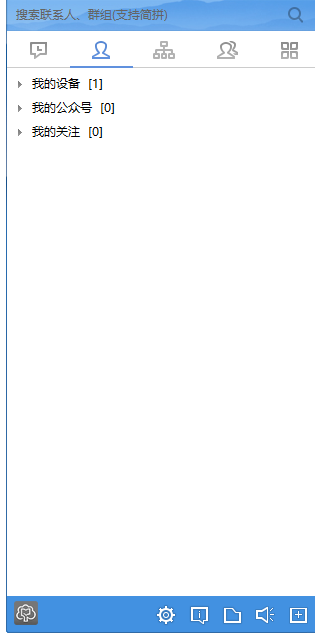
3. Provide grouping function, which can display my attention, unit address book, my group, and system messages

​​ 4. Support message prompts, you can check whether the group request is

5. You can also check the tips added by the application

​ 6. There are many teaching assistants that can be added to the software.

7. You can access the teaching space through the public version of Online Education

8. Directly connect to the official learning space to facilitate teachers to manage teaching resources

9. You can also open the course center to allow students to immediately access officially provided courses

Screenshot of online education

Features of Online Education Software

​​ 1. The public version of Online Education provides my learning resource management

2. Students can view personal learning resources after purchasing courses on the official platform

3. It also supports the homework function. You can view the homework posted by the teacher after joining the class.

4. Supports Q&A function, teachers can also immediately publish some Q&A questions

5. It also supports the review function. After students upload their homework, teachers can review it immediately.

​ 6. Support my class, my parents, my tasks, personal information, and safety center

​​ 7. Support material download, teachers can obtain teaching materials from the official platform

​​ 8. You can prompt categories such as downloaded, not downloaded, sent, etc.

9. Send the downloaded resources to the group and to designated students

How to use online education

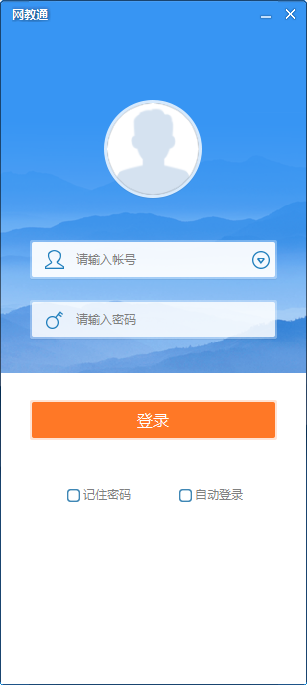
​ ​ 1. Click the official version shortcut of Online Education on the desktop, and you will see that you need to enter your account number and password.
Screenshot of online education

​ ​ 2. Friends need to register an account on the official website. Such as:

Screenshot of online education

3. After registration, enter your account number and password to log in
Screenshot of online education

​​ 4. Click the arrow to create a new group, and then fill in the basic information
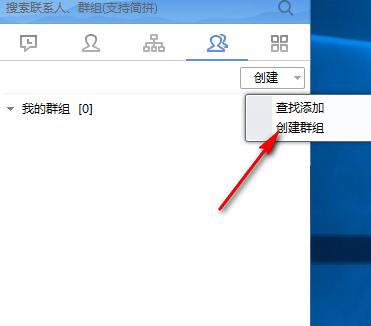
Screenshot of online education

5. The following are the menu functions of the system, which include application message manager, security center, help, change user, exit and other functional modules.
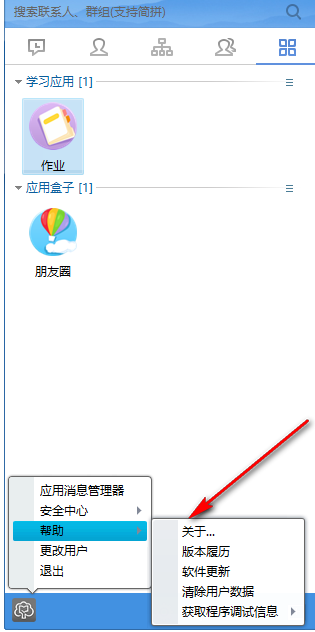
Screenshot of online education


Frequently Asked Questions about Online Teaching

How to assign homework?

​​ 1. After logging in as a teacher, select [Home]-[Homework]
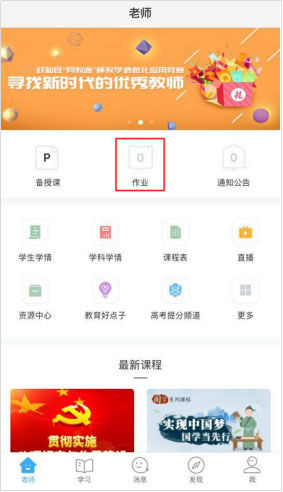
Screenshot of online education

​​ 2. Click [Assign Homework]

Screenshot of online education

3. Select the type of question and complete the assignment
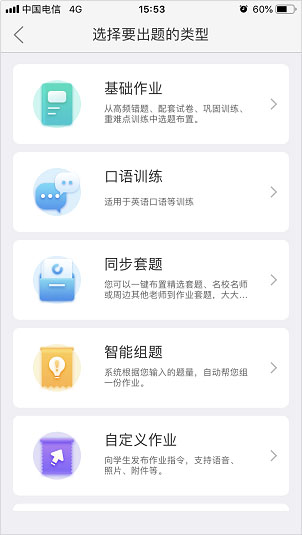
Screenshot of online education

Online Education Update Log

1. Fix bugs
2. Optimize some functions

Special instructions for online education

In 2020, we faced the new pneumonia epidemic together and chose to postpone the start of school and implement live online teaching to achieve "schooling without stopping classes". In order to support the nationwide "school suspension without suspension" work, Wangedutong provides free online live teaching services in nearly 100 districts and counties across the country. However, with the concentrated and explosive growth of demand for live broadcast teaching in various districts, counties and schools, it still exceeds the carrying capacity of network bandwidth and platform servers. To this end, we hope that all teachers and students can work together to distribute the teaching practice reasonably and disperse the pressure on the server, so as to jointly ensure the smooth progress of teaching and get through this special period.
​​ 1. The recent peak hours of classes are 9:00-10:30 and 14:00-15:30. It is recommended that teachers stagger the live broadcast during the peak hours.
​ ​ 2. The online education platform supports the live broadcast replay function. Teachers can notify students to watch the replay during off-peak hours for learning.
3. Teachers and students can jump to the National Online Cloud Classroom and other platforms through Online Education to obtain online learning resources.

Huajun editor recommends:

Wangjiotong has always been a commonly used software for most friends. It has such a dominant position in the minds of netizens. The editor of Huajun Software Park recommends all users to download Wangjiotong and use it. Come and download it. In addition, there arequestion bank expert,jingyou.com,Learn Wubi easily with WinCet,Whale Academy,Online learning platform for cadres in the national human resources and social security systemAvailable for download.



FAQ

online education

Online Education 3.9.1 Android version

close