If you are looking for software to use, go to Huajun Software Park! software release AI product list

Hello, if there is a need for software inclusion, please package the software and attach the software name, software introduction, software-related screenshots, software icon, soft copy, business license (if you do not have a business license, please provide the front and back of the corresponding developer ID card and a photo of yourself holding the ID card), and send it to email http://softwaredownload4.com/sbdm/user/login

Close >>

Send to email:news@onlinedown.net

Close >>

Location: Home pagePC softwaremanagement softwareOffice software PPT timer (PPTGenius)
PPT timer (PPTGenius)

PPT timer (PPTGenius) 1.0.3.1

QR code
  • Software licensing: Trial software
  • Software size: 1.39MB
  • Software rating:
  • Software type: Domestic software
  • Update time: 2024-12-31
  • Application platform: Winxp/vista/win7/2000/2003
  • Software language: Simplified Chinese
  • Edition: 1.0.3.1

Download the service agreement at the bottom of the page

Software introduction Related topics FAQ Download address

Recommended for you:- PPT tool PPT timer

Basic introduction
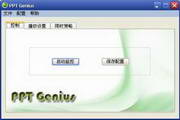
PPT timer (PPTGenius) paragraph first LOGO
PPT Genius is a PPT timer software that is used to control the time during PPT presentations. It is one of the most complete and easy-to-use PPT timers available. PPT Genius can set various control parameters, such as clock display, sound prompts, countdown clock, etc.; these configurations can be saved and loaded. After activating the monitoring function of PPT Genius, you can monitor the presentation playback of all PPTs on this machine.
Similar software
Release Notes
Software address

The main functions of PPT timer (PPT Genius) are as follows:

(1) The PPT presentation time limit can be set from 1 to 600 minutes.

(2) When playing PPT, the timer can automatically start counting down and display the countdown clock (the clock is always displayed on the PPT playback interface).

(3) Two advance prompt points can be set to pop up window prompts, and sound prompts can be set.

(4) When the demonstration time is up, you can set black screen, white screen, lock screen and other operations.

(5) Setting parameters can be saved/loaded.

(6) The software is solidified in the USB flash drive, no installation or registration is required, and it is easy to use.

(7) Applicable environment:

PPT: Microsoft Office PowerPoint 2000/2003/2007/2010.

Operating system: windows 2000/XP/2003/WIN7.
FAQ