




- Green versionView
- Green versionView
- Green versionView

Mini (mini) Thunder software introduction
1. MiniThunderThe interface and operation methods are completely similar toIEThe standard download makes it easy for any user to get started, and is also very suitable for users who are tired of the complicated operations of downloading software.
2. Mini Thunder Pairmp3The resources have been specially optimized so that users can easily enjoy the fun of downloading music at high speed;
3. The smaller installation package allows users to install it conveniently.
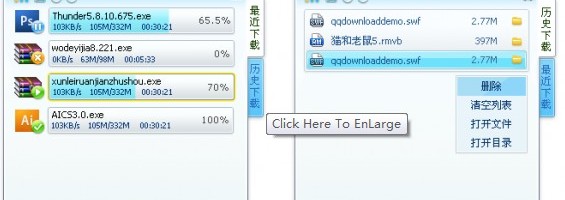
Features and functions of mini Thunder
快速 极速下载,流畅体验,清爽界面纯净,简约精致。
Emotional design, convenient and fast.
小巧 小巧玲珑,功能强大。
Mini (mini) Thunder installation tutorial
1. First, you need to find the download address on this page and select any address to download the mini Thunder software package to your local. After downloading, double-click and decompress the .EXE format program in the running package. As follows:

2. After running the installation program, you will enter the mini Thunder installation interface. Please set the mini Thunder installation path in the following interface.
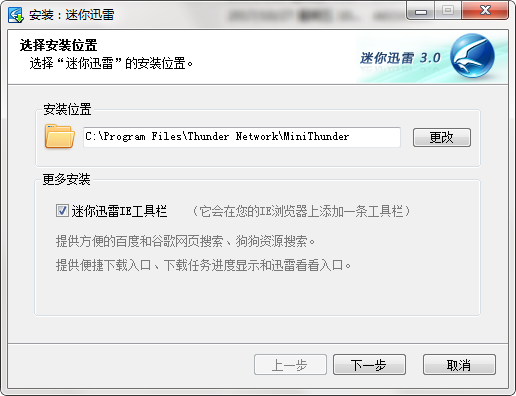
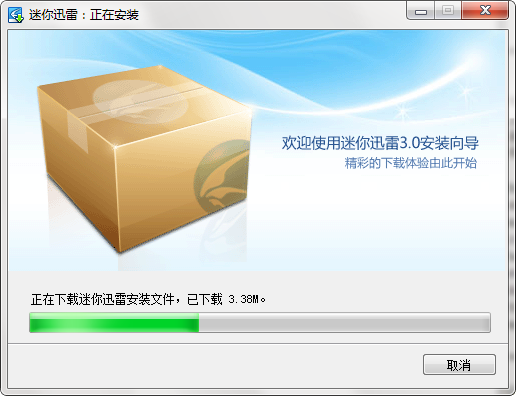
3. After setting the mini Thunder installation path, you will enter the mini Thunder installation progress bar interface. Please wait patiently in this interface for the installation to complete.
4Finally, after the installation of mini Thunder is completed, the following interface appears on the desktop:

Mini (mini) Thunder usage tutorial
1. First run and open mini Thunder. The effect after opening is as follows:
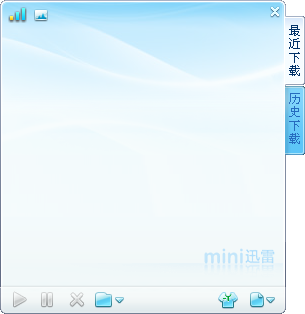
2. After running and opening mini Thunder, select the next file button on the interface to open it. Select the function you need to open the operation. The editor will take a new task as an example to demonstrate:

3. Select mini (mini) Thunder to create a new task and enter the setting interface. Please follow the prompts to enter the file link you need to download in the following interface.
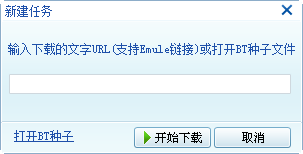
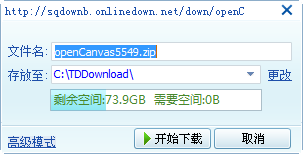
4. After selecting Start Download, you will enter the file download setting interface. You can customize the name and address of the current file after downloading in this interface. After setting, click [Start Download]
5. Finally, mini Thunder starts downloading, just wait for it to finish downloading.
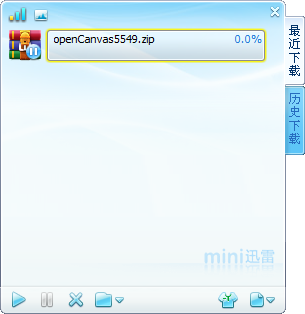
6. If you do not want to download the file, you can select the [X] at the bottom of the interface to close and cancel. Either select the pause button (second button from the bottom left) to temporarily stop task execution, or select start re-downloading (the first button from the bottom left).
mini (mini) Thunder update log
Fix bugs
Optimize some functions
|
Huajun editor recommends: Need a relatively compact and easy-to-use resource download tool? The editor recommends you to use this mini Thunder. This mini Thunder combines the features of browser Internet access, allowing users to enjoy smooth Internet experience while downloading. Isn’t it very special, then download mini Thunder to experience it. In addition, the editor of Huajun has also collected and organized other [resource download] tools for everyone to choose and download, such as: seed search artifact, network disk resource searcher, etc. |













Useful
Useful
Useful