



SAI painting software Chinese version software description
The latest version of SAI is a very unique drawing software. As a drawing software, the latest version of SAI has a streamlined size, extremely fast running speed and many irreplaceable functions, which make this software a new favorite for painting; but after all, this is a brand new small-sized software with its own inevitable shortcomings, which makes it not popular in a wide enough range.
SAI painting software Chinese version shortcut keys
space: move the canvas
ALT+space: Rotate canvas
ALT: Pick color
TAB: Display canvas in full screen
CTRL+E: Merge layers downward (but I think the function of transferring images downward is easier to use. It will also open a layer for you)
CTRL+F: Fill
CTRL: Move layer
SHIFT: used to draw straight lines
CTRL+D: Cancel selection
CTRL: Press and hold CTRL in the pen layer to move and add drawing points at will
ALT+CTRL: Adjust brush size
SAI painting software Chinese version installation steps
This site provides a surface installation package, which can be used after opening it. As shown below, open the folder and double-click [sai.exe] to start the software.
SAI painting software Chinese version usage tips
1. First, let’s get to know the interface of SAI.
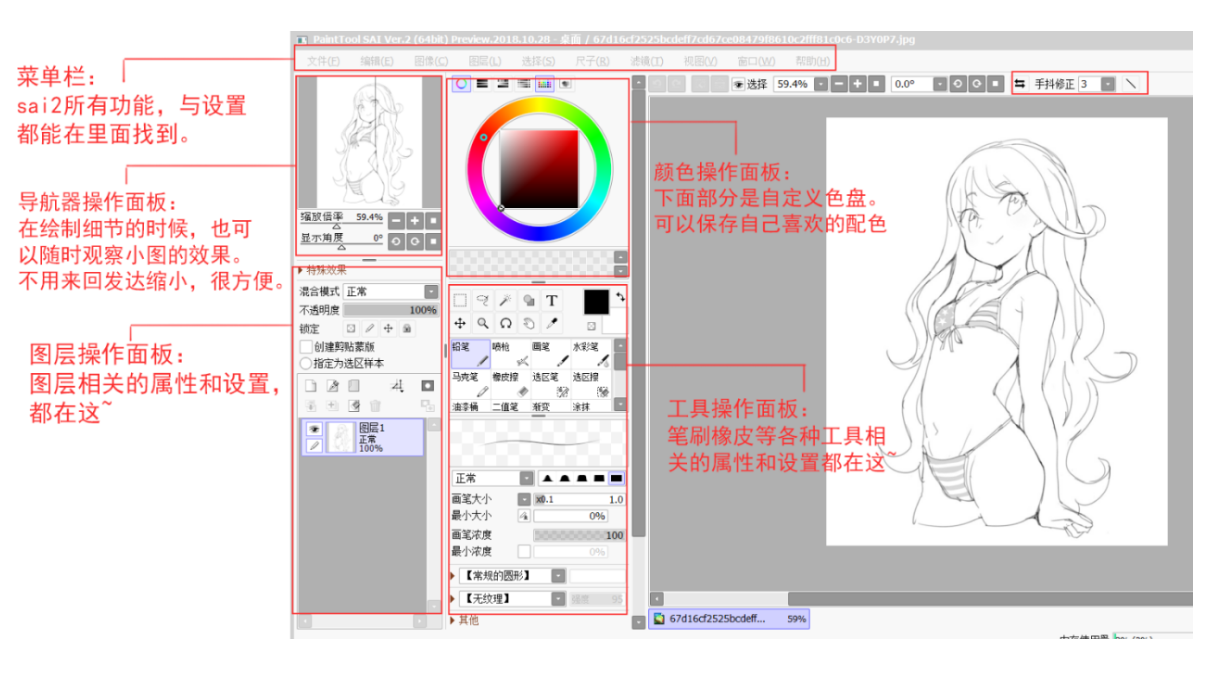
It is obvious that SAI does not use the traditional explorer interface, but uses its own designed UI interface. The advantage is that some are very user-friendly and some are very inhumane... The SAI interface can be divided into 5 parts according to functions: navigation area, layer area, drawing area, color area, and tool area.
2. The layout of the interface can be selected in the drop-down menu of "Window". You can try it yourself.
This is one of the few customizable contents in SAI's interface. If you want to hide all interfaces and leave only the canvas, just press the Tab key just like Photoshop.
3. A unique advantage of SAI is that it can rotate the canvas perspective efficiently and freely.
The specific options are shown in the figure. Usually you can use ALT + space + cursor movement to achieve any rotation of the canvas perspective.
4. SAI does not have a history panel, but you can control retracement and recovery through the arrows in the upper left corner of the canvas. The shortcut keys are Ctrl + Z and Ctrl + Y.
The default historical step capacity recorded by SAI is approximately 100M. The layer area is similar to Photoshop. You can see 8 mixing methods with completely different effects, which is enough.
5. Looking at the color area, there are 6 functional wheels: color wheel, RGB slider, HSV slider, gradient slider, color plate and color palette. The small button above selects the opening and closing of the function panel.
6. Finally, take a look at the tool area. At a glance, there are 10 customizable tools, which can be seen by right-clicking in the tool area.
7. Let’s briefly talk about pen tools.
Pencils, pens, watercolor pens, airbrushes, and markers are of the same type. Each of them can load the shape and texture of the brush. The difference between them is the number of options, among which watercolor pens have the most options.
8. There is also a 2-value pen, which is similar to the pencil tool in Photoshop. It is a pen tool that is completely sharpened to 100% opacity pixels. It cannot load textures and has very few related options.
User reviews
Fatty
卡那了很多动漫,真想自己动手画,这款软件满足了我的需求,上手也快,大赞。
The lines of Sai are more beautiful than PS, and it is really convenient to use with the writing pad.
SAI painting software Chinese version update log
[Error fixed]
-[Shortcut Key Dialog] Shortcut key assignments for tools and tool groups are not applied immediately.
[Change]
-[Move tool] adds [pickup layer without mode]. key] checkbox.
(If you want to apply bug fixes for mobile tools on 2021-07-03, please turn this checkbox on)
Editor's message
It is very convenient to use SAI to draw lines. The brush patterns are rich and lifelike, and the strokes are straighter and harder. It is suitable for comic lovers, and it takes up little space and has low computer requirements. SAI provides a canvas rotation function. By using shortcut keys, you can rotate the canvas at any angle. You can rotate the canvas at any time while painting on one side. It is said that many manga illustrators in Japan use this drawing software.
Huajun editor recommends:
SAI painting software Chinese version, produced with conscience, guaranteed performance, personally tested by the editor, I believe you can try it on my children's shoes! There are more useful software in our Huajun Software ParkComic Downloader (ComicDown),Comics Controller,SQPaint artifact spray,love anime,cat group animation!




Useful
Useful
Useful