






Highlights of the National Smart Education Platform for Primary and Secondary Schools
Multi-terminal adaptation
Supports PC, mobile (download "Smart Primary and Secondary Schools" from App Store/Application Mall) and TV screencasting to achieve seamless switching across devices.
The length of the micro-lesson video is scientific (15-20 minutes for primary school and 20-25 minutes for secondary school), which meets the needs of vision protection. It uses the form of "teacher explanation + multimedia large screen" to restore the classroom scene.
Intelligent functions
Video interception: Accurately edit teaching clips to meet personalized lesson preparation needs.
Resource recommendation: Automatically match resources according to user roles (students/teachers/parents) to improve usage efficiency.
Data statistics: The system generates learning activity reports to help teachers evaluate teaching effects.
Convenient operation process
Login without registration: learn directly online for free, lowering the threshold for use.
Class management: Teachers can create class groups and publish notifications, and students can join by entering their class code; parents can associate multiple children's information and switch accounts flexibly.

Features of the National Smart Education Platform for Primary and Secondary Schools
Support the "double reduction" policy
Provide after-school service resources to enrich students’ after-school life and reduce the burden of off-campus training.
Through the question bank and test writing functions, teachers can be helped to design hierarchical assignments and improve the quality of classroom teaching.
Promote educational balance
The distributed deployment mechanism realizes resource sharing across provinces, allowing students in rural areas to have access to high-quality educational resources.
Support the special education section to meet diverse learning needs.
Home-school collaborative education
The home-school group function promotes real-time communication between teachers and parents and forms an educational synergy.
Parents can learn scientific parenting methods through the platform and improve family education capabilities.
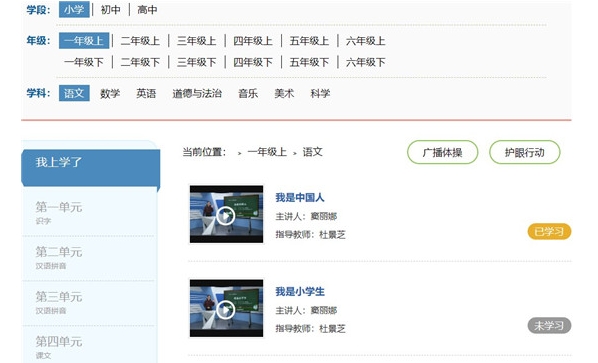
Functions of the National Smart Education Platform for Primary and Secondary Schools
Multi-section resource coverage
The platform integrates more than 10 major sections including moral education, curriculum teaching, physical education, aesthetic education, labor education, after-school services, family education, teacher training, and practical experience in educational reform to meet diverse educational needs.
Course teaching resources: covering the entire schooling period of primary school, junior high school, and high school, including 17,492 curriculum resources in 19 versions and 452 volumes of textbooks, as well as 2,004 electronic textbooks and 28,568 learning resources from 67 publishing units.
Personalized learning support
Student terminal: You can browse resources such as "special education, course teaching, and after-school services", support video projection, cache offline viewing, and ask teachers for help at any time through the "Ask a Question" function.
Teacher's side: Provides lesson preparation and teaching tools, supports resource search, filtering, and uploading to "My Resource Library", and can use subject tools and multimedia materials to edit courseware.
Parent Portal: Learn parent-child communication skills through the "Family Education" section, understand the "Family Education Promotion Law", and check your children's learning progress through the home-school group.
Interactive teaching tools
Classroom interaction: Supports various tools such as magnifying glass, paintbrush, and eraser, as well as functions such as random team formation and classroom evaluation to enhance teacher-student interaction.
Homework management: Teachers can filter exercises and papers, and the system will automatically correct them and calculate the accuracy; students can self-study and self-test through the platform to improve learning efficiency.
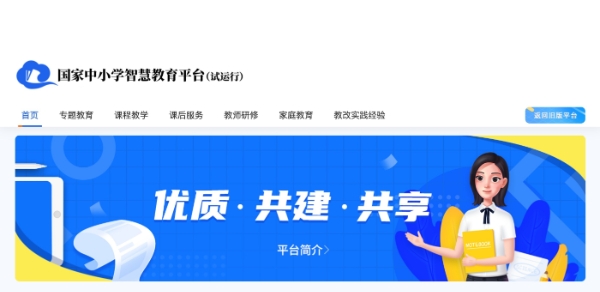
Frequently Asked Questions about the National Smart Education Platform for Primary and Secondary Schools
Crashes or crashes
Possible reasons: software bugs, system compatibility issues, insufficient memory, etc.
Solution: Try to restart the device; update to the latest version; check the operating system version to ensure compatibility; clean the device memory and close unnecessary background programs.
Unable to receive push messages
Possible reasons: push function is not turned on, network problems, device permission settings, etc.
Solution: Enable the push function; check the network connection to ensure the network is stable; check the device permission settings to ensure that the APP has the permission to receive push messages.
National primary and secondary school smart education platform update log:
Working day and night just so you can be happier
Mummy, Mummy, coax~all the bugs are gone!
Huajun editor recommends:
The editor guarantees that as long as you use the national smart education platform for primary and secondary schools, if you don’t like it, you can come and hit me! The editor has also prepared for youBertso Cloud Academy Student Portal,seewo class optimization master,Spark Thinking Student Terminal,51talk ac online classroom,101 Smart Classroom Teacher Terminal













Useful
Useful
Useful