





 You may like





Time Camera Pro software features
Precise time and location stamping
Timestamp: Add a time watermark accurate to seconds (or even milliseconds) for each photo to ensure the authenticity and traceability of the record.
Geolocation tagging: Automatically record the name, address and latitude and longitude information of the shooting location, making it easier for users to recall and share photo backgrounds.
Custom watermark: Supports user-defined watermark content (such as text, pattern, logo) to meet personalized needs.
HD shooting and multiple modes
High-definition image quality: Supports multiple resolutions and frame rate settings to meet the needs from daily recording to professional photography.
Shooting modes: Provide single shooting, continuous shooting, time-lapse photography, night scene mode, etc. to adapt to shooting needs in different scenes.
Quick Shot: Capture fast-moving objects or moments to ensure you don’t miss important moments.
Rich editing tools
Basic editing: crop, rotate, filter, exposure adjustment, etc. to easily optimize photo quality.
Batch processing: Supports batch editing of multiple photos (such as adding watermarks, resizing) to improve work efficiency.
Advanced features: Provides certified photo mode, automatically focuses and generates high-quality photos with certification number, QR code and real-time positioning.
Cloud synchronization and sharing
Cloud storage: Supports automatic uploading of photos to the cloud, making it convenient for users to synchronize and manage photos between different devices.
One-click sharing: Supports sharing photos to social media, cloud storage and other platforms to quickly share life or work results with others.
Applicability to multiple scenarios
Work scenarios: Suitable for project inspection, survey and evidence collection, prevention and control, law enforcement, attendance and clocking, field photography, project management, micro-commerce and e-commerce, etc., to meet professional needs.
Life scenes: Supports creative watermarks such as travel check-in, store visit check-in, fitness check-in, etc. to make life records more interesting.
Special needs: Provide special templates such as epidemic prevention watermarks and Spring Festival watermarks to adapt to different festivals and scenes.
Time Camera Pro software features
Photography enthusiasts: The pursuit of high-quality photos requires accurate recording of the time and place of shooting.
Professional photographers: need professional tools to record work information to meet work needs.
Working professionals: Suitable for attendance and clocking, field records, project management and other scenarios.
Ordinary users: record beautiful moments such as daily life, travel, food, etc., and share them on social platforms.
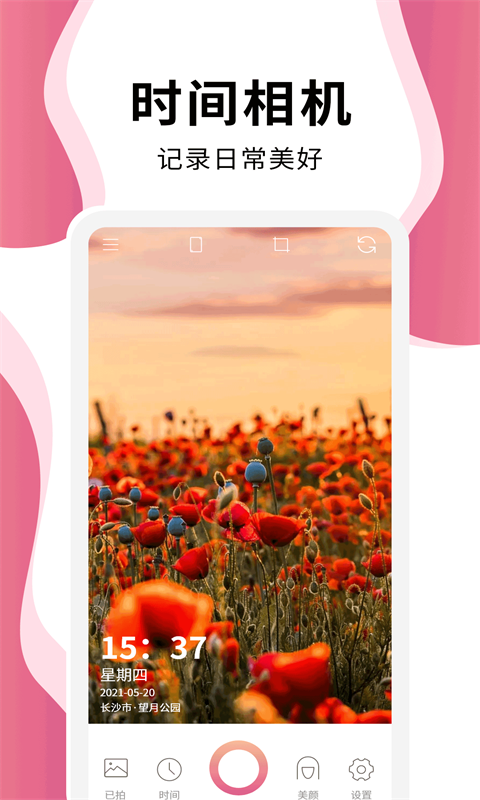
Time Camera Pro Software Highlights
High accuracy: timestamps are accurate to milliseconds, and geolocation tags are accurate to ensure the timeliness and authenticity of photos.
Easy to operate: The interface is simple and intuitive, even a novice photographer can get started quickly.
Strong compatibility: supports Android and iOS systems to meet the needs of different users.
Efficient and convenient: Batch processing and cloud synchronization functions improve work efficiency and facilitate users to access and manage photos anytime and anywhere.
High security: Encryption technology is used to protect user privacy and photo security to ensure that data is not leaked.

Time Camera Pro FAQ
Unable to add time or location watermark
Reason: The timestamp function is not turned on, or the location permission is not authorized.
Solution:
Turn on the timestamp function in the app settings and adjust it to automatic mode.
Check your phone settings to make sure Time Camera Pro is authorized to access location information (iOS: Settings → Privacy → Location Services; Android: Settings → App Management → Time Camera Pro → Permissions → Location).
Inaccurate time or location information
Reason: The mobile phone system time is wrong, or the GPS signal is weak.
Solution:
Correct the mobile phone system time to ensure it is synchronized with the network time.
Shoot in open areas to avoid signal obstruction (such as high-rise buildings, tunnels).
Time Camera Pro update log:
Sweep the bug out and carry it out to the end
Optimize user feedback issues and improve detailed experience
Huajun editor recommends:
Time Camera Pro is very simple to install, has powerful functions, and has no installation garbage. It is specially recommended to everyone, and everyone is welcome to download it! This site also hasRemove watermarks with one click,music album,Tempo,Hippocampus Photo Studio,You and me back then, available for you to download!























Your comment needs to be reviewed before it can be displayed