





Basic introduction
The official version of Linyi Smart Education Cloud Platform App has realized the cross-regional integration of various domestic and local high-quality educational resources, allowing students in cities, counties, towns, streets, and rural areas to obtain online learning resources of high-quality famous teachers and courses, maximizing the balance of regional educational resources. Comprehensively improve the level of education informatization, achieve the integration of information technology and education and teaching practice, and promote the improvement of education and teaching quality and management level.
Download Benefit Description
1. Provide diaries to allow students to record their daily lives
2. Provide daily online communication lectures for students
3. Is there a teacher community that provides teachers with interactive friends and a chat platform?
4. Various discussion posts provide an interactive question platform
5. Users can add each other as friends to achieve interactive dating
6. Virtual photo album records every moment of daily life
Specific software features
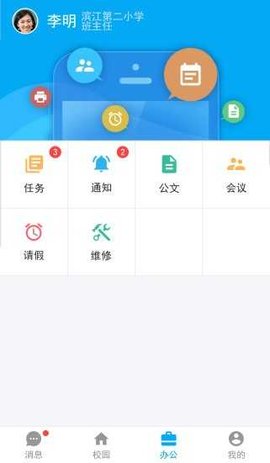
1. E School: Realize the construction of the school website through school exchanges and class exchanges, and realize the construction of website content through independent management
2. Class Circle: Contains a must-reach notification function, which can communicate with parents at home and school through free text messages.
3. Resource Center: Provides high-quality resources from books to classrooms in all subjects and throughout the study period, and provides high-quality local teaching resources (written by outstanding local teachers)
4. Application Center: The platform can introduce any third-party software to provide students with more and more practical learning applications, such as 101 Education PPT, virtual laboratory, 21st paper system, interactive movies, etc. At the same time, through this system, Linyi Intelligent Education Cloud Platform has independently developed a student academic evaluation system. Students and parents can accurately understand students' academic performance and achieve steady improvement in academic performance.
5. Personal space: Realize communication, interaction, space application, truly realize communication between home and school, school, and communication between platform and mobile app
6. Yimeng School: With online classroom construction as the core, it has formed a local teaching resource co-construction and sharing platform including Linyi famous teachers’ micro classes, famous school open classes, personalized online tutoring and other projects
Installation steps
Special note: The installation package provided by Huajun Software Park contains the Android emulator and software APK files. For the computer version, you need to install the emulator first and then install the APK file.
1. First download the installation package from Huajun Software Park. The software package contains an Android emulator exe installation program and an APK file and unzip it. First click on the exe program to install the lightning simulator.

2. Double-click "Lightning simulator.exe" file to enter the installation interface. Users can click "Quick Installation" to select the system's default installation address for installation, or click "Custom Installation" to choose the installation path. Custom installation is recommended here.

3. WaitingLightning simulatorAfter the installation is complete, click "Try Now" to open the emulator.

4. Enter the main interface of the lightning simulator and clickRight column APK iconSelect the "Local APK Install" button.

5. In the pop-up window, click on the decompressed APK file, and then click to open.

6. After that, the software will enter the installation process. You need to wait for a moment. After the software installation is completed, it will appear in my software list. Click the icon and double-click to open it. 
Linyi Smart Education Cloud Platform PC version update log:
Working day and night just so you can be happier
Mummy, Mummy, coax~all the bugs are gone!
Huajun editor recommends:
In addition to Linyi Smart Education Cloud Platform PC version, a very convenient education and teaching, there are alsoHomework Help 2021,Seewo College,Master of Laws Postgraduate Entrance Examination,Driving school test subject one,Chinese Examination Online SchoolRelated software is available for download. If you need it, please click to download and use it.











Your comment needs to be reviewed before it can be displayed