






Introduction to the PC version of iFlytek Little Book Boy:
iFlytek Little Book Boy is a new artificial intelligence language learning product launched by iFlytek. The current products mainly include Mandarin and English learning. The product uses a number of world-leading artificial intelligence technologies such as speech recognition, speech synthesis, Mandarin and English spoken evaluation, and artificial intelligence human-machine scene dialogue. Iflytek's main target user group is primary school and junior high school students across the country. Allow them to correct their spoken pronunciation and quickly master oral communication skills from language learning. Become a "Language Learning Expert in the Artificial Intelligence Era".
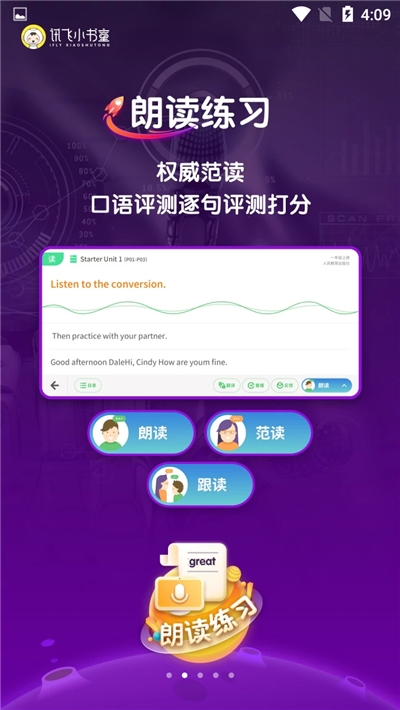
Core functions of iFlytek Little Book Boy PC version:
The product mainly achieves in-depth learning and rapid mastery of language through listening, reading and speaking, currently including English and Chinese.
1. "Listening exercises" are: the cultivation of pronunciation and language sense;
2. "Reading exercises" are: language imitation and accurate assessment;
3. "Situational dialogue" is: artificial intelligence scenario dialogue, focusing on the practical use of language.
4. "Listening and Speaking Test": It uses the National Ministry of Education's English speaking test scoring technology and Mandarin level test scoring technology. According to the test standards, the professional teaching and research team carefully compiles simulation test questions to help students simulate the English speaking and Mandarin test, and effectively test the learning effect.
5. In addition, famous teacher classes contain a large number of language learning videos for primary school students. The translation module supports voice and text input, and the translated content can also be directly read and evaluated.
Installation steps
Special note: The installation package provided by Huajun Software Park contains the Android emulator and software APK files. For the computer version, you need to install the emulator first and then install the APK file.
1. First download the installation package from Huajun Software Park. The software package contains an Android emulator exe installation program and an APK file and unzip it. First click on the exe program to install the lightning simulator.

2. Double-click "Lightning simulator.exe" file to enter the installation interface. Users can click "Quick Installation" to select the system's default installation address for installation, or click "Custom Installation" to choose the installation path. Custom installation is recommended here.

3. WaitingLightning simulatorAfter the installation is complete, click "Try Now" to open the emulator.

4. Enter the main interface of the lightning simulator and clickRight column APK iconSelect the "Local APK Install" button.

5. In the pop-up window, click on the decompressed APK file, and then click to open.

6. After that, the software will enter the installation process. You need to wait for a moment. After the software installation is completed, it will appear in my software list. Click the icon and double-click to open it. 
Iflytek PC version update log:
Sweep the bug out and carry it out to the end
Optimize user feedback issues and improve detailed experience
Huajun editor recommends:
iFLYTEK Little Book Boy PC version, word-of-mouth software, guaranteed to solve all your problems! The editor highly recommends! There are similar software on this siteHomework Help 2021,Seewo College,Master of Laws Postgraduate Entrance Examination,Driving school test subject one,Chinese Examination Online School, if you are interested, you can download it!





































Your comment needs to be reviewed before it can be displayed