





 You may like



Time management countdown software function
Multi-dimensional time management
It supports multiple time units such as days, hours, minutes, seconds, years and months, etc., to meet the planning needs of short-term tasks (such as 25-minute Pomodoro) and long-term goals (such as project deadlines).
Provides task decomposition function, which can break down complex projects into manageable sub-tasks and set periodic reminders.
Accurate reminder and synchronization
Supports calendar reminders, pop-up notifications, and sound/vibration reminders to ensure users will not miss important things.
Supports multi-platform data synchronization (such as Android, iOS), and historical records can be restored through the account after changing devices.
Personalization
Users can customize background themes, font colors, reminder ringtones, etc. to create a personalized interface.
Some apps (such as "Countdown") support lunar calendar display and percentage progress bar to enhance the intuitiveness of time perception.
Highlights of time management countdown software
Daily task management
Record important events such as birthdays, anniversaries, and exam days, and set countdown reminders in advance.
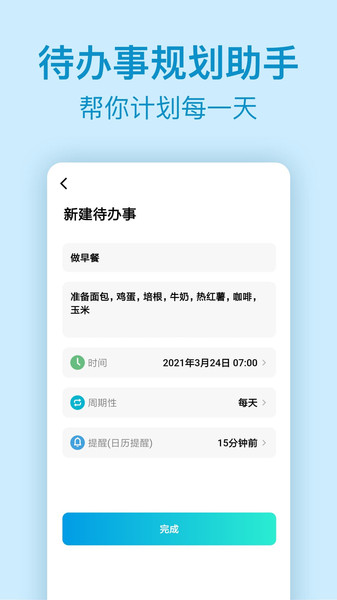
Plan daily to-do items (such as work, study, and life tasks) and manage them efficiently through the list editing function.
Improving work and study efficiency
Combined with the Pomodoro Technique, set a cycle mode of 25 minutes of focus time + 5 minutes of rest to avoid fatigue.
Statistics of focus time data are generated to generate trend analysis charts to help users optimize time allocation.
Life Scenario Application
Set a countdown during cooking to accurately control the cooking time of ingredients.
Plan the duration of each set of movements during fitness to improve training efficiency.
Features of time management countdown software
Dynamic countdown effect
Some apps (such as "Time Management Countdown") support real-time beating and dynamic effects of numbers to enhance the sense of urgency.
Privacy protection and local storage
Data is stored locally by default and can be used without the need for an Internet connection to avoid the risk of privacy leaks.
Widgets and quick operations
Provides desktop widgets so users can quickly view countdowns and to-do items without opening the App.
Supports voice assistant setting countdown (such as Siri, Google Assistant) to simplify the operation process.
FAQ
Software freezes or crashes
Problem description: When using time management software, the software freezes, becomes unresponsive or crashes.
Solution: Try closing unnecessary background applications to free up memory resources. At the same time, check whether the mobile phone system has been updated to the latest version to avoid software crashes caused by system compatibility issues. If the problem persists, you can contact software customer service or seek technical support.
Problems occur after software update
Problem description: After the software is updated, new functions cannot be used or original functions are abnormal.
Solution: Read the software update notes carefully to learn about new feature changes and fixes to known issues. If you encounter new problems, you can try to roll back to the old version or contact software customer service for help.
Time management countdown update log
Sweep the bug out and carry it out to the end
Optimize user feedback issues and improve detailed experience
Huajun editor recommends:
Time management countdown is a good life service software. If you are interested, please download it and use it. I believe you will like it.Meditation,a village,Blacklight Talent Network,WeChat reading,T3 travelIt is also a good software and is recommended for students to download and use.



















Your comment needs to be reviewed before it can be displayed