





- Green versionView
- Green versionView
- Green versionView
- Green versionView
- Green versionView
Things to note:
inmacWhen downloading and installing software, you will generally encounter the following three error situations. Now the editor of Huajun will give you the answers. If you encounter errors, please read them carefully:
1."...The software is corrupted and cannot be opened. You should move it to the Trash"
2."Can't open...software because it comes from an unidentified developer"
3."Can't open...software becauseAppleUnable to check if it contains malware"
When encountering the above three situations, we should:
1. First set:Open any source
2, most software settings can be downloaded and installed normally after opening any source; a small number of softwareiosRestrictions on unsigned application permissions require the execution of command line code to bypass application signature authentication. Therefore it is necessary to:Execute command bypassiosnotarizationGatekeeper.
3. If none of the above operations can solve the problem, then you need to:closeSIPSystem integrity protection.
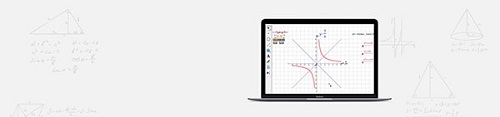
Geometry Sketchpad Mac software features
fan-shaped, bow-shaped
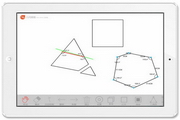
Similar to the interior of a triangle (select three vertices first), sectors and arcs contain "faces", not just "boundaries". The drawing method of fan shape and bow shape is similar:
Use the above method to make an arc, select the arc, and use the "Sector Inside" (or "Arc Inside") command in the "Construction" menu to make a sector or bow (shaded part).
measure, calculate
[Measurement] After selecting the interior of the triangle, use the "Area" and "Perimeter" commands in the "Measure" menu to measure the area and perimeter of the triangle. Use the "Parameter Selection" command in the "Display" menu to set the "Object Parameters".
[Calculation] The "Calculate" command of the "Measurement" menu can operate on the value of the object to obtain the required result. Let's take the "Intersecting String Theorem" verification as an example to illustrate.
①Draw a circle and two intersecting chords; ②Measure the lengths (distances) of the four line segments; ③Select the distance values of the two line segments on the same straight line, and use the calculation command in the "Measurement" menu to calculate the product of the two in turn; ④Drag the moving point and observe the pattern: the intersecting chord theorem.
tabulation
[Tabulation] "Tab" command in the "Measures" menu. Select the "length of four line segments" in the above example and use the "Tab" command to create a table. There are three ways to change graphics and add table items: select the "Add Item" command in the table menu; select the table and use the CtrL+E shortcut key; double-click the table.
transform
“Transformation” includes commands such as translation, rotation, scaling, and reflection. Each marking command allows you to specify the geometric object, geometric relationship, or metric that determines the transformation. You can also define your own transformations by combining translation, rotation, scaling, reflection and other transformations.
The Mark Center and Mark Mirror commands determine the type of geometric transformation. Rotation and scaling require a center point, so a center point must be determined before implementing these two transformations. Similarly, reflection requires a mirror, and a mirror must be determined before reflection.
label
The so-called label is to give a name to the geometric figures such as points, lines, circles, arcs, etc. Geometric objects created with Geometric Sketchpad generally have labels automatically configured by the system. Use the "Label" tool to double-click the label text to rename it.
Features of Geometric Sketchpad Mac software
window
It is composed of title bar, menu bar, tool bar, status bar, drawing window and recording window.
Toolbar
The toolbar consists of selection tools (to realize selection, and object translation, rotation, and zoom functions), point drawing tools, line drawing tools, circle drawing tools, text tools, and object information tools. Press and hold the left mouse button on the selection tool and line drawing tool buttons for a moment, and more type tools will pop up; you can select objects by clicking, Shift-clicking or dragging.
relationship
The relationship between objects in the geometric sketchpad is like the relationship between parents and children in life. If the position or size of the "parent" is changed, in order to maintain the geometric relationship with the parent, the object as a "child" will also change accordingly. For example, if we first make two points and then a line segment, the line segment we make is the "child" of those two points. For another example, first create a geometric object, and then use some geometric relationship (parallel, perpendicular, etc.) or transformation (rotation, translation, etc.) to create another object based on this object. Then the geometric figure created later is the "child" of the previous object.
How to use Geometry Sketchpad Mac
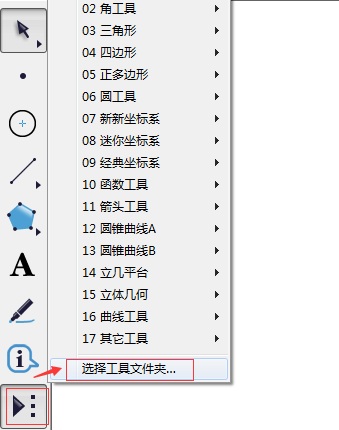
How to add custom tools?
Open the Geometric Sketchpad software and click "Select Tool Folder" in the custom tool.
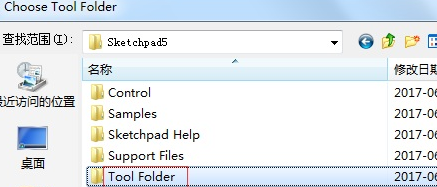
In the pop-up dialog box, find the Tool Folder you placed in the installation directory, click to select the file, as shown in the figure below.
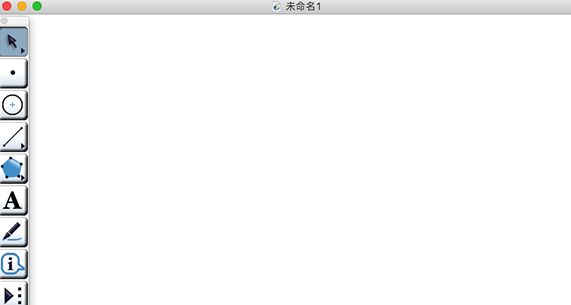
Double-click to open this folder and click the "Select" button in the lower right corner, as shown in the figure below.
After a moment, a prompt window indicating successful addition will pop up (as shown in the picture below), click "OK".
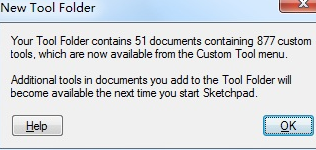
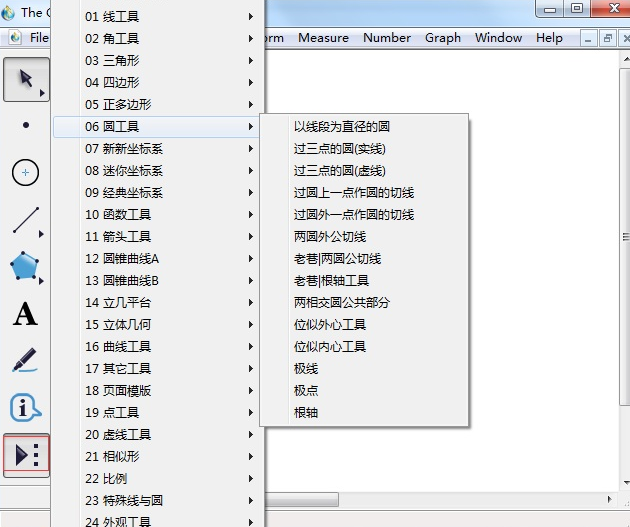
In this way, you can add many basic drawing tools under the custom tools on the left side of the geometric sketchpad (as shown in the picture below). You can use the mouse to select any tool to operate in the drawing area.
Geometry Sketchpad Mac update log
Sweep the bug out and carry it out to the end
Optimize user feedback issues and improve detailed experience
Huajun editor recommends:
The Geometry Sketchpad Mac software is completely fool-proof and super simple to operate. In addition, the editor also recommends it.Baidu Input Method For Mac,Mac OS X,CrossOver Pro For Mac,CleanMyMac,EaseUS Data Recovery SoftwareDownload and use related software.





Useful
Useful
Useful