



Hermes Protocol (Ethernet protocol simulation software) official version software functions
1. Protocol simulation
The current version of Protocol Pass supports DCHP Client, PPPOE Client, and IGMP Simulation tests for Client, ICMP, ARP, and UDP protocols support IPv4, and subsequent versions will continue to improve simulation tests for other protocols. The protocol simulation configuration process is a step-by-step wizard, which facilitates users to configure specific simulation strategies and custom protocol fields. The simulation interaction process and results can be viewed visually, and protocol messages can be analyzed directly.
2. Message sending and receiving
Protocol Pass can identify the network card and related information on the PC, and perform protocol logic processing based on the wired network card sending and receiving messages and filtering messages. After the software sets the wireshark path, you can start the network card message packet capture and filtering function, and support messages with *.pcap , *.pcapng way to import and export.
3. Network function
Protocol supports network card IP binding, routing configuration and other functions to facilitate user network interface configuration.
Instructions for use of the official version of Hermes Protocol (Ethernet protocol simulation software)
Protocol can be installed on Win7, Win10, Linux and other operating systems.
The installation steps are simple. After agreeing to the disclaimer agreement, just select the installation path. When starting, you will be prompted to try it for half a year. After half a year, you can apply to continue the trial.
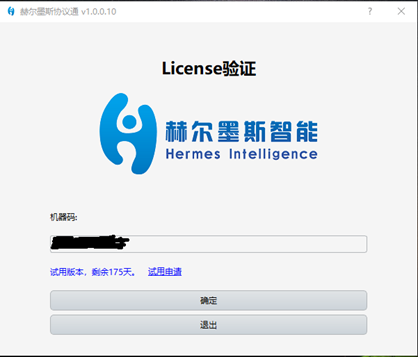
Operation steps:
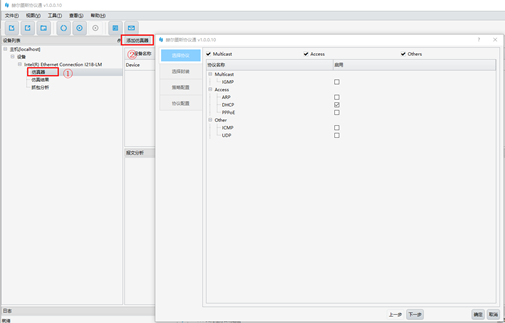
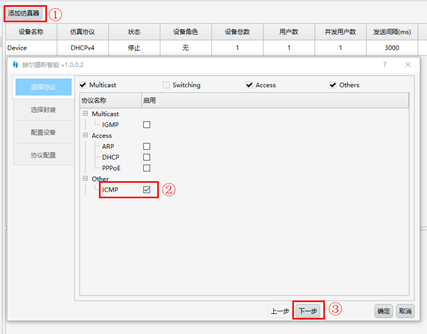
1. The emulator interface in the navigation bar is the configuration entrance for communication protocol testing. After clicking, the "Add emulator" button will appear on the main interface (step ① shown below), and you can add related protocol configurations (step ② shown below). You can also right-click on the main interface to add an emulator;
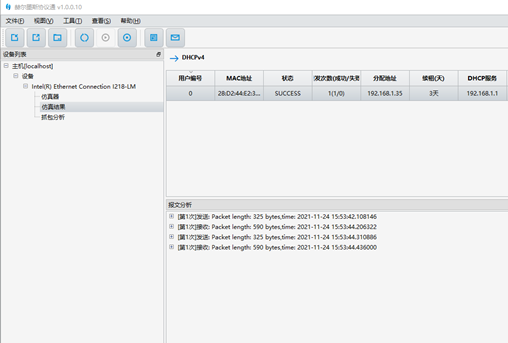
2. In the simulation results interface in the device list in the navigation bar, you can view the communication protocol simulation process, results and related information;
3. The packet capture analysis interface in the device list in the navigation bar can start, stop, and filter network card messages in real time, and visually view message fields, and messages can be imported and exported;
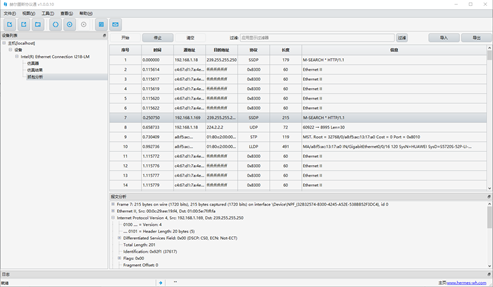
4. The protocol simulation steps have operating instructions in the download network disk, please refer to;
Hermes Protocol (Ethernet protocol simulation software) official version update log
1: Optimized performance
2: We are serious about solving bug problems
Huajun editor recommends:
A very good communication network. The editor also uses this software. It is powerful, green and safe. This site also providesVCF address book editor,VMware Workstation,GNU Go,TCPMP,Mobile phone managerWaiting for you to download.




Useful
Useful
Useful