




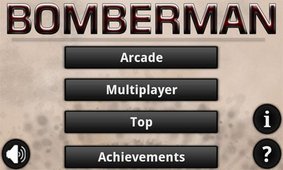
Bomberman game features
1. The game uses a maze-like scene, and each level has different content to experience.
2. The fresh and simple pixel style and retro electronic sound effects are full of nostalgia.
3. The classic ACT type arcade game is also very famous in the arcade era.
bombman game level
The number of monsters in the game is relatively large and the types are relatively complex.
Balloons: small red monsters with medium moving speed and low IQ. They like to run around between walls.
Green type: No attack ability, average speed, but it can track players and has a relatively high IQ.
White Monster: A monster with a relatively high speed, which can become invisible and can pass through walls. It usually appears around the player after becoming invisible. Blue category: -A little blue monster that moves very fast and can pass through brick walls. It has a relatively high IQ.
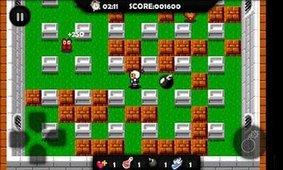
Bomberman game features
The operation of this game is very simple, and multiple modes of gameplay are waiting for players.
Unique screen design and production methods, a variety of weapons and props can be used at any time.
It was a very popular fun game many years ago, and it still retains the most classic gameplay.
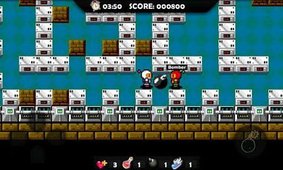
Bomberman game description
The protagonist uses the method of placing bombs to eliminate enemies and find the secret door hidden in the wall in each round to pass the level.
Enemies of different shapes have different attributes and require different techniques to deal with them. There are several kinds of treasures that can be picked up along the way, which will make it easier to eliminate enemies and pass the level. Different babies have different attributes.
Each level has a certain time limit. When the time is exceeded, the most difficult enemies will appear. Of course, if they can be eliminated smoothly, you can still pass the level normally.
There are 50 levels in total. All enemies on the screen need to be eliminated before entering the door to pass the level.
Installation steps
Special note: The installation package provided by Huajun Software Park contains the Android emulator and software APK files. For the computer version, you need to install the emulator first and then install the APK file.
1. First download the installation package from Huajun Software Park. The software package contains an Android emulator exe installation program and an APK file and unzip it. First click on the exe program to install the lightning simulator.

2. Double-click "Lightning simulator.exe" file to enter the installation interface. Users can click "Quick Installation" to select the system's default installation address for installation, or click "Custom Installation" to choose the installation path. Custom installation is recommended here.

3. WaitingLightning simulatorAfter the installation is complete, click "Try Now" to open the emulator.

4. Enter the main interface of the lightning simulator and clickRight column APK iconSelect the "Local APK Install" button.

5. In the pop-up window, click on the decompressed APK file, and then click to open.

6. After that, the software will enter the installation process. You need to wait for a moment. After the software installation is completed, it will appear in my software list. Click the icon and double-click to open it. 
Bomberman update log:
1. Fixed BUG, the new version has a better experience
2. Some pages have been changed
Huajun editor recommends:
Bomberman is a very practical and simple tool. Interested users can download and use it from the Huajun Software Park. In addition, there are many similar software of the same type available for download, such as:Street Fighter Showdown,constellation guard,Marvel Super Wars,Tomahawk Brawl,Heroic Soul Blade Genesis EditionWait.




Useful
Useful
Useful