





Highlights of Xigua Maker Scratch learning client software
Self-developed graphical programming IDE
Independently developed integrated development environment (IDE), deeply optimized for Chinese children's learning habits, with a friendly interface and easy operation.
The self-research platform supports rapid iteration and can continuously update functions based on teaching needs and user feedback.
AI dual teacher classroom
Combining live recording and virtual teaching assistants, each class is interspersed with 3-4 interactive questions and answers to enhance the sense of participation.
Senior programming teachers answer questions online, and no questions remain overnight to ensure learning effectiveness.
Creative workshop community
Students can upload their works and receive likes from other users and comments from instructors. 85% of students participate in interactions more than twice a week.
The community supports the spontaneous establishment of studios, cooperation to complete projects, and stimulates creativity.
Features of Xigua Maker Scratch learning client software
LEAP course system
Benchmark the American CSTA computer science education standards, follow the MIT CLS creative learning spiral, and develop a unique curriculum system.
The course is divided into three stages: graphical programming, Python, and C++. Each stage includes 12 interdisciplinary theme projects, covering more than 70 software programming works and 16 hardware programming works.
Project-Based Learning (PBL)
Learn around real projects, such as making games, designing applications, etc., to cultivate logical thinking, project management and team collaboration skills.
For example, children can create a "Fruit Ninja" scoreboard by learning variable knowledge and intuitively experience the programming results.
Thought training tools
Provides visual thinking tools to systematically improve the depth and breadth of thinking and help children make a leap from image thinking to abstract thinking.
Combine programming and mathematics to cultivate "computational thinking + mathematical thinking" and improve logical abilities such as analysis, synthesis, deduction, and induction.
Xigua Maker Scratch learning client software functions
Gamification and interactive learning
Use drag-and-drop building blocks to complete programming (similar to Scratch), which lowers the entry barrier and stimulates interest in learning.
Combined with the adventure plot of the cute protagonist, knowledge points are integrated into challenging tasks to make the learning process full of fun.
There is a built-in "energy block" unlocking level mechanism, and children can receive rewards by completing programming tasks to enhance their motivation for continuous learning.
Multidisciplinary integration
Integrate multi-disciplinary content such as physical science, earth and space science, language and literature, music, and art to break the boundaries of traditional classrooms.
For example, in the "Smart Home" project, children need to learn sensor knowledge and write codes to control devices to realize the application of interdisciplinary knowledge.
Multi-language support
Covering the three mainstream languages of Scratch (graphical), Python (practical code), and C++ (competition programming), it adapts to the needs of different learning stages.
The Scratch stage is divided into five levels, L0-L4, gradually improving from basic instructions to complex algorithms; the Python stage introduces data analysis projects; the C++ stage strengthens algorithm capabilities for the Informatics Olympiad.
Hardware programming expansion
Provides hardware programming courses such as Arduino and Micro:bit, complete with physical teaching aids, and supports smart home DIY, robot control and other practical projects.
Children can control lights, fans and other equipment by writing codes, combining virtual programming with real-life applications.
Xigua Maker Scratch learning client installation steps
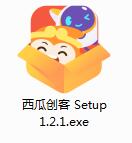
1. Download the installation package of the software in Huajun Software Park, unzip it, and double-click the exe program
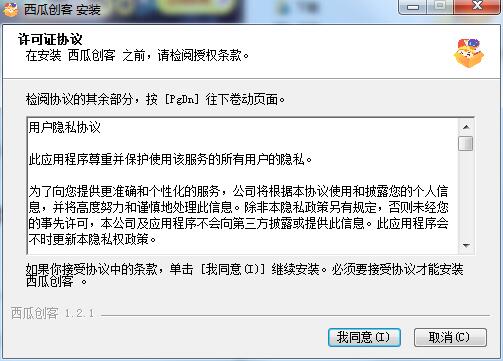
2. Read the license agreement and click I agree
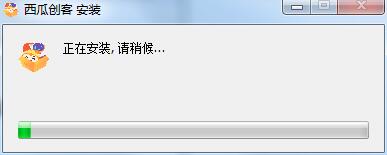
3. Xigua Maker is being installed, please wait patiently.
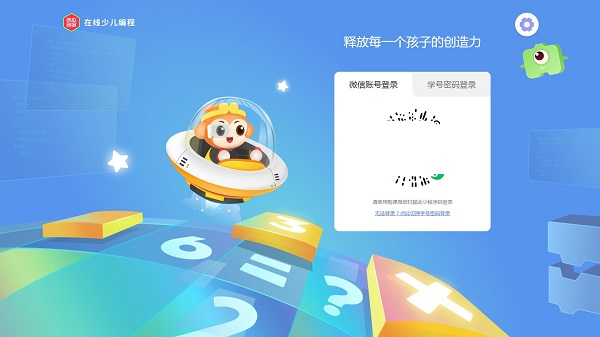
4. The software installation is completed and you can start using it.
FAQ
1. How to create in the Scratch programming interface?
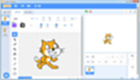
Users can enter the Scratch programming interface from [Free Creation] on the left sidebar of the learning map.
In the programming interface, users can use various building blocks (code blocks) to build their own programs.
Users can drag building blocks to the workspace and connect them in a logical order to achieve specific functions or effects.
2. What should I do if I encounter programming problems or software failures?
Users can find relevant help documents and tutorials on Xigua Maker’s official website or community forum.
If the problem is still not resolved, users can contact Xigua Maker’s customer service team or join relevant programming exchange groups for help.
When contacting customer service, users should provide detailed problem descriptions, screenshots and other information so that the customer service team can locate the problem more quickly and provide solutions.
Xigua Maker Scratch learning client update log
1.Fix known bugs
2. Optimize operating experience
Huajun editor recommends:
Children's shoes, the Xigua Maker Scratch learning client can definitely meet your needs. From the software interface to the software functions, it is absolutely eye-catching. Everyone is welcome to download and use it! There are similar software on this sitequestion bank expert,jingyou.com,Learn Wubi easily with WinCet,Whale Academy,online education!










Useful
Useful
Useful