
If you are looking for software to use, go to Huajun Software Park! software release AI product list

Hello, if there is a need for software inclusion, please package the software and attach the software name, software introduction, software-related screenshots, software icon, soft copy, business license (if you do not have a business license, please provide the front and back of the corresponding developer ID card and a photo of yourself holding the ID card), and send it to email http://softwaredownload4.com/sbdm/user/login

Close >>

Send to email:news@onlinedown.net

Close >>

Location: Home pageAndroid softwareApplicatione-commerce shopping Alibaba Retail Link

95.71%

4.29%
QR code

Scan the QR code to access the mobile version

Permissions: View

The following important permissions need to be called
uses-permission:'android.permission.MANAGE_ACCOUNTS', allows the program to manage the account list in AccountManager
uses-permission:'android.permission.AUTHENTICATE_ACCOUNTS', allows the program to access account management ACCOUNT_MANAGER related information through account verification
uses-permission:'android.permission.USE_CREDENTIALS', allows the program to request verification from AccountManager
uses-permission:'android.permission.BLUETOOTH', allows the program to connect to paired Bluetooth devices
uses-permission:'android.permission.READ_EXTERNAL_STORAGE', the program can read files in the device's external storage space (built-in SDcard and external SDCard)
uses-permission:'android.permission.RECORD_VIDEO'
uses-permission:'android.permission.RECORD_AUDIO', allows the program to record sound through the microphone of the phone or headset
uses-permission:'android.permission.PREVENT_POWER_KEY'
uses-permission:'android.permission.KILL_BACKGROUND_PROCESSES', allows the program to call the killBackgroundProcesses(String). method to end the background process
uses-permission:'android.permission.ACCESS_COARSE_LOCATION', allows the program to obtain the user's erroneous latitude and longitude information through WiFi or mobile base stations
uses-permission:'android.permission.ACCESS_FINE_LOCATION', allows the program to receive satellite positioning information through the GPS chip
uses-permission:'android.permission.ACCESS_BACKGROUND_LOCATION'
uses-permission:'android.permission.INTERNET', allows the program to access the network connection, which may generate GPRS traffic
uses-permission:'android.permission.WRITE_EXTERNAL_STORAGE', allows the program to write to external storage, such as writing files on the SD card
uses-permission:'android.permission.READ_CONTACTS', allows the program to access contact address book information
uses-permission:'android.permission.RECEIVE_BOOT_COMPLETED', allows the program to run automatically after booting
uses-permission:'android.permission.WAKE_LOCK', allows the background process to still run after the phone screen is turned off
uses-permission:'android.permission.VIBRATE', allows the program to vibrate
uses-permission:'android.permission.ACCESS_NETWORK_STATE', allows the program to obtain network information status, such as whether the current network connection is valid
uses-permission:'android.permission.CHANGE_NETWORK_STATE', allows the program to change the network status, such as whether it is connected to the Internet
uses-permission:'android.permission.READ_PHONE_STATE', allows the program to access the phone state
uses-permission:'android.permission.ACCESS_WIFI_STATE', allows the program to obtain the current WiFi access status and WLAN hotspot information
uses-permission:'android.permission.CHANGE_WIFI_STATE', allows the program to change the WiFi state
uses-permission:'android.permission.CAMERA', allows the program to access the camera to take pictures
uses-permission:'android.permission.GET_TASKS', allows the program to obtain task information
uses-permission:'com.android.launcher.permission.READ_SETTINGS'
uses-permission:'com.android.launcher.permission.WRITE_SETTINGS'
uses-permission:'com.android.launcher2.permission.READ_SETTINGS'
uses-permission:'com.android.launcher2.permission.WRITE_SETTINGS'
uses-permission:'com.android.launcher3.permission.READ_SETTINGS'
uses-permission:'com.android.launcher3.permission.WRITE_SETTINGS'
uses-permission:'org.adw.launcher.permission.READ_SETTINGS'
uses-permission:'org.adw.launcher.permission.WRITE_SETTINGS'
uses-permission:'com.htc.launcher.permission.READ_SETTINGS'
uses-permission:'com.htc.launcher.permission.WRITE_SETTINGS'
uses-permission:'com.qihoo360.launcher.permission.READ_SETTINGS'
uses-permission:'com.qihoo360.launcher.permission.WRITE_SETTINGS'
uses-permission:'com.lge.launcher.permission.READ_SETTINGS'
uses-permission:'com.lge.launcher.permission.WRITE_SETTINGS'
uses-permission:'net.qihoo.launcher.permission.READ_SETTINGS'
uses-permission:'net.qihoo.launcher.permission.WRITE_SETTINGS'
uses-permission:'org.adwfreak.launcher.permission.READ_SETTINGS'
uses-permission:'org.adwfreak.launcher.permission.WRITE_SETTINGS'
uses-permission:'org.adw.launcher_donut.permission.READ_SETTINGS'
uses-permission:'org.adw.launcher_donut.permission.WRITE_SETTINGS'
uses-permission:'com.huawei.launcher3.permission.READ_SETTINGS'
uses-permission:'com.huawei.launcher3.permission.WRITE_SETTINGS'
uses-permission:'com.fede.launcher.permission.READ_SETTINGS'
uses-permission:'com.fede.launcher.permission.WRITE_SETTINGS'
uses-permission:'com.sec.android.app.twlauncher.settings.READ_SETTINGS'
uses-permission:'com.sec.android.app.twlauncher.settings.WRITE_SETTINGS'
uses-permission:'com.anddoes.launcher.permission.READ_SETTINGS'
uses-permission:'com.anddoes.launcher.permission.WRITE_SETTINGS'
uses-permission:'com.tencent.qqlauncher.permission.READ_SETTINGS'
uses-permission:'com.tencent.qqlauncher.permission.WRITE_SETTINGS'
uses-permission:'com.huawei.launcher2.permission.READ_SETTINGS'
uses-permission:'com.huawei.launcher2.permission.WRITE_SETTINGS'
uses-permission:'com.android.mylauncher.permission.READ_SETTINGS'
uses-permission:'com.android.mylauncher.permission.WRITE_SETTINGS'
uses-permission:'com.ebproductions.android.launcher.permission.READ_SETTINGS'
uses-permission:'com.ebproductions.android.launcher.permission.WRITE_SETTINGS'
uses-permission:'com.oppo.launcher.permission.READ_SETTINGS'
uses-permission:'com.oppo.launcher.permission.WRITE_SETTINGS'
uses-permission:'com.huawei.android.launcher.permission.READ_SETTINGS'
uses-permission:'com.huawei.android.launcher.permission.WRITE_SETTINGS'
uses-permission:'telecom.mdesk.permission.READ_SETTINGS'
uses-permission:'telecom.mdesk.permission.WRITE_SETTINGS'
uses-permission:'dianxin.permission.ACCESS_LAUNCHER_DATA'
uses-permission:'android.permission.FLASHLIGHT',允许访问闪光灯
uses-permission:'android.permission.WRITE_SETTINGS',允许程序读取或写入系统设置
uses-permission:'android.permission.SYSTEM_ALERT_WINDOW',允许程序显示系统窗口
uses-permission:'android.permission.READ_LOGS',允许程序读取系统底层日志
uses-permission:'android.permission.REQUEST_INSTALL_PACKAGES',允许访问来自未知来源的安装应用程序
uses-permission:'oppo.permission.USE_FACE'
uses-permission:'android.permission.USE_FACERECOGNITION'
uses-permission:'android.permission.SYSTEM_OVERLAY_WINDOW'
uses-permission:'android.permission.FOREGROUND_SERVICE'
uses-permission:'android.permission.EXPAND_STATUS_BAR',允许程序扩展或收缩状态栏
uses-permission:'com.samsung.android.authservice.permission.READ_CONTENT_PROVIDER'
uses-permission:'android.permission.CALL_PHONE',允许程序从非系统拨号器里拨打电话
uses-permission:'android.permission.WRITE_SYNC_SETTINGS',写入Google在线同步设置
uses-permission:'android.permission.MODIFY_AUDIO_SETTINGS',允许程序修改声音设置信息
uses-permission:'android.permission.PACKAGE_USAGE_STATS'
uses-permission:'android.permission.READ_CALENDAR',允许程序读取用户的日程信息
uses-permission:'android.permission.WRITE_CALENDAR',允许程序写入日程,但不可读取
uses-permission:'com.sec.android.provider.badge.permission.READ'
uses-permission:'com.sec.android.provider.badge.permission.WRITE'
uses-permission:'com.htc.launcher.permission.UPDATE_SHORTCUT'
uses-permission:'com.sonyericsson.home.permission.BROADCAST_BADGE'
uses-permission:'com.sonymobile.home.permission.PROVIDER_INSERT_BADGE'
uses-permission:'com.anddoes.launcher.permission.UPDATE_COUNT'
uses-permission:'com.majeur.launcher.permission.UPDATE_BADGE'
uses-permission:'com.huawei.android.launcher.permission.CHANGE_BADGE'
uses-permission:'android.permission.POST_NOTIFICATIONS'
uses-permission:'com.huawei.android.launcher.permission.CHANGE_BADGE'
uses-permission:'android.permission.CHANGE_WIFI_MULTICAST_STATE', allows the program to change the WiFi multicast state
uses-permission:'android.permission.BLUETOOTH_ADMIN', allows the program to discover and pair new Bluetooth devices
uses-permission:'com.android.launcher2.permission.INSTALL_SHORTCUT'
uses-permission:'com.android.launcher3.permission.INSTALL_SHORTCUT'
uses-permission:'com.hihonor.security.permission.ACCESS_THREAT_DETECTION'
uses-permission:'android.permission.MOUNT_UNMOUNT_FILESYSTEMS', allows the program to mount and unmount external file systems
uses-permission:'android.permission.BROADCAST_STICKY', allows the program to quickly receive the next broadcast after receiving the broadcast
uses-permission:'com.vivo.notification.permission.BADGE_ICON'
uses-permission:'com.coloros.mcs.permission.RECIEVE_MCS_MESSAGE'
uses-permission:'com.heytap.mcs.permission.RECIEVE_MCS_MESSAGE'
uses-permission:'com.alibaba.wireless.lstretailer.permission.MIPUSH_RECEIVE'
uses-permission:'cn.org.ifaa.permission.USE_IFAA_MANAGER'
uses-permission:'com.huawei.permission.USE_TSM_AGENT'
uses-permission:'android.permission.SMARTCARD'
uses-permission:'org.simalliance.openmobileapi.SMARTCARD'
uses-permission:'android.permission.USE_FINGERPRIN'
uses-permission:'android.permission.USE_BIOMETRIC'
uses-permission:'android.permission.CAPTURE_VIDEO_OUTPUT', allows an application to capture video output and is not used by third-party applications
uses-permission:'com.alibaba.wireless.lstretailer.permission.PROCESS_PUSH_MSG'
uses-permission:'com.alibaba.wireless.lstretailer.permission.PUSH_PROVIDER'

Ali Retail 6.0.12

Special area
Software size:134.0 MB
software language:Simplified Chinese
Software rating:
Software type:Domestic software
Software licensing:free software
Update time:2025-10-15
Application platform:android
Software classification:e-commerce shopping
Version:6.0.12
Registration number:Zhejiang B2-20120091-43A
Software vendor:Alibaba (China) Network Technology Co., Ltd.

Software introduction Related topics FAQ Other versions Download address

Basic introduction
Alibaba retail channel first LOGO
Alibaba Retail Pass Android version is a professional APP owned by Alibaba. Alibaba Retail Connect cooperates with high-quality supply sources around the world and relies on its exclusive purchase platform to help millions of offline retail stores across the country achieve one-stop online purchase and full offline services. Alibaba Retail APP relies on Alibaba's strong influence to bring a large number of suppliers and products, and provides retail stores with popular activities, product browsing, product purchase, order management, Alipay payment, logistics viewing, event notifications, convenient services and other functions.

Screenshot of Alibaba Retail Link

Introduction to Alibaba Retail Software

Alibaba Retail Pass (Android version) is launched by Alibaba Retail Pass for Android mobile phone users. It is an essential APP for opening and purchasing physical retail stores such as supermarkets, convenience stores, mom-and-pop stores, groceries, grocery stores, grocery stores, tobacco and alcohol stores, community stores, campus stores, stationery stores, department stores, restaurants, fruit stores, maternal and child stores, Internet cafes and other physical retail stores. It helps 6 million offline physical store owners across the country to provide one-stop comprehensive services such as purchase, ordering, replenishment, shelf display, mobile phone recharge, vending machines, oden cooking, fresh food, smart cashiers, POS equipment, credit purchases, Tmall stores, etc. It is a must-have choice for store owners to open a store and start a business. Alibaba Retail Connect cooperates with global high-quality supply sources, including imported goods, brand goods, Tao brand supply, village Tao supply, 1688, 1688 Alibaba wholesale supply, Tmall supply, to provide high-quality goods for retail stores. At the same time, we also provide full-service guarantee for small stores: you can apply for compensation if the delivery is late; if the product price is expensive, you can apply for compensation; if the goods are not sold out, you can apply for compensation; if the goods have expired, you can also apply for compensation. Authentic products at low prices, on-time arrival, and worry-free after-sales are our commitments!

The businesses of affiliated companies include: Alibaba 1688, Cainiao Network, Taobao, Rural Taobao, Ele.me, Hema, Tmall, Juhuasuan, Alimama, Alibaba Cloud, Ant Financial (alipay), and MYBank.

Screenshot of Alibaba Retail Link

Alibaba Retail Software Functions

      1)【搜索找货】支持品牌筛选,搜“薯片”,自动出现【乐事】、【可比克】【上好佳】品牌帮筛选

​ ​ 2) [Category Search] The categories are adjusted to three levels, and the sub-categories use real product pictures to be more intuitive.

​ ​ 3) [Commodity purchase decision] Imported goods customs declaration form, quarantine form, and shelf life can be viewed on the APP

​​ 4) [Event to collect orders] The full reduction and full increase activities have not been reached, and the guidance for order collection is clearer

5) [Shopkeeper service] Modify the shopkeeper account and simplify the registration process 6) [Easy ordering and door-to-door delivery] Bind Alipay to place an order quickly! Alibaba is responsible for door-to-door delivery, and you can easily purchase goods even if you are looking at the store alone! 7) [Convenient service, easy recharge] Provides recharge function, supports phone bill, broadband, QQ recharge, online game point card, gas card recharge, supports train tickets, bus tickets, air tickets, hotels and other booking functions.

Screenshot of Alibaba Retail Link

How to use Alibaba Retail Link

And then add the goods to the purchase order?

​​ 1. Enter the software and click the search box above
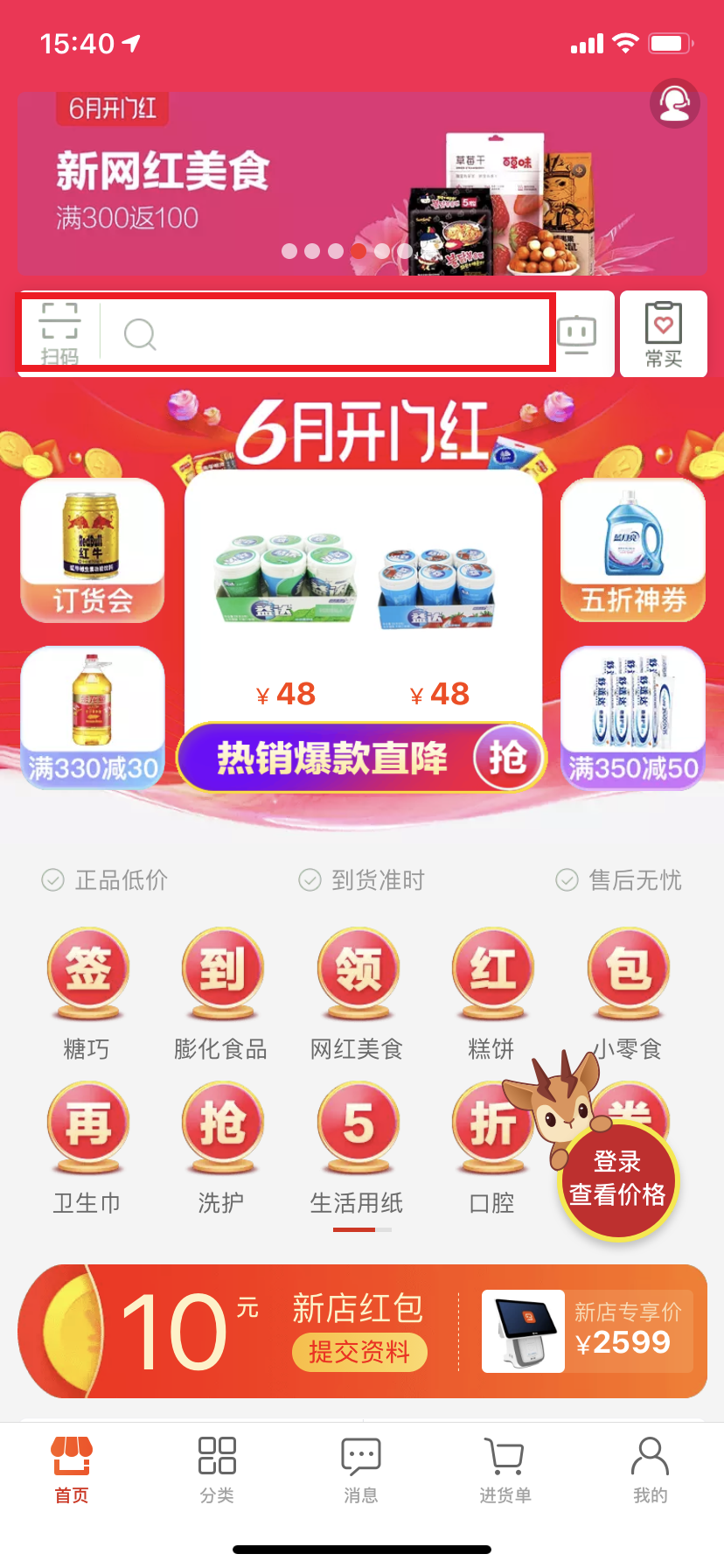
Screenshot of Alibaba Retail Link

2. Enter the product name you want in the search box
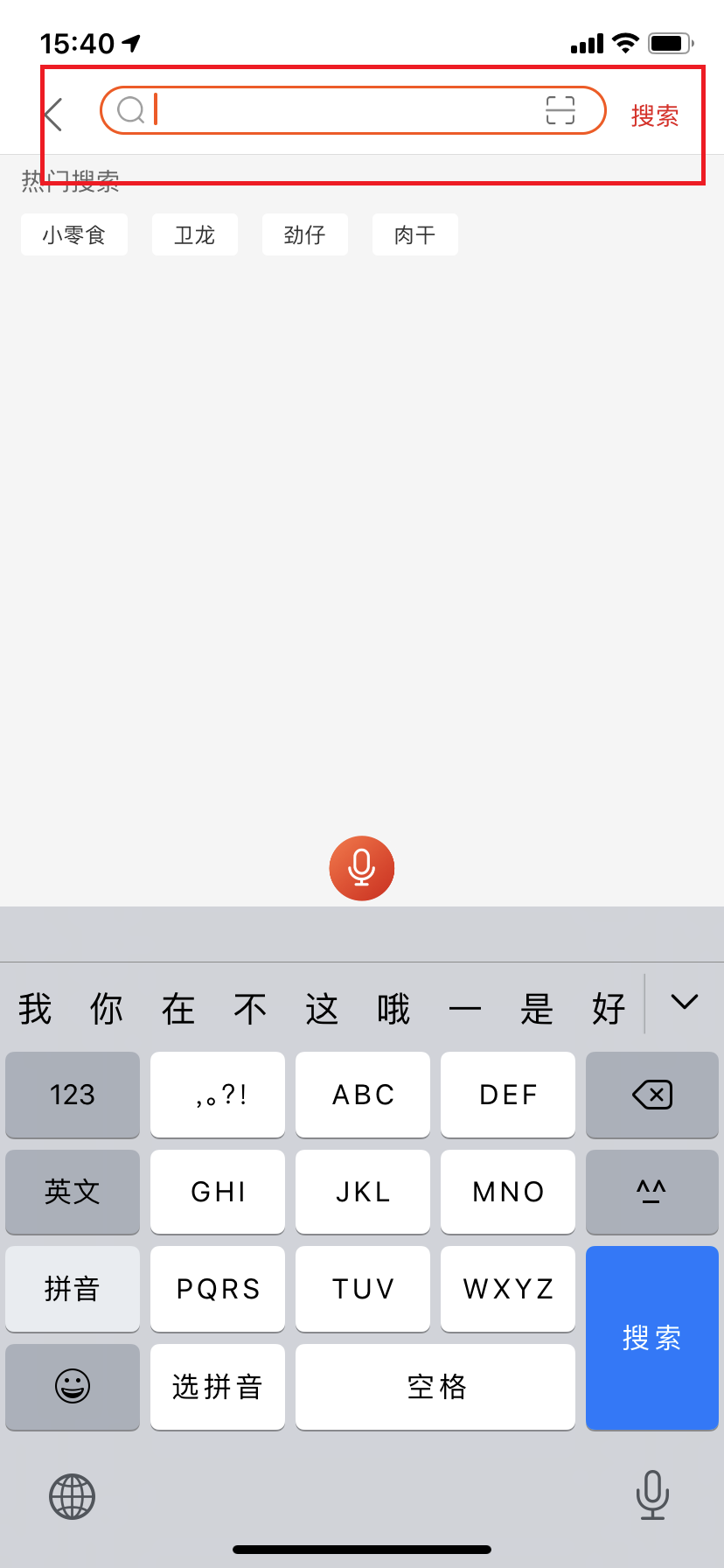
Screenshot of Alibaba Retail Link

3. In the search results, click on the product you want
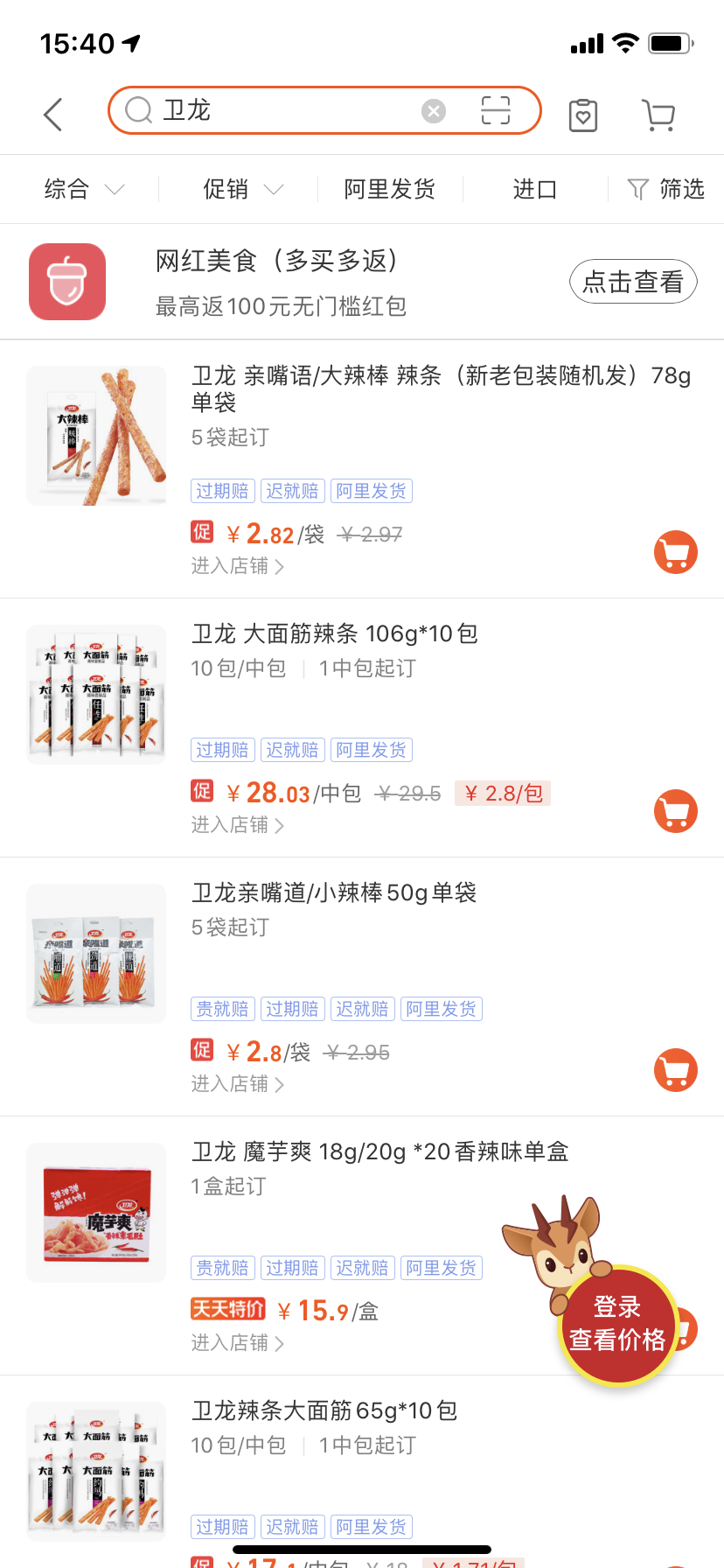
Screenshot of Alibaba Retail Link

​​ 4. Click to add the purchase order in the product interface
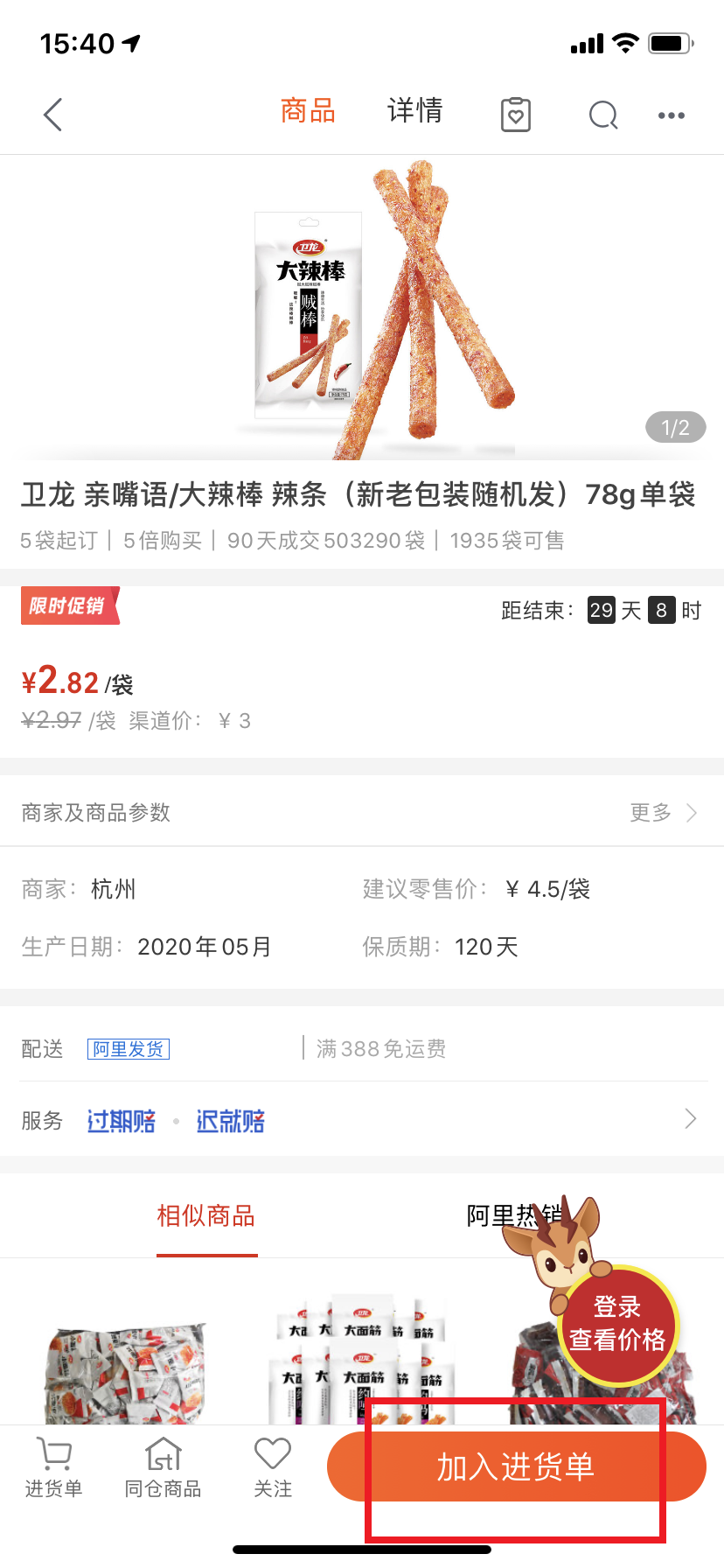
Screenshot of Alibaba Retail Link

Frequently Asked Questions about Alibaba Retail

      How to contact online customer service in the Android version of Alibaba Retail Communication?

Open the Android version of Alibaba Retail, click on My, and slide to the bottom of the My page.

At the bottom of my page, find the contact customer service entrance and click Contact Customer Service.

Enter the retail customer service dialog page, enter the manual number in the dialog box, and wait for the system response

After the system responds, the appropriate customer service will be arranged to intervene based on the page you consulted. Then you can directly describe your problem to the customer service.

Comparison of similar software

      AlibabaThe 1688 platform gathers sources of goods from all over the country and global quality goods. It is the preferred platform for 80% of Taobao sellers and 60% of physical stores to purchase goods, and is the common choice of more than 100 million buyers and sellers. The Alibaba mobile client has been fully upgraded, and 6.0 is starting a new journey! Different operating interfaces for buyers and sellers, faster to use and more focused functions; Wangwang mobile phone is online 24 hours a day, making communication hassle-free at any time.

      TmallThe APP is Tmall on mobile phones and belongs to Alibaba Group. There are a large number of brand stores here, with strict merchant and product management systems. On Tmall APP, you will meet thousands of good brand stores, buy authentic products with high cost performance, and enjoy satisfactory customer service. The Tmall APP that only sells authentic products allows you to meet your favorite baby with confidence.

Alibaba Retail Update Log

​ ​ 1. Reduce the difficulty of discount calculation: the search page will display the estimated price of the product.

​ ​ 2. Buy more and get more rebates more clearly: Search and product pages more clearly display which products support more purchases and get more rebates.

​​ 3. Some categories support quality issues and you can apply for a refund online within 90 days!

​​ 4. Scan the QR code to check the recommended retail price of the product, and big data will help you see the pricing clearly!

​​ 5. Scan the code to purchase replenishment and have a chance to obtain rare exclusive brand coupons!

Huajun editor recommends:

Alibaba Retail Link is specially launched for Android mobile phone users and provides store opening and purchasing services for physical retail stores such as supermarkets, convenience stores, mom-and-pop shops, grocery stores, and grocery stores. There are similar software on this siteHui Taobao, recommend everyone to download!
FAQ

Associated version