



Introduction to Aegis Folder Encryption Software
Aegis Folder Encryption Software uniformly manages encrypted files through the manager, eliminating the need for customers to find too many encrypted files. Aegis Folder Encryption Software has a unique and powerful hiding function that makes it difficult for anyone to find them using any tool without logging in to Aegis Folder Encryption Software. Aegis Folder Encryption Software has extremely fast encryption speed, which can be said to be instantaneous encryption. Users can perform operations such as editing, copying, and deletion on the encrypted disk, and perform real-time encryption on the encrypted disk. After encryption, the encrypted files are automatically hidden, which is convenient and safe. It can ensure the security of the user's encrypted files to a large extent and effectively prevent the user's important information from being peeped and deleted. ps: If you want to redo the system or restore with one click, please copy out the encrypted files.
Features of Aegis Folder Encryption Software
1. Brand new encryption core and professional encryption algorithm to achieve data encryption.
2. Aegis computer folder encryption software integrates encryption/hiding, and the encryption is efficient and safe.
3. This free folder encryption software is simple and easy to use. You can edit encrypted files by opening the encrypted disk.
4. It is safe and stable. Deletion/uninstallation of the free encryption software will have no impact on the encrypted files. Encrypted files can still be opened after reinstallation.
5. Super protection, files encrypted by encryption software can prevent deletion, copying and movement.
Instructions for use of Aegis Folder Encryption Software
First proceed with software installation. First download the Aegis file encryption software and install it. Double-click the icon on the desktop to open the Aegis file encryption software, as shown in the figure:

Step 2: Create a user. Click the "New User" button to create a username, as shown in the figure:
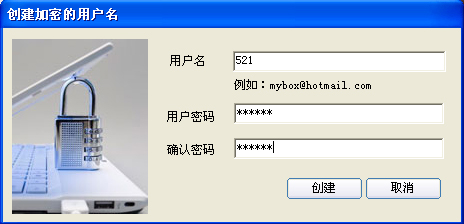
Enter your username and password, and then click Create. Remember this username and password. You will need to enter your username and password the next time you log in.
Step 3: Log in. Enter the username and password created in the second step and click Login.
Step 4: Create an encrypted disk. After logging in, the following picture is displayed:

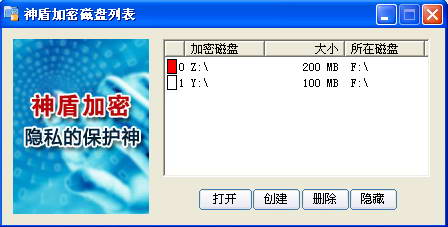
After this interface appears, select the disk where the encrypted disk file is to be stored. The encrypted disk size we apply for by default is 4GB. You can also modify the size of the encrypted disk as needed, and then click Create. The encrypted disk has an initialization process. Please wait. After the initialization is completed, the following figure is displayed (multiple encrypted disks can be created):

Step 5: After selecting the encrypted disk, click "Open" to open the encrypted disk. Then just copy the files, documents, pictures, etc. you want to encrypt to the encrypted disk. You can also create, edit, delete, copy, etc. in the encrypted disk. The encrypted disk is shown in the figure below:

Step 6: After the operation is completed, right-click the icon of the Aegis encryption software in the lower right corner of the computer, and then left-click "Exit" to complete the encryption and hiding functions.

Aegis Folder Encryption Software Update
1. The new version of encryption software supports 64-bit operating systems
2. Add an exit button to the disk dialog box
3. The Aegis folder encryption tool adds right-click encryption.
Huajun editor recommends:
Aegis folder encryption software withBlack Beetle File Encryption Lock,Yitong folder encryption software,Universal Encryption Master,U disk super encryption 3000,Hua Xia Bank’s agency business data encryption softwareThese are all very good software, welcome to my site to download and experience!




Useful
Useful
Useful