




- Green versionView
- Green versionView
- Green versionView
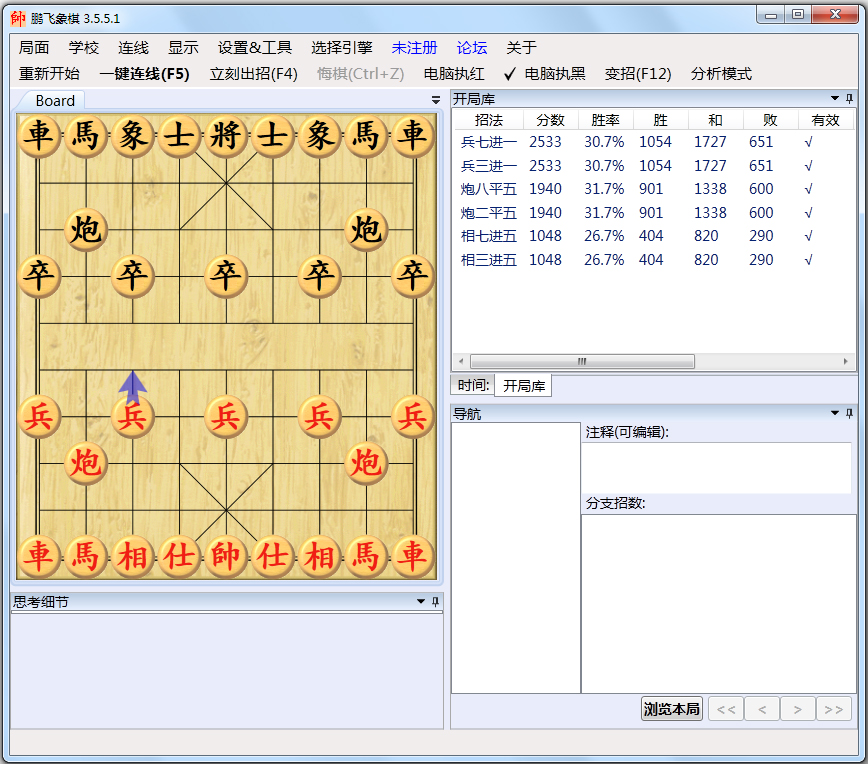
Pengfei chess software introduction
Xiangqi is played on a square checkerboard and red and black round chess pieces. There are ten horizontal lines and nine vertical lines on the chessboard, which are divided into 90 intersection points. There are 32 chess pieces in total, 16 pieces of each color, divided into 7 types of arms, which are placed and moved at the intersection points. The two sides alternately play chess, and the side that "checkmates" the opponent's general (coach) first wins. In China, chess, which has a history of thousands of years and is full of oriental wisdom, has a mass base in China that far exceeds that of Go, and it has always been the most popular chess game.
Pengfei chess software functions
1. You can connect to major network clients including JJ chess to automatically play chess and move. F5 connects with one click, easy and simple.
2. Supports branch chess records. All moves played will be completely recorded, including moves to regret chess, moves to dismantle chess in analysis mode, etc., and automatically saved in pfc chess record format.
3. Comes with the chess "school" menu (which contains more than 100 chess games with detailed annotations, and has detailed explanations for each variation)
4. The chessboard and chess pieces support any level of zoom. There is no loss in image quality. The bigger it is, the clearer it is.
5. Supports various UCCI and UCI smart engines. (UCCI and UCI are both chess universal engine protocols.)
6. Support background thinking, analysis mode, and opening library.
7. You can browse the history of moves on the small chessboard. You can browse and think about details in the small chessboard.
Pengfei Chess FAQ
Question: Why sometimes after connecting, Pengfei Xiangqi waits for more than 10 seconds, but there are no chess pieces or the chess pieces are incorrect.
Answer: Possible reasons are:
1. This client may have to create a special plan to connect.
2. In some operating systems, users do not use administrator rights by default. In this case, you must right-click PengfeiChess.exe. Select Run as Administrator in the pop-up menu to run Pengfei Xiangqi.
2. Some clients must click the black car on the upper left when creating a plan.
3. Some clients do not support the blockable function without turning on the glass effect, and the client's chessboard is blocked.
Question: Why does Pengfei Chess move the pieces when connected to some clients, but the network client does not move the pieces.
Answer: A. It is possible that Pengfei Chess only causes the refresh problem of the client, but it does not affect the actual chess playing:
There are 2 solutions:
1. Turning on the glass effect (Aero theme) under Win7 or Vista can perfectly solve this problem.
2. If the operating system does not have a glass effect (Aero theme), canceling the blockable function in other settings of Pengfei Xiangqi can solve the problem, but the client can no longer be blocked.
B. If it is true that the client’s chess pieces cannot be moved, or the chess pieces do not move smoothly
The solutions are:
1. Some clients must select "Simulate real mouse clicks" in the advanced options when creating a plan
2. Some clients must set the "mouse time delay multiplier" to 10 or higher in the advanced options when creating a solution.
3. For clients that use drag-and-drop mode, you must select "drag-and-drop mode" in the advanced options when creating a plan.
4. Click on the target chessboard of the client.
Pengfei Xiangqi update log
1: Optimized performance
2: We are serious about solving bug problems
Special instructions:
Hello, the software you are about to use is an auxiliary tool and may be intercepted and checked by major anti-virus software. This software may have risks, please pay attention to avoid it. If you want to continue using it, it is recommended to close various anti-virus software before use.
Attached is the software package decompression password: softwaredownload4.com
Huajun editor recommends:
Pengfei chess software takes up little memory, has stable performance, is free of any bundles, is green and safe, and is truly a conscientious software! This site also hasChinese chess,Yicheng Go,MultiGo Go score software,Wangyou Go PC version,chess, available for you to download!




Useful
Useful
Useful