Hot search terms: 360 Security Guard Office365 360 browser WPS Office iQiyi Huawei Cloud Market Tencent Cloud Store
Hot search terms: 360 Security Guard Office365 360 browser WPS Office iQiyi Huawei Cloud Market Tencent Cloud Store

Network detection Storage size: 83.21 MB Time: 2022-12-22
Software introduction: Wireshark is a tool dedicated to network packets and is more suitable for network management and security engineering professions. By using Wiresha...
Wireshark is a powerful and widely used network protocol analysis tool. By in-depth learning of its usage and techniques, users can better understand network communications and troubleshoot network problems. Next, let Huajun editor explain to you how wireshark automatically saves files and how wireshark automatically saves files!
first step
Make sure that the Wireshark software has been correctly installed and opened. Do not run other packet capture or analysis functions at this time to avoid interfering with the setup process.
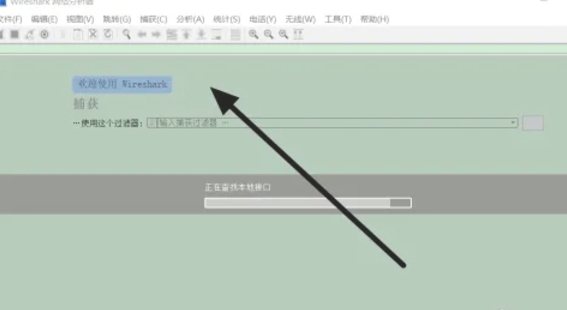
Step 2
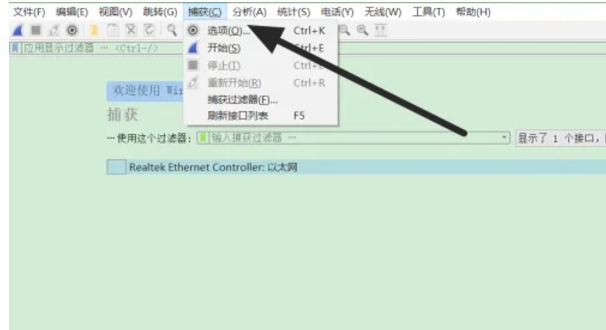
In Wireshark's main interface, find the "Capture" option on the toolbar and click it. In the drop-down menu, select Options to open the capture interface settings window.
Step 3
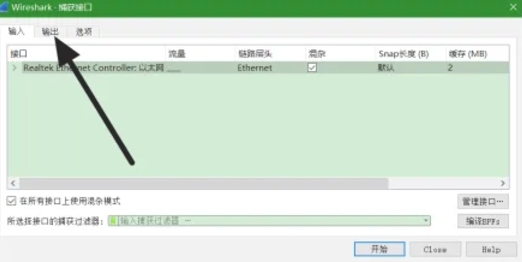
In the capture interface settings window, find the Output tab and click on it. By default, the output file format will be set to pcapng, which is a commonly used packet capture format for Wireshark.
Step 4
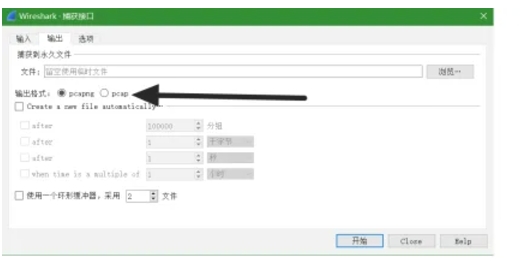
In the Output Settings tab, find the option "Create a new file automatically..." and click on it. This option allows you to set Wireshark to automatically create a new file after capturing a certain number of packets.
Step 5
In the dialog box that pops up, enter the number of packets you want Wireshark to capture before creating a new file. The recommended setting here is 10,000 packets, but you can adjust it according to your needs.
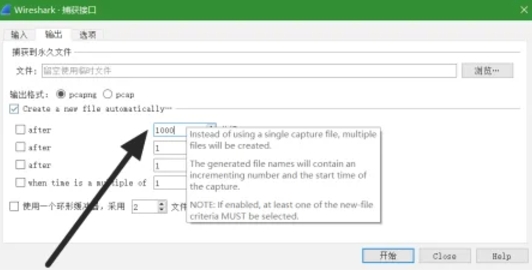
Step 6
Make sure to check the "after" option so that Wireshark will automatically stop capturing the current file and start a new file when the number of packets you set is reached. At the same time, when naming the automatically saved file, you can choose to use the default file name format or customize the file name.
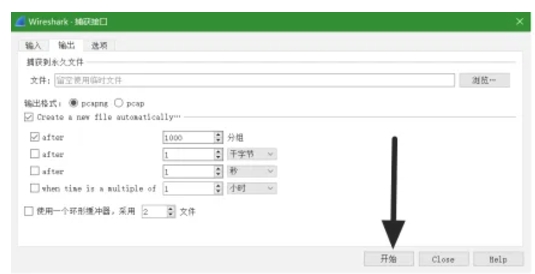
Step 7
After completing the above settings, click the "Start" button and Wireshark will start capturing packets and automatically save the file according to your settings.
The above is how wireshark automatically saves files and the method of wireshark automatically saving files compiled by Huajun editor for you. I hope it can help you!

 Microsoft Edge browser
 Steam
Steam
 Tencent Video
 WPS Office
 iQiyi
iQiyi
 Sohu video player
 Lightning simulator
 MuMu emulator
 Eggman Party
 What to do if there is no sound after reinstalling the computer system - Driver Wizard Tutorial
 How to switch accounts in WPS Office 2019-How to switch accounts in WPS Office 2019
 How to clear the cache of Google Chrome - How to clear the cache of Google Chrome
 How to fire bullets in scratch-How to fire bullets in scratch