
Hot search terms: 360 Security Guard Office365 360 browser WPS Office iQiyi Huawei Cloud Market Tencent Cloud Store
Hot search terms: 360 Security Guard Office365 360 browser WPS Office iQiyi Huawei Cloud Market Tencent Cloud Store

Server class Storage: 149MB Time: 2015-12-31
Software introduction: XAMPP is an easy-to-install website-building integrated software package that includes MySQL, PHP and Perl. XAMPP software is easy to operate and powerful. I...
The software xampp is very popular and attracts many users. So if you want to create a database during operation, how should you do it? Details are described below.
Open the xampp main interface, open Apache and MySQL, and click admin behind MySQL.

This is what it looks like after opening it

Enter the database name where the red arrow points and click Create
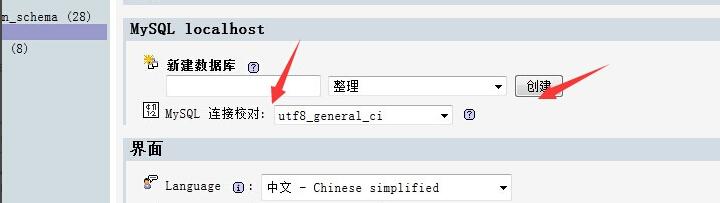
The above explains the operation process of creating a database with xampp. I hope friends in need can learn it.

 How to upgrade software in 360 Software Manager? -How to upgrade software in 360 Software Manager
 Microsoft Edge browser
 Steam
Steam
 Tencent Video
 WPS Office
 iQiyi
iQiyi
 Sohu video player
 Lightning simulator
 MuMu emulator
 Eggman Party
 What to do if there is no sound after reinstalling the computer system - Driver Wizard Tutorial
 How to switch accounts in WPS Office 2019-How to switch accounts in WPS Office 2019
 How to clear the cache of Google Chrome - How to clear the cache of Google Chrome
 How to fire bullets in scratch-How to fire bullets in scratch


