
-
OneNote 2016
- Size: 5.71M
- Language: Simplified Chinese
- Category: File management
- System:winall






OneNote 2016 is a digital notebook used to record important events in life. You can briefly write down your thoughts and record class and meeting notes. It has no expiration date and can be used as long as you want. OneNote 2016 can plan important events, seize inspiration to create new content, and use your notes across devices whether at home or in the office. Friends who like OneNote 2016, come to Huajun Software Park to download and experience it!
OneNote 2016 features:
1. Use notebooks with different sections and pages to keep everything organized.
2. Easily find notes through convenient navigation and search functions.
3. With OneNote, which can be used across various devices, capturing inspiration is like searching for something.
4. Edit annotations using the Type, Highlight, or Ink Annotation functions.
5. Record voice notes, insert online videos and add files.
6. Sort and categorize the contents of each notebook, section, and page.
7. Share notebooks with colleagues, friends and family.
8. Encourage students to take handwritten notes and draw diagrams.
OneNote 2016 installation steps:
1. Instructions before installation:
Office 2016 supports 32-bit and 64-bit Windows 7, Windows 8 and Windows 10 PCs, notebooks and tablets, but it no longer supports Windows XP systems.
Office2016 cannot coexist with office2013. Users must uninstall Office2013 first. The two versions cannot be installed at the same time.
2. Specific installation method
Download the 32-bit/64-bit version of office2016 online installer provided by this site
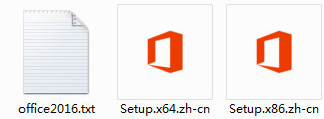
Just install it directly, wait for the installation to be completed and automatically decompress the installation package to create a shortcut
How to use OneNote 2016:
1. Select the picture in the OneNote note, right-click and select "Copy the text in the picture" or "Copy the text in this printout page"
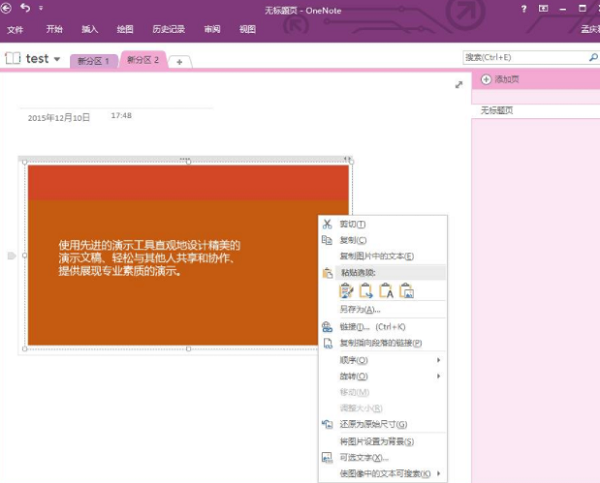
2. Press "ctrl+v" to paste, and you can get the text in the picture.
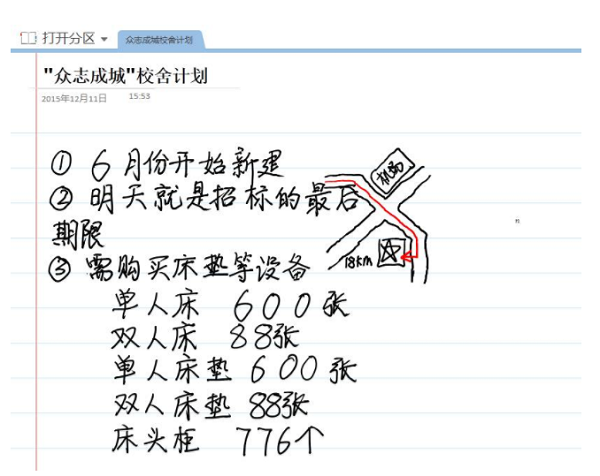
3. The following are quick handwritten notes
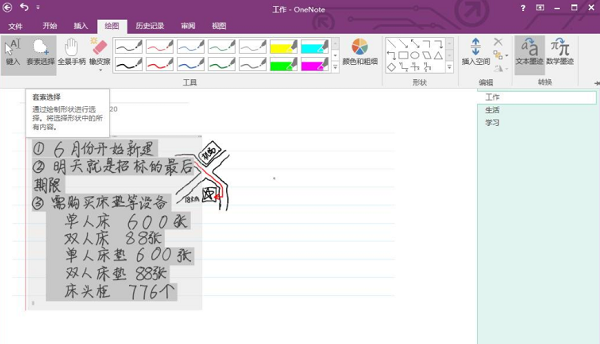
4. Select the text that needs to be converted, click "Draw", and "Text Ink" can be converted into text.
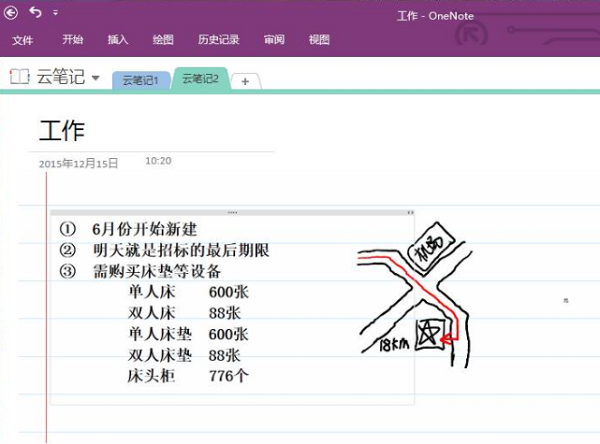
5. The picture below is the result after conversion
OneNote 2016 FAQ:
1. How to share notebooks with others in OneNote 2016?
1) First open OneNote 2016 and click the file button in the upper left corner
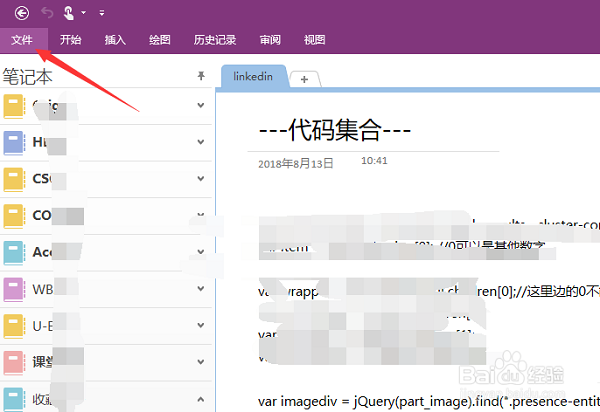
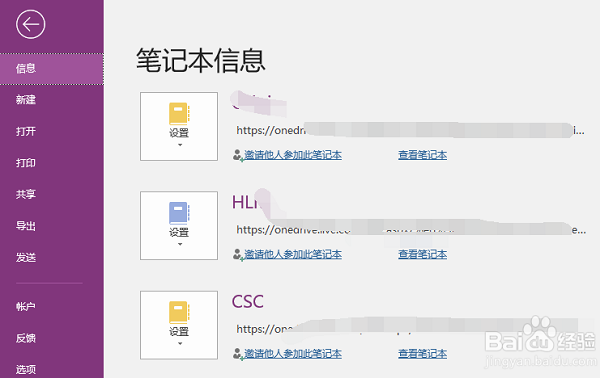
2) Click Information to see all your notebooks, scroll down to find the notebook you want to share, click Settings, then click Share or Move
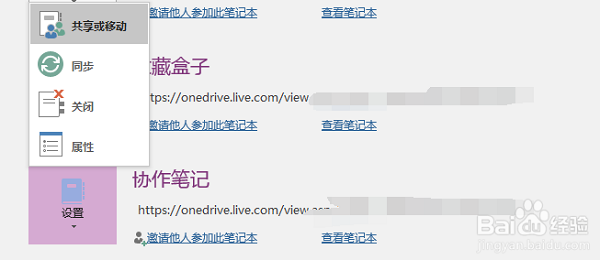
3) Then come to the shared notebook page. If it is shared privately, click on the share with others column, and then enter the other party's Microsoft account (email) on the right as shown.
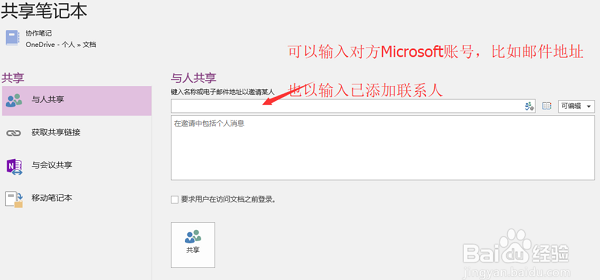
4) On the right side, you can set editable or viewable, set the other party's permissions, and then click Share below. You can later see the current sharing status of the notebook below.
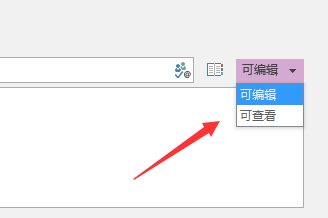
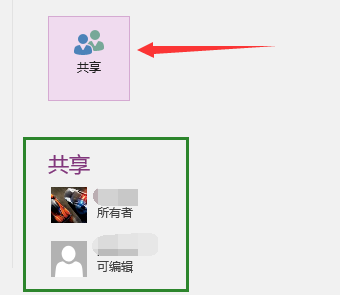
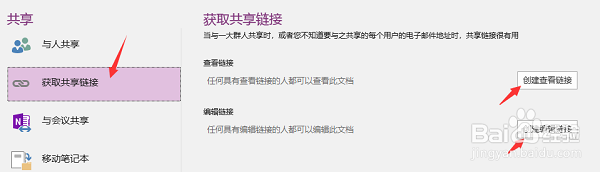
5) If it is shared by multiple people or shared publicly, you can click to get the sharing link, create a viewing link or an editing link. Then share the link with others
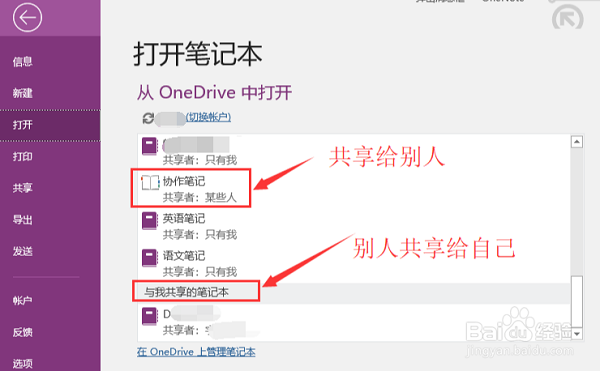
6) If you want to open a notebook shared by others with you, open the "Open" column, scroll down in the list box to find the column of notebooks shared with me, and below are the notebooks shared by others with you.
Which one is better between OneNote 2016 and similar software:
OneNote 2016 can search and store text, pictures, numbers and other information on the computer, allowing users to easily search and recall it when needed. OneNote 2016 is a very good business office software and is very convenient to use.
All Note is a powerful notepad software. Through this software, users can memorize words and write notes. All Note has a freely scalable interface. It is an all-round notepad software with many functions and runs very fast.
Youdao Cloud Notes helps users manage their personal daily life and time. It is very fast and smooth to use, providing convenience for users and friends. It supports quick search and classification, stores precious information that will never be lost, and makes working easy.
These three software are all worth downloading and using. They each have their own advantages. You can choose the one that suits you and download it.
All Note download address:http://softwaredownload4.com/soft/767884.htm
Youdao Cloud Notes download address:http://softwaredownload4.com/soft/493639.htm
OneNote 2016 FAQ
What should I do if login fails or prompts an error?
Sometimes users may encounter login failures when logging into OneNote 2016 using a specific account (such as the account provided by the group). This may be caused by incompatible software versions or account permission settings. Solutions include trying to uninstall the current version of OneNote and install the OneNote 2016 version, or contact the account administrator to check account permissions.
OneNote 2016 update log:
1.Fix some bugs
2. Optimized some functions
|
Huajun editor recommends: OneNote 2016 is easy to use and simple to operate. This is a very good business office software with very powerful functions. OneNote 2016 allows you to fully utilize it and make your records more convenient and faster. In addition, there are two softwares, SmartPhOneNotes and Evernote2OneNote, recommended to everyone. You are welcome to download and use them. |
Version: 4.3.5.21 | Update time: 2025-10-23
Similar recommendations





Latest updates





How to convert images to text in Onenote? -Onenote image to text tutorial
How to add a new template in Onenote? -Onenote adds new template tutorial
How to add add-ins to Onenote? -Tutorial on adding add-ons to Onenote
How to insert logarithms in OneNote-How to insert logarithms in OneNote
How to draw a circle in OneNote - How to draw a circle in OneNote
How to insert date in OneNote-How to insert date in OneNote
How to use the translation function in OneNote-How to use the translation function in OneNote
How to change the screen tip style in OneNote - How to change the screen tip style in OneNote
How to change battery options in OneNote - How to change battery options in OneNote
OneNote 2016 Review
-
1st floor Huajun netizen 2021-08-19 01:01:39OneNote 2016 is very useful, thank you! !
-
2nd floor Huajun netizen 2022-02-22 04:21:40OneNote 2016 is convenient, practical and powerful. The software is very easy to use!
-
3rd floor Huajun netizen 2021-05-13 13:00:56OneNote 2016 has quite comprehensive functions. It is the latest version. It is free to download. Keep up the good work!
Recommended products
-

TeamDoc document management software
-

Foxit PDF to Word Converter
-

Beyond Compare 4 Mac file comparison tool
-

Word document batch processing master
-

Folder encryption wizard
-

Change file names in batches with Feibox
-

Yicai file batch processing treasure box
-

Advanced RAR Repair
-

PDF decryption tool
-
Microsoft Project
- Diablo game tool collection
- Group purchasing software collection area
- p2p seed search artifact download-P2P seed search artifact special topic
- adobe software encyclopedia - adobe full range of software downloads - adobe software downloads
- Safe Internet Encyclopedia
- Browser PC version download-browser download collection
- Diablo 3 game collection
- Anxin Quote Software
- Which Key Wizard software is better? Key Wizard software collection




