
-
ipscan (ip port scanning tool)
- Size: 17.6M
- Language: Simplified Chinese
- Category: IP tools
- System: Win 7 and above






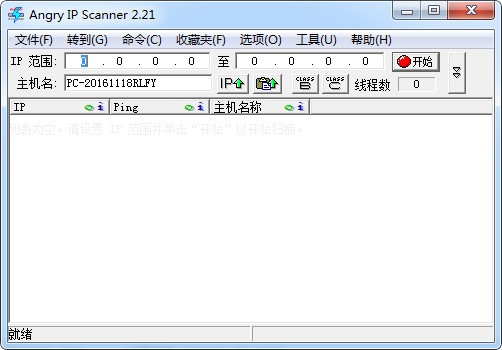
ipscan (ip port scanning tool)It is a program that operates within a local area networkport scantool, ipscan can help you find used and unused files in the LANIP address, and also supports scanning the ports opened by the specified IP address. It is very powerful. You only need to set the starting and ending IP addresses, and wait for the results after starting! Huajun Software Park provides you with ipscan computer version download, come and experience it!
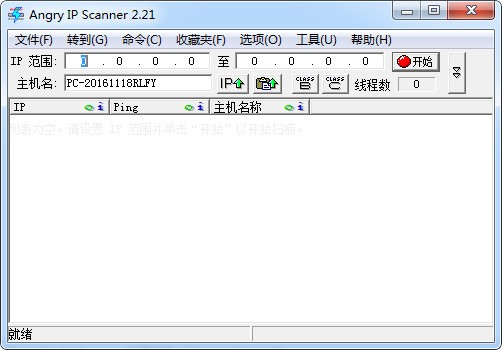
Basic introduction to ipscan
The English name of the IP port scanning tool is ipscan, which is a search toolLANIPScan, a small green software for the machine, provides complete IP address management in a static IP address environment or a DHCP environment. Users can also use the DHCP server that comes with IPScanProbe, which can provide a higher security and flexible DHCP environment. IPScan can also collect and store an ongoing, auditable history of all devices in the network. These historical records can provide a high-value, continuously updated document of network conditions.
ipscan installation steps
1. First download the ipscan software package from this site. After the download is completed, you will get the zip format compressed package.

2. Right-click the compressed package and selectUnzipGo to the current folder and get the exe file

3. Double-click the exe application to enter the main interface of the ipscan software for use. No installation is required.

How to use ipscan
How to export data from ipscan?
1. Download ipscan (ip port scanning tool) from this site, decompress it and run the exe file, enter the ipscan main interface, enable scanning, and the results of a certain scan are displayed as follows

2. In the menu bar, click File--Save As

3. Select the save format
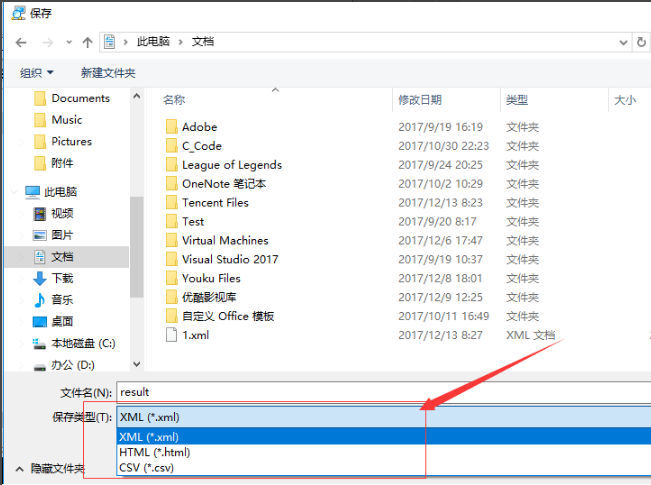
4. View the saved data as follows

5. You can also save customized items, as follows

Features of ipscan software
IPScan is a product that combines software and hardware. IPScan is an industry-leading solution for centralized network management and enhanced basic network access control, IP address allocation, etc. The distributed IPScan detector monitors each VLAN and can detect all Ethernet and IP devices connected to the network. The centrally controlled IPScanServer includes a relational database management system (RDBMS), which can realize central network policy management, monitoring, alarming and real-time control of all devices on the enterprise's backbone network.
IPScan provides complete IP address management in either a static IP address environment or a DHCP environment. Users can also use the DHCP server that comes with IPScanProbe, which can provide a higher security and flexible DHCP environment.
Based on configured management policies, IPScan can automatically prevent unauthorized devices with conflicting Ethernet or IP addresses from accessing the network. By denying access to these devices, IPScan blocks potential attacks from the outside, even if the attacker has gained a connection to the switch or WiFi access point. IPScan also helps eliminate IP address conflicts that can cause harm to network infrastructure or critical equipment.
IPScan can also collect and store the ongoing, auditable history of all devices in the network. These historical records provide a high-value, continuously updated document of network conditions.
ipscan FAQ
How to use IPScan to scan active hosts?
1. Start IPScan, enter the starting IP and ending IP in the "IP Range" text box, and click the "Start" button on the far right of the window.

2. IPScan is scanning. The blue ones indicate active hosts that can be pinged successfully.
3. After the scan is completed, a prompt dialog box will pop up. Here you can see how many IPs have been scanned in the IP address range, and how many of them are currently active hosts. Click the "OK" button to return to the IPScan window and you can see more detailed information.

Comparison of similar software with ipscan
ScanPort port scanning tool is a compact network port scanning tool. The ScanPort port scanning tool is a green version that can be used without installation. After opening, it will help you fill in the starting IP and port number by default. You can fill in the ending IP according to your needs, and then scan.
ip Port Scanner Batch IP Scanner, that is, specifying a port to scan an IP segment, is very practical for network administrators, and this software is a green version, you can use it by double-clicking it after downloading, and no additional installation is required.
LAN IP Address Scanner is a very fast IP scanner and port scanner. Its purpose is for system administrators and general users to monitor and manage networks. With multi-threaded page scanning technology, this program can scan hundreds of computers per second. It simply pings each IP address to check if it is alive, then selects the hostname it is in, resolves its hostname, determines the MAC address, NetBIOS information, scans ports, etc. to obtain the information in a file exported as a plain text file.
The above software are all IP port scanning tools. Each of these software has its own characteristics. Users can download and use it according to their own needs.
ipscan update log
1. Bug fixed
2. Improved user experience
3. Increased interface beautification
4. Fixed compatibility
5. Increased stability
Huajun editor recommends:
The editor of Huajun Software Park recommends that you download ipscan (ip port scanning tool). The editor has personally tested it and you can use it with confidence. In addition, the Xinlan IP automatic changer, IP search batch modification tool, and .NET provided by Huajun Software Park are also good software. If necessary, you may wish to download and try it! The editor is waiting for you in wind and rain!
Version: V3.9.1 | Update time: 2025-10-23
Similar recommendations





Latest updates




How to use ipscan - How to use ipscan to scan active hosts
How to use ipscan - How to use ipscan to quickly share printers on a LAN
How to use UClient-How to use UClient
How to add NC to UClient - Tutorial on how to add NC to UClient
How to use ipscan (ip port scanning tool) - How to use ipscan to export data
How to upgrade software in 360 Software Manager? -How to upgrade software in 360 Software Manager
ipscan (ip port scanning tool) reviews
-
1st floor Huajun netizen 2021-06-30 00:59:01ipscan (ip port scanning tool) is awesome! 100 million likes! ! !
-
2nd floor Huajun netizen 2021-11-27 06:40:07The overall feeling of ipscan (ip port scanning tool) is good and I am quite satisfied. The installation and operation are very smooth! It went very smoothly following the installation step-by-step guide!
-
3rd floor Huajun netizen 2021-12-25 12:43:41ipscan (ip port scanning tool) is not bad. It downloads very quickly. I give you a good review!
Recommended products







- Diablo game tool collection
- Group purchasing software collection area
- p2p seed search artifact download-P2P seed search artifact special topic
- adobe software encyclopedia - adobe full range of software downloads - adobe software downloads
- Safe Internet Encyclopedia
- Browser PC version download-browser download collection
- Diablo 3 game collection
- Anxin Quote Software
- Which Key Wizard software is better? Key Wizard software collection




