
-
Xiaolu temperature monitoring
- Size: 11.1M
- Language: Simplified Chinese
- Category: System optimization
- System: winall






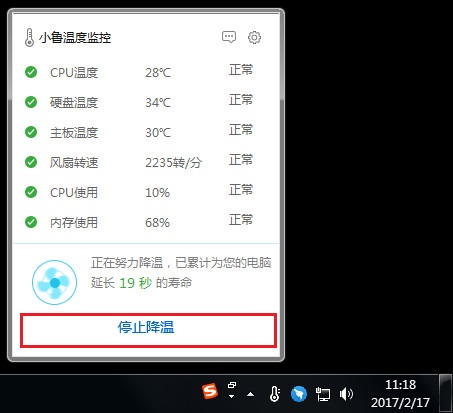
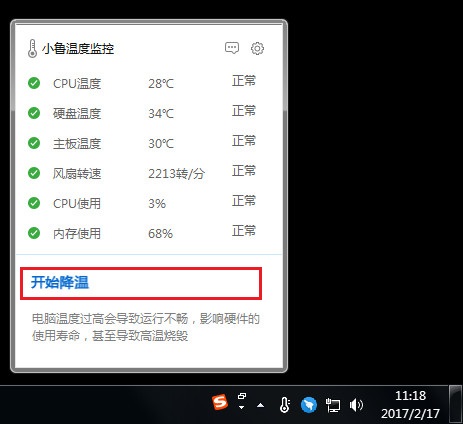
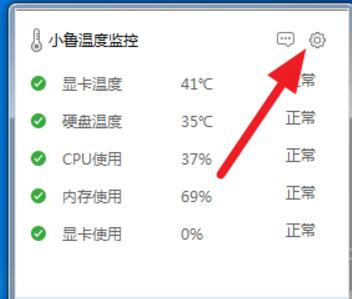
Xiaolu temperature monitoringIt is an independent Xiaolu temperature monitoring tool that is combined with the technical support of Master Lu and extracted from Master Lu. It can monitor and optimize the temperature of the computer without occupying the background memory, affecting the normal Internet speed, or affecting the computer's running speed. Xiaolu temperature monitoring can not only monitor hardware temperature, but also monitor fan speed, CPU, memory and other resource usage.
Features of Xiaolu temperature monitoring software
Master Lu’s Temperature Monitoring Standalone Edition can not only monitor hardware temperature, but also monitor fan speed, CPU, memory and other resource usage. By default, there is only one column of floating windows, which only extracts Master Lu’s temperature monitoring function!
Introduction to Xiaolu temperature monitoring function
1. Real-time detection of computer hardware temperature;
2. Temperature monitoring will automatically start when the machine is turned on;
3. Browser homepage protection.
How to use Xiaolu temperature monitoring
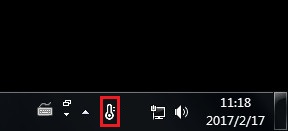
1. Just open it directly after downloading. Successful opening will be displayed in the lower right corner.
2. Click to start cooling
3. After cooling is completed, you can click to stop cooling.
Xiaolu temperature monitoring FAQ
How to uninstall Xiaolu temperature monitoring?
1. When Xiaolu is running, Ctrl+alt+delete to bring up the task manager
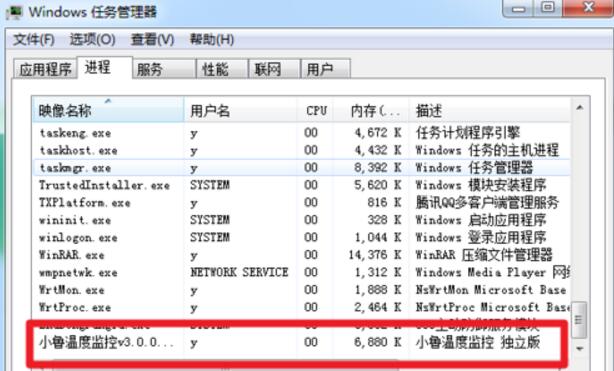
2. Find the Xiaolu Temperature Control in the process, right-click it and click "Open File Location"
3. After opening the file location, select it, then right-click "Use 360 Powerful Delete" or delete directly
4. In 360, forcefully crush the file
5. Repeat 2-4 and delete Master Lu’s lete version
6. Repeat 2-4 to delete the core process of Master Lu
7. In the folder "temp" where Master Lu's core process was deleted, use 360 to forcefully delete all the files in the Master Lu's core process file.
8. Click "Xiao Lu", and then the exit button will appear, click it.
9. Turn on 360 Antivirus and 360 Security Guard, scan all of them on the computer, restart the computer, and it will be fine.
Comparison of temperature monitoring software:
Driving life temperature monitoring:
Temperature detection software is a temperature detection software extracted from Driving Life. DriveLife temperature detection software is also a very small, green and simple temperature detection software. If you want to actually detect the temperature occupancy rate of various indicators of your computer, you may wish to use this temperature detection software.
Xiaolu temperature monitoring:
Xiaolu Temperature Monitoring is an independent Xiaolu temperature monitoring tool extracted from Master Lu combined with the technical support of Master Lu. It can monitor and optimize the temperature of the computer without occupying background memory, affecting normal Internet speed, or affecting the running speed of the computer.
Xiaolu temperature monitoring update log:
1. Optimize content
2. The details are more outstanding and the bugs are gone.
Huajun editor recommends:
Believe me, as long as you use Xiaolu Temperature Monitoring, other software can be uninstalled to meet all your needs. The editor has also carefully prepared Cloud Machine Butler, Batch Small Butler, and Cloud Machine Butler for you.
Version: 3.0.0.1020 Standalone version | Update time: 2025-10-23
Similar recommendations






Latest updates




Xiaolu Temperature Monitor Review
-
1st floor Huajun netizen 2021-04-15 01:13:50Xiaolu temperature monitoring software is very easy to use, downloads quickly and is very convenient!
-
2nd floor Huajun netizen 2021-06-10 08:24:53Xiaolu’s temperature monitor is great! 100 million likes! ! !
-
3rd floor Huajun netizen 2022-03-23 07:09:54The overall feeling of Xiaolu temperature monitoring is good, I am quite satisfied, the installation and operation are very smooth! It went very smoothly following the installation step-by-step guide!
Recommended products
-

Xiaoyu System Reinstallation Master
-

WinSxS directory cleanup
-
Xiaolu temperature monitoring
-

win7 system repair tool (Repair Center)
-

360 software assistant
-

View occupied shortcut keys (Windows Hotkey Explorer)
-

word cannot open repair tool software
-

360 computer clinic
-

Windows 7 USB/DVD Download Tool
-

Microsoft Fix It (Microsoft official system repair tool)
- Diablo game tool collection
- Group purchasing software collection area
- p2p seed search artifact download-P2P seed search artifact special topic
- adobe software encyclopedia - adobe full range of software downloads - adobe software downloads
- Safe Internet Encyclopedia
- Browser PC version download-browser download collection
- Diablo 3 game collection
- Anxin Quote Software
- Which Key Wizard software is better? Key Wizard software collection




