o(╥﹏╥)oSad

WeChat cannot downloadYiyou Student Classification Assistant, but just click on the upper right corner and select open in browser or Safari!
Yiyou Student Classification Assistant

Yiyou Student Classification Assistant

  • Size: 3.77M
  • Language: Simplified Chinese
  • Category: Educational Management
  • System: Winxp/vista/win7/2000/2003

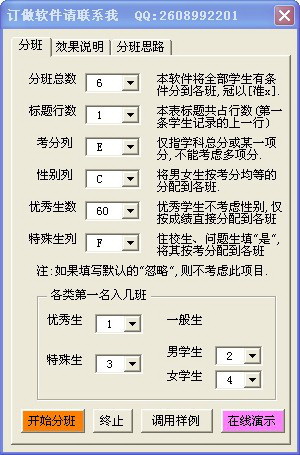
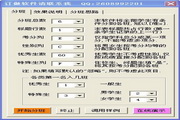
"Yiyou Student Classification Assistant" can easily divide students into several teaching classes in a balanced manner by referring to factors such as students' academic performance, gender, outstanding students, special students, etc., to facilitate future teaching management and performance evaluation.

Users can freely choose between the total score snake-type class arrangement method and the average score adjustment method one by one for each subject. Teaching classes separated through this software can achieve the following indicators:

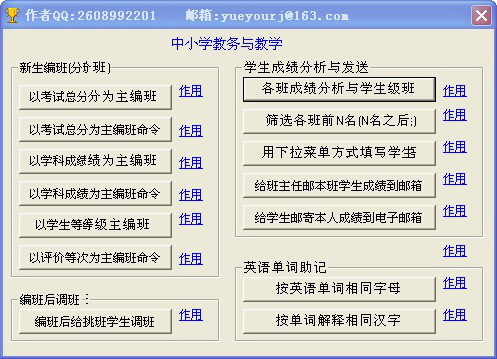
1. Student placement and class adjustment: According to the different standards for class placement for each school and grade, two class placement methods are provided for selection:

(1) Classification based on total score ranking: Students can be ranked in a one-stop manner based on their total score (or a certain subject score) with reference to factors such as grades, gender, special students, etc., and students can be evenly organized into several teaching classes. The divided teaching classes can achieve the following indicators: (a) the number of students in each class is basically equal; (b) The number of male and female students in each class is basically equal; (c) the number of students in each ranking group is basically the same; (d) the average grades of each class are basically the same; (d) In order to meet the requirements of different users, the software can not consider the ratio of male and female students, but only assign classes according to their grades. It can also ignore the gender of the first few students and only consider the gender of the following students, or it can also randomly divide classes without grades; (e) The software labels the class formation results as "accurate" in order to distinguish them from the official serial numbers; (f) The software has intelligent reminder, inspection and repair functions. Guide you to enter various reasonable data; automatically correct the spaces that are mistakenly entered before and after the text of gender and special birth columns for you when entering.

(2) Classes will be divided according to each subject test: those with "pre-selected classes" requirements will be satisfied first. Then we mainly consider the small gap in the average scores of each subject, and also consider the gender matching. If the above conditions are met, consider the matching of special students (two columns are provided for special students, and you can fill in outstanding students, class cadres, problem students, boarding students, etc.). Several indicators achieved by the separated teaching classes are the same as (1).

The design ideas of the two class classification methods are: the former first classifies and ranks students, and then allocates them to each class in a "one-stop" manner, so the number of students in an integer multiple of the class number only differs by 1-2 students in each class; the latter determines which class the student is assigned to appropriately based on the student's scores in each subject, gender, etc., so the final average score of each subject and the overall average score of each class are only within half a point.

The editor strongly recommends that you do not have more than two special requests, and do not consider too many class formation factors, otherwise it will be at the expense of "balance". The more factors are considered, the greater the gap between the number of students in each grade and the average score.

(3) Class adjustment: Class adjustment requires students to have a small difference in test scores, male and female students and other conditions to match, and the primary student cannot be transferred out again... Therefore, manual class adjustment is quite laborious. This software is designed with functions such as automatic search based on test number size, name sequence, and class adjustment mark color and remarks to make class adjustment easy. After adjusting the class, you can tap the button to track the number of boys and girls in each class, the number of special students, the average score of the top students, the distribution of the top students in each class, etc.

2. Student ranking/class score analysis: (1) Students can be ranked by grade on the report cards of each class in the same grade, or ranked within the class where the student is located, that is, single-subject ranking, multi-subject ranking, and total score ranking can be performed at once. (2) Class score analysis means that the scores of each class are summarized into an independent table. The content includes: the number of people who took the exam, the number of people who actually took the exam, the average score, the average score of the top students in the class, the distribution of the top students in each class in the grade, etc.

3. Quickly write comments: This software comes with a student comment library. Users can conveniently select comments from the comment library to fill in the student report card (based on the second column, the number of students is measured), and with the personal information group sending function, it can be quickly sent to the students' (or parents') personal mailboxes. There are a lot of comments in the comment database, and you can add and modify them at will.

Note: Using the function of mass sending salary slips (score sheets), the uniformly registered school and grade test score sheets of the school can be split into the score sheet of each class (saved in an independent workbook under the [Classified File] folder), and then sent to the mailboxes of each class teacher. The class teacher will then add a comment column to the score record row of the students in the class, and finally send it to the email mailboxes of the students (parents).

4. Filter the top N names in each class: filter the row data of the top N outstanding personnel (scores) in each unit (class) in the same table, and delete the row data of the remaining personnel.

5. Classification of English words and explanations: English words in primary and secondary schools can be classified according to how many consecutive letters they have in common. For example, words containing 4 consecutive identical letters can be classified into one category (marked with the same serial number); the explanations of English words in primary and secondary schools can also be classified according to the same number of 1 or 2 Chinese characters (marked with the same serial number). It is very helpful for memorizing English words.

Version: 2013.08.10 | Update time: 2024-12-23

Similar recommendations

Latest updates

Reviews of Yiyou Student Classification Assistant

  • 1st floor Huajun netizen 2016-06-15 06:02:01
    The interface design of Yiyou Student Classification Assistant is very easy to use and has rich functions. I highly recommend it!
  • 2nd floor Huajun netizen 2020-12-23 03:40:37
    Yiyou Student Classification Assistant is super awesome! 100 million likes! ! !
  • 3rd floor Huajun netizen 2015-01-13 13:58:24
    Yiyou Student Classification Assistant has comprehensive functions and is very convenient to use.

Recommended products

everyonealso likeThese:

+

This application has not passed real-name authentication. You can download it through the mobile assistant.

CancelOK