
-
Thunderbolt Android Emulator
- Size: 3.59M
- Language: Simplified Chinese
- Category: Android emulator
- System: WinALL






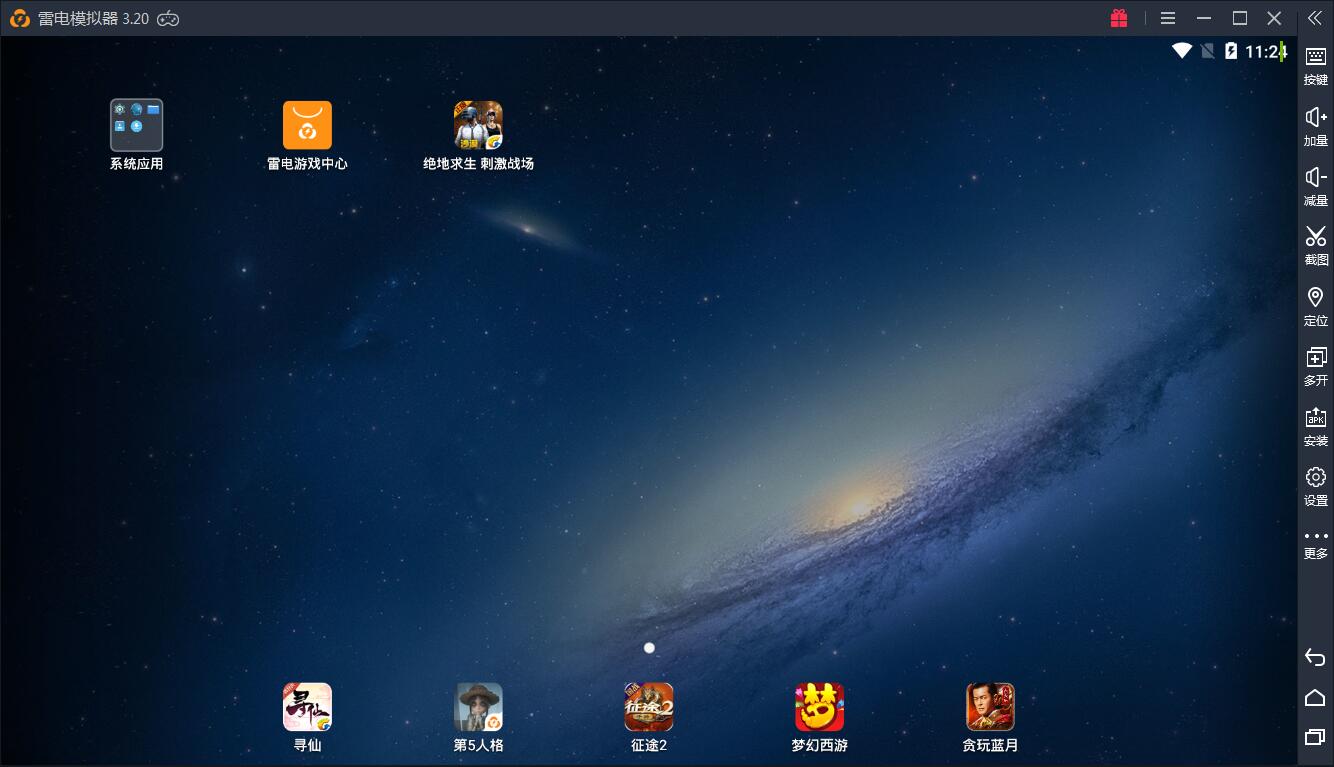

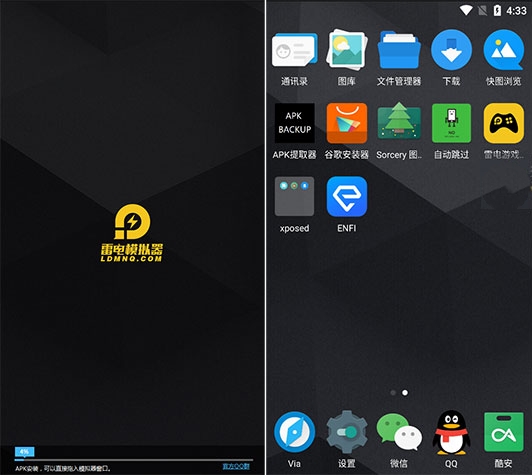

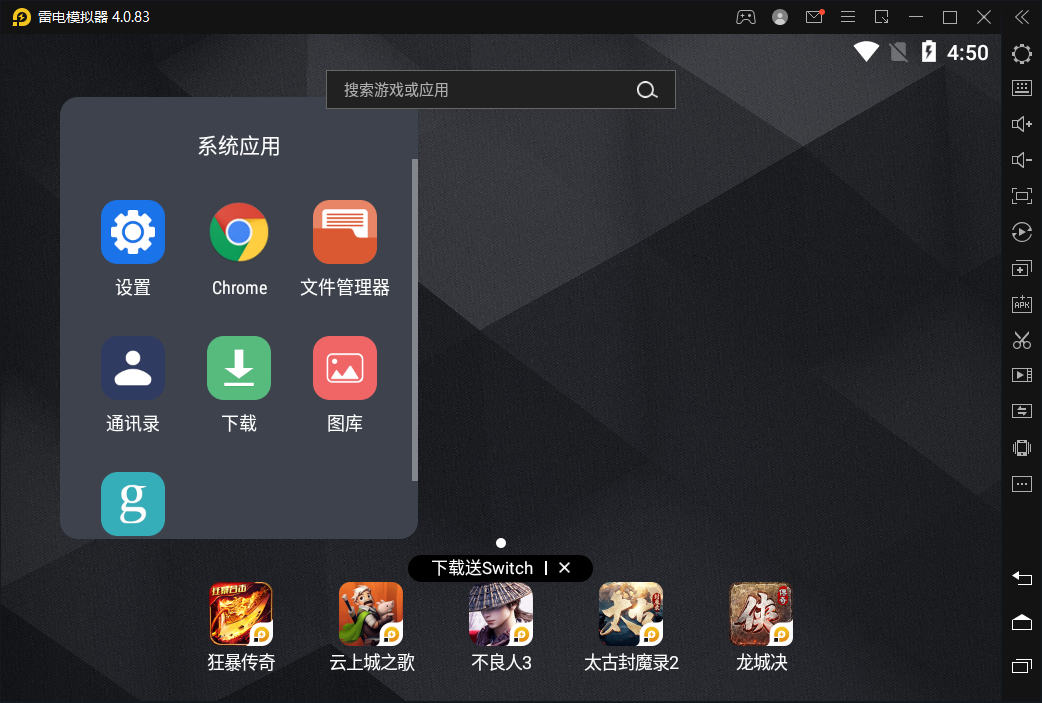
Thunderbolt Android Emulator(Thunder and Lightning Simulator) PC version is an auxiliary tool that can run mobile games on the computer. If you want to play mobile games on your computer, you can use the Thunder and Lightning Android Simulator. The Thunderbolt Android emulator allows players to experience a larger screen and faster speed, allowing friends to enjoy a better gaming experience. Friends who like the Thunderbolt Android emulator, come to Huajun Software Park to download and experience it!

Highlights of Thunderbolt Android Emulator
Pure and interference-free environment: The Thunderbolt Android emulator completely removes all advertising interference, including startup ads and pop-up recommendations, creating a refreshing and focused experience for users.
Automated operation tools: Provide operation recording function, which can completely record the operation process; also support macro setting to realize the automatic execution of complex operations, such as combo release, cycle tasks, etc.
Continuous iterative optimization: The Thunderbolt Android emulator maintains a version update frequency every 15 days, continuously optimizes graphics card performance, multi-core CPU adaptation and file transfer efficiency, and promptly fixes game compatibility issues.
Multi-scene resolution support: Provides 12 preset resolution solutions, covering multiple display modes such as tablets, mobile phones, and ultra-wide screens, to meet the visual needs of different applications.
Thunderbolt Android Emulator Features
Multiple opening and batch management: Thunderbolt Android emulator supports running multiple emulator instances at the same time. Users can easily manage multiple game accounts or application instances through functions such as one-click multiple opening, batch closing, automatic window arrangement, and instance copying. This function is especially suitable for players who need to hang up, spawn monsters, or collect resources, and can significantly improve efficiency.
High performance and compatibility: Based on Android 5.1.1/9 dual-kernel development, the Thunderbolt Android emulator is compatible with mainstream hardware architectures such as Intel and AMD, supports 99% of Android applications, and adapts to multiple operating system versions from Windows XP to Windows 10. Its intelligent resource scheduling mechanism can automatically adjust performance parameters according to device configuration to ensure smooth operation in various hardware environments.
Keyboard, mouse and gamepad control: Thunderbolt Android emulator perfectly supports keyboard, mouse and gamepad operation, providing precise input control. Users can customize the key layout according to different applications to achieve one-click combos, quick reactions and other operations to improve the game winning rate and experience.
Virtual positioning and file sharing: With built-in virtual positioning function, users can freely set geographical location information to meet the needs of specific application scenarios. At the same time, it supports the rapid transfer of various files to and from PCs, breaking down device barriers and achieving efficient sharing and management of data.
Thunderbolt Android Emulator FAQ
1. How to open multiple Thunderbolt Android emulators?
1. Double-click the desktop thunderbolt multi-opener

2. After opening the lightning simulator multi-opener, click [New/Copy Simulator] in the lower right corner
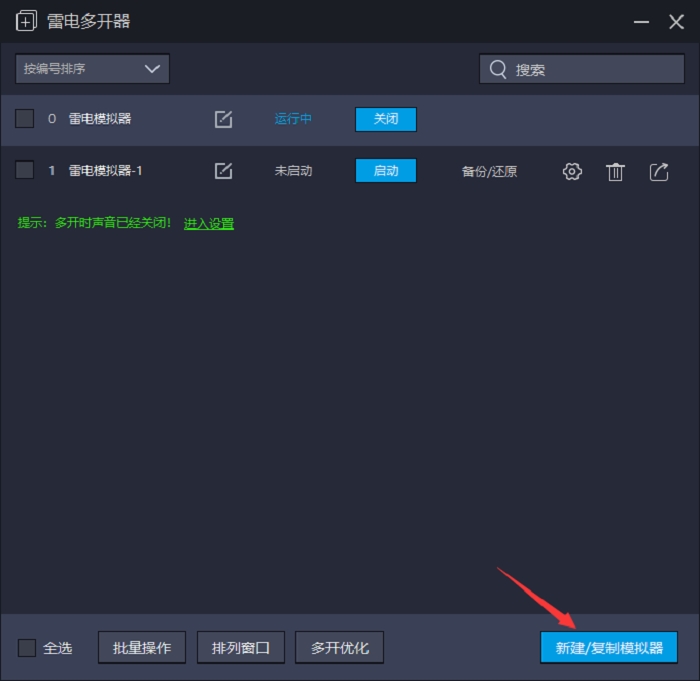
3. In the window that opens, you can add a new simulator, or copy a simulator; you can edit the simulator name to make it easy to distinguish. You can choose.
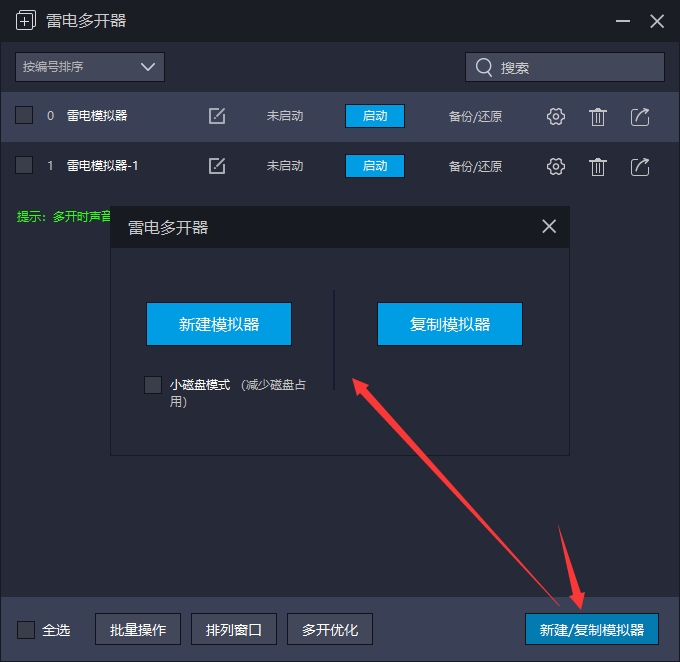
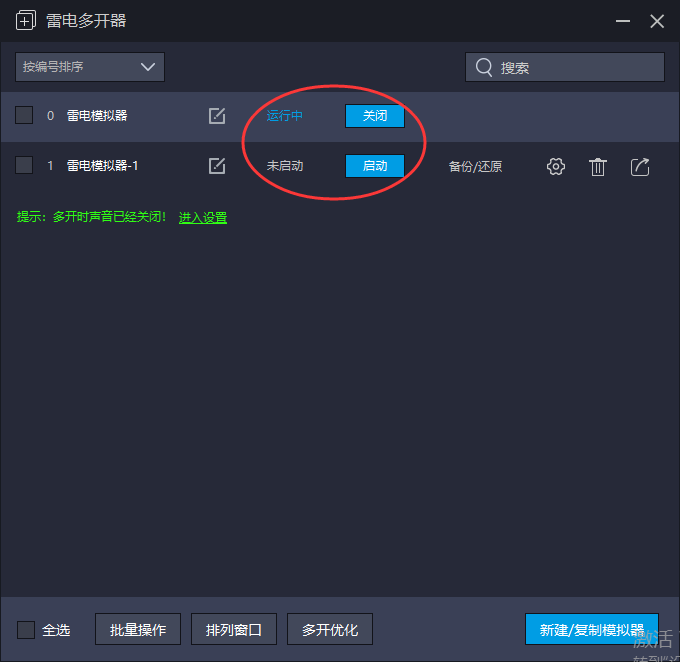
4. Click [Start] to open the lightning simulator.
2. How to set buttons on the Thunderbolt Android emulator?
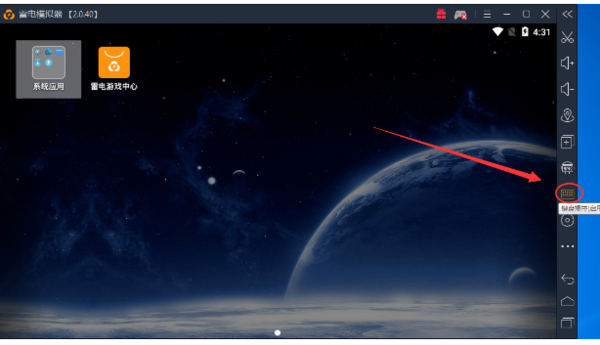
1. Run and open the Thunderbolt Android emulator, select [Keyboard Control] in the right toolbar or select [...] in the second picture to open and select keyboard control.

2. According to the prompts in the picture, click the screen to set the buttons you need. If you don’t need it or the setting is wrong, you can select the [x] in the upper right corner of the virtual key to delete it.

3. You can also set the direction keys, shooting keys, attack keys, etc. You only need to set them to the required keys.
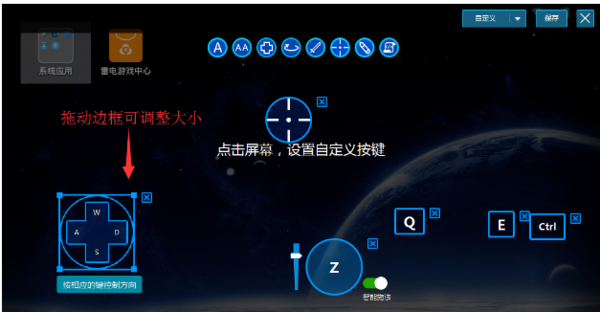
4. Finally, we save and the settings are completed.
3. Tutorial on modifying DNS when the Android emulator network is abnormal
Many Thunderbolt friends have reported that they cannot update when updating games or files online in the Android emulator, and there will be "update failure, network abnormality, browser showing no network" and other situations. The solution is as follows.
1. Click the computer Start button to open the "Control Panel" in your computer.
2. Click Network and Sharing Center.
3. Then enter "Ethernet" and select properties; if it is Win7 system and Win10 system, double-click with the left mouse button to enter "Internet Protocol Version 4 (TCP/Pv4)". If it is an XP system, double-click with the left mouse button to enter "Internet Protocol Version (TCP/IP)".
4. Select Obtain an IP address automatically, click Use the DNS server address below, and enter the preferred and backup DNS servers.
Preferred DNS server: 114.114.114.114
Alternate DNS server: 114.114.115.115
The opening method of 5.XP is also similar: Start → Control Panel → Network Connection → Local Area Connection → Properties → Internet Protocol (TCP/IP) → Properties.
6. If the problem is still not solved, please open the command indicator, directly search for CMD or command indicator in the lower left corner of the computer, and then right-click the command indicator to open it with administrator privileges.
Enter the command ipconfig/flushdns. After the input is completed, press Enter to refresh the DNS cache. When refreshing, refresh the DNS cache a few more times, and then reopen the simulator.
Note: When modifying DNS, if the IP address on the computer already exists. It is recommended to take a screenshot first and save one on the desktop to avoid possible disconnection (if there is an IP address, modify the DNS to disconnect and re-enter the IP address based on the previous screenshot to restore it).
In the end, if you still cannot update the game online, close the emulator, and then restart the network device (such as a router).
Thunderbolt Android emulator usage tutorial
1. Download/add applications
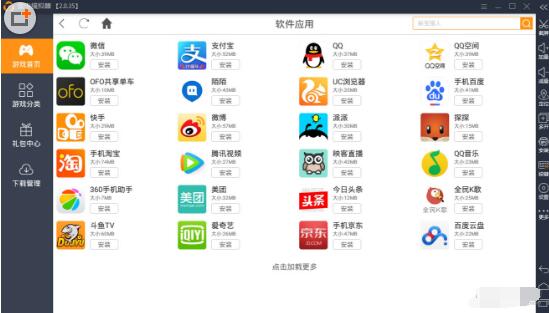
Download the newly needed programs in the application center of the Thunderbolt Android emulator, such as WeChat, Alipay, QQ, QQ Space, ofo shared bicycles, etc.
2. Play games
If you want to play games, you can choose to find your favorite game applications under the game category of the Thunderbolt Android Emulator.

3. Function settings
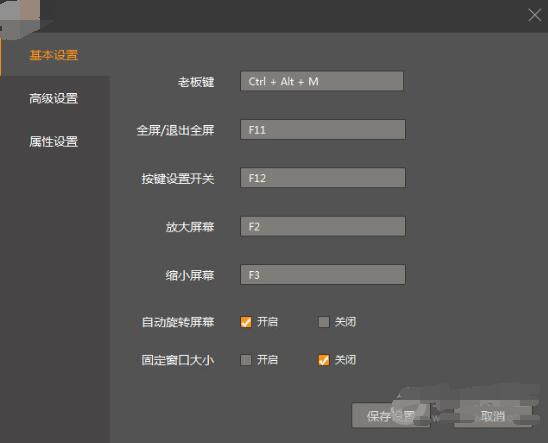
In addition, in the Thunderbolt Android emulator, you can also set the boss button, multi-game opening, VT virtual, button burst, handle, etc., allowing friends to experience different game operations.
Introduction to the Features of Thunderbolt Android Emulator
1. Thunder Simulator is an Android simulator that uses the world's leading kernel technology
2. It has the fastest running speed and the most stable performance among similar simulators
3. Players can play mobile games on the computer through this emulator
4. Use the lightning simulator to experience a larger screen, faster speed, and a more perfect control experience
Thunderbolt Android Emulator Function Description
1. Perfect control performance
2. Infinitely unlimited willful openings
Hang up and play multiple games at the same time without restrictions.
3. The new king of performance
The lightning simulator is powerful and compatible with all kinds of games, with smooth control, stability and efficiency.
Which one is better, Night God Simulator or Thunder Simulator?
Night God Android EmulatorIt is a software based on android 4.4.2 and compatible with X86/AMD, so it has more advantages than other emulators in terms of stability and compatibility. The Yeshen Android emulator has been fully optimized. Whether it is a game or an application, it will be more stable and smoother to use, and it will have an extraordinary terminal game operating experience, making you one step ahead of others. However, because the Yeshen Android emulator "debuted" earlier, in addition to having more functions, it also has some bugs.
The Thunderbolt Android Simulator is developed based on the Android 4.3.0 version of the kernel to run on a computer. This function can be said to be unique to this software, allowing the Thunderbolt Android Simulator to run the fastest and most stably among similar software. The Thunderbolt Android emulator allows friends to experience a large screen and better gaming effects. It supports opening multiple applications and playing multiple games at the same time, allowing you to explore unlimited gameplay. More open and free!
Thunderbolt Android Emulator update log
1. King of Glory: Fixed the issue of occasional failure of the handle push tower/last hit, and treatment buttons due to multi-touch.
2. King of Glory: Fixed the issue where the controller's skills occasionally failed to automatically aim.
3. Supports turning off Root mode and is compatible with more games (such as games from Huawei channels).
|
Huajun editor recommends: Want to experience mobile games on your computer? Need a better mobile game emulator? The editor recommends this Thunderbolt Android simulator to everyone. The Thunderbolt Android simulator (Thunderbolt Simulator) does not have any advertising links. Players can use it with confidence. It is a must-have simulator for playing mobile games on the computer. Download it now! This site also provides you withNight God Simulator,MEmu Android EmulatorWait for the software to download. |
Version: 9.1.76 | Update time: 2025-11-07
Similar recommendations





Latest updates





Raiden Android simulator "Monument Valley 2" Android PC version debuts
Introduction to the relevant operations of the Thunderbolt Android Emulator setting buttons
The operation process of adjusting the resolution of the Thunderbolt Android emulator
Pixel Naruto online play entrance-Pixel Naruto web version online play-Huajun Software Park
How to add background music in python-How to add background music in python
How to configure environment variables in python - How to configure environment variables in python
How to run python - How to run python
How to create a project in python - How to create a project in python
How to make a blue sky background with scratch-How to make a blue sky background with scratch
Thunderbolt Android Emulator Review
-
1st floor Huajun netizen 2019-12-23 12:38:37The Thunderbolt Android emulator is very useful, thank you! !
-
2nd floor Huajun netizen 2021-09-13 16:46:47The Thunderbolt Android emulator is awesome! 100 million likes! ! !
-
3rd floor Huajun netizen 2021-11-29 00:16:14The Thunderbolt Android emulator is not bad and downloads very quickly. I would like to give you a good review!
Recommended products







- Diablo game tool collection
- Group purchasing software collection area
- p2p seed search artifact download-P2P seed search artifact special topic
- adobe software encyclopedia - adobe full range of software downloads - adobe software downloads
- Safe Internet Encyclopedia
- Browser PC version download-browser download collection
- Diablo 3 game collection
- Anxin Quote Software
- Which Key Wizard software is better? Key Wizard software collection




