
-
CAD drawing encryption software SmartLock_A
- Size: 66.72M
- Language: Simplified Chinese
- Category: System assistance
- System: Win







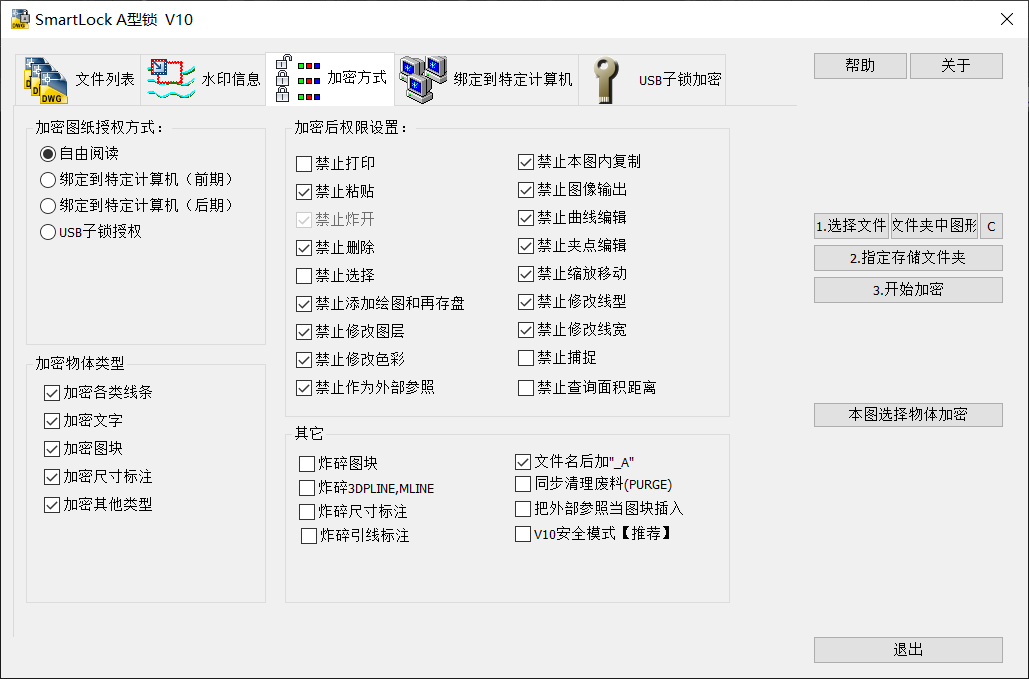
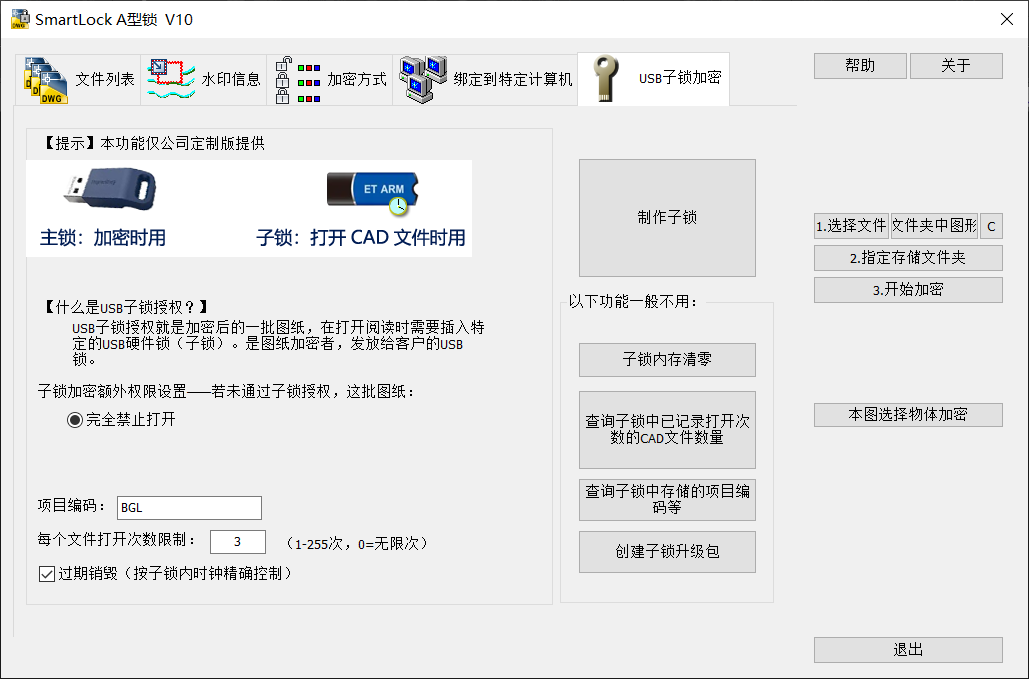
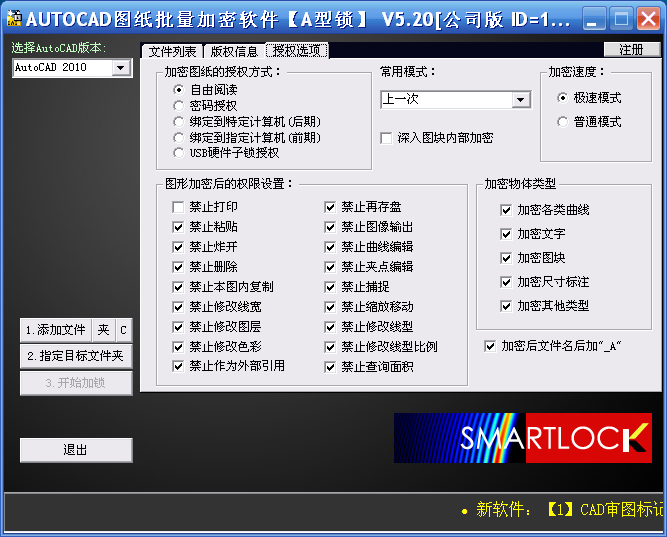
SmartLock_A is a kernel-level encryption software designed specifically for AutoCAD drawings. Its core value lies in deeply integrating the AutoCAD kernel to perform high-strength encryption on graphic data in DWG/DXF and other formats to ensure the intellectual property security of design drawings. The software supports batch encryption processing and can quickly complete the encryption work of a large number of drawings. It also provides additional functions such as access control, copyright protection, and operation auditing to meet the enterprise's security management needs for the entire life cycle of drawings. Huajun Software Park provides you with free download of CAD drawing encryption software SmartLock_A2024. Friends who like CAD drawing encryption software SmartLock_A come to Huajun Software Park to download and experience it!
CAD drawing encryption software SmartLock_AFeatures
Design Institute/Engineering Company: Protect core design results and prevent competitors from obtaining drawings through illegal means. At the same time, partners are allowed to view or measure within the scope of authorization, but modifications are prohibited.
Manufacturing companies: Encrypt product drawings to prevent technical data from leaking to suppliers or competitors, and ensure that the production department can only access necessary information through permission control.
Construction companies: Encrypt construction drawings to prevent on-site personnel from mistakenly modifying them and causing project errors. At the same time, the watermark function can be used to trace the source of the drawings and avoid disputes.
CAD drawing encryption software SmartLock_AFunction
Kernel-Level Encryption
Deeply integrated with AutoCAD: directly operates the underlying graphics data, and the encryption process does not change the internal structure of the DWG file, ensuring that the encrypted file can still be read normally by AutoCAD, but cannot be cracked or tampered with by unauthorized tools.
High-strength encryption algorithm: Using military-grade encryption standards such as AES, the encryption strength far exceeds traditional transparent encryption or shell encryption methods, and the technical cracking is extremely difficult.
Flexible permission management
18 permission combinations: Supports operations such as prohibiting modification, copying, printing, outputting images, breaking up (decomposing graphics), and inserting into other files. Enterprises can allocate differentiated permissions to different users or departments according to actual needs.
Bind computer/USB lock: Encrypted drawings can be bound to specific computer hardware or USB devices. Even if the file is copied to other environments, it cannot be opened to prevent internal leakage.
Copyright protection and auditing
Permanent watermark: An invisible copyright watermark is embedded during encryption. Even if the drawing is screenshotted or printed, the watermark information can still be traced back to the original designer.
Operation log audit: records all access, editing, printing and other operational behaviors, and supports multi-dimensional query by time, user, file, etc. to facilitate subsequent traceability and responsibility identification.
Batch processing and compatibility
Batch encryption: Supports encryption of multiple files or entire folders at the same time. Encrypting hundreds of drawings (approximately 1M/sheet) only takes 1-2 minutes, greatly improving work efficiency.
Cross-version compatibility: Compatible with AutoCAD 2004-2024 and mainstream domestic CAD software (such as Zhongwang CAD, Haochen CAD) to ensure the seamless flow of encrypted files between different platforms.
CAD drawing encryption software SmartLock_AFAQ
What should I do if I encounter problems during the installation process?
Make sure the installation package is complete and not damaged.
Check whether the system is compatible with SmartLock software, especially the operating system version and hardware configuration.
If you encounter permission issues, try running the installation package as an administrator.
How to configure SmartLock to encrypt drawing files?
After opening the SmartLock software, enter the configuration interface.
Set encryption options, such as encryption method, encryption strength, password protection, etc.
Make sure the encryption method you choose meets your security needs and keep your encryption passwords properly.
CAD drawing encryption software SmartLock_A update log:
1. The pace of optimization never stops!
2. More little surprises are waiting for you to discover~
Huajun editor recommends:
CAD drawing encryption software SmartLock_A has the same complete functions as the official one, the interface is more beautiful and elegant, and the design is more complete. Welcome to download it to continuously meet the needs of users. If you are interested, you can also download Batch Butler, Batch Butler, and Cloud Machine Butler.
Version: 10.45 | Update time: 2025-12-05
Similar recommendations


Latest updates





How to delete history in Video Pioneer? -How to delete history records by Video Pioneer
How to set the skin for Video Pioneer? -How to set skin for Video Pioneer
How to upgrade software in 360 Software Manager? -How to upgrade software in 360 Software Manager
How to draw a lottery in 360 Software Butler - How to draw a lottery in 360 Software Butler
CAD drawing encryption software SmartLock_A review
-
1st floor Huajun netizen 2022-03-22 09:30:24The interface design of CAD drawing encryption software SmartLock_A is very easy to use and has rich functions. I highly recommend it!
-
2nd floor Huajun netizen 2022-03-02 16:46:22CAD drawing encryption software SmartLock_A is not bad. It downloads very quickly. I give you a good review!
-
3rd floor Huajun netizen 2022-03-12 01:02:02CAD drawing encryption software SmartLock_A is convenient, practical and powerful. The software is very easy to use!
Recommended products







- Diablo game tool collection
- Group purchasing software collection area
- p2p seed search artifact download-P2P seed search artifact special topic
- adobe software encyclopedia - adobe full range of software downloads - adobe software downloads
- Safe Internet Encyclopedia
- Browser PC version download-browser download collection
- Diablo 3 game collection
- Anxin Quote Software
- Which Key Wizard software is better? Key Wizard software collection




