
-
PCSX2 emulator
- Size: 8.68M
- Language: English
- Category: PC emulator
- System: WinAll






PCSX2 emulatorIt is a simple-to-operate and powerful game emulator. The PCSX2 emulator not only supports most ps2 games, but the PCSX2 emulator is very stable and can run many games smoothly, so you don’t have to worry about game lags and can play games easily. The most important thing is that the PCSX2 emulator is completely free. You don't need to spend money to enjoy the software features and let you play games happily.
PCSX2 simulator software introduction
The ps2 emulator (PCSX2) is the world's first new version of the PCSX2 emulator that successfully simulates PS2 commercial games. Running ps2 emulator games quickly is no longer a distant dream! PCSX2 (PS2 emulator) is optimized to a super practical version, which can run many games smoothly even with low configuration. The latest frequency plug-ins all have Chinese interfaces and come with very detailed instructions and annotations.
The PCSX2 emulator is a free, open source software released under the GNU General Public License. It is also a PlayStation 2 emulator software that can be run directly by unzipping it. This simulator has caused quite a stir in foreign and domestic simulator forums. By correcting the modeling vertices, the simulator restored the original appearance of the game characters who originally looked like Parkinson's patients. I really like it!
PCSX2 simulator features
1. PS2 emulator games run very fast, most of them have been improved to 60%-70%, and some have even reached 100% running speed.
2. The PCSX2 simulator also has a wide range of resolution options, and it also supports windowing and full-screen switching.
3. PCSX2 can already better recognize and read ISO game images and CDs, giving netizens more choices when playing games.
4. The ps2 simulator supports multi-core mode
PCSX2 emulator installation steps
1.First, download the PCSX2 simulator installation package from this site. After the download is complete, right-click to unzip it.
2. Double-click the ps2 emulator (PCSX2) installation package to perform a customized installation
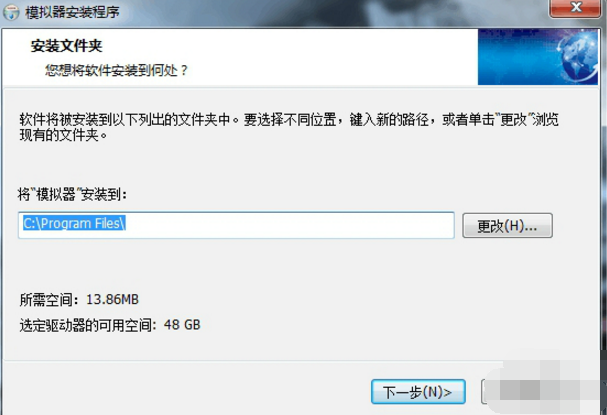
3. Select the remaining software to be installed and click Next
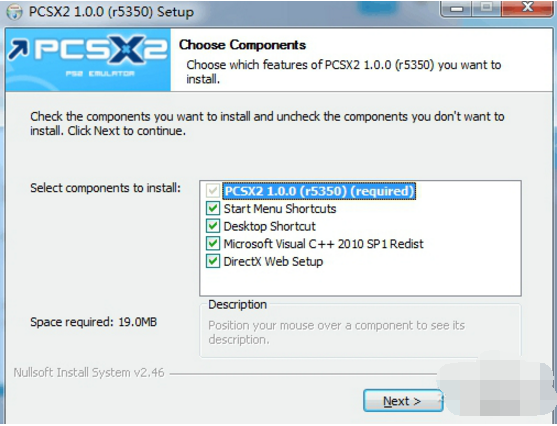
4. Click Install and wait patiently for the progress bar.
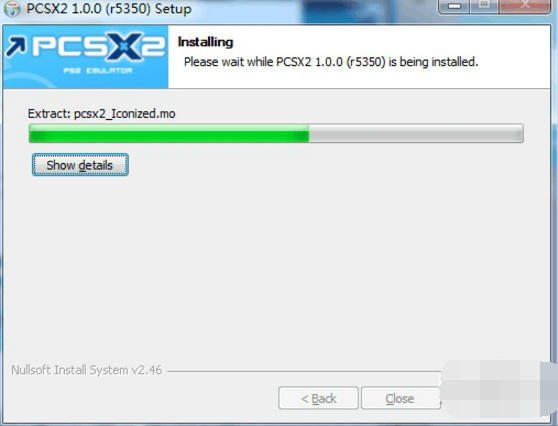
5. After the progress bar is completed, the ps2 emulator (PCSX2) is successfully installed.
Installation summary:First, download the software installation package of the PCSX2 simulator from this site, unzip it, open the exe file, and enter the installation wizard. Follow the steps to install according to the prompts. During installation, you can choose the default installation location or customize the installation location. After checking the included components that need to be installed, enter the installation program and wait for a while before the installation is completed and enjoy this software.
PCSX2 emulator usage tips
1. If you want to play PS2 games, you have to download the iso image file of the ps2 game online. You can search and download it yourself.
2. After decompressing the simulator’s compressed package, open the pcsx2.exe file to enter the simulator interface.
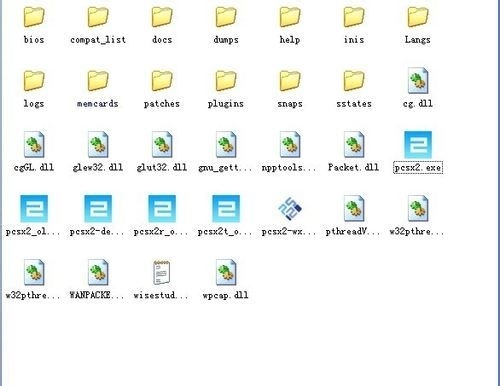
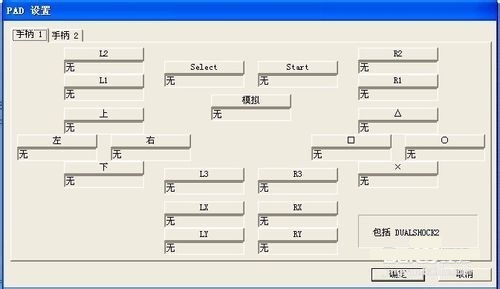
3. We should modify the controller settings before loading the game.
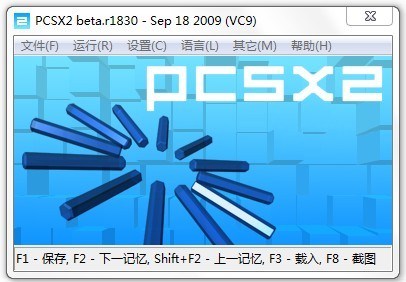
4. After we open it, select the file--run the ISO image.
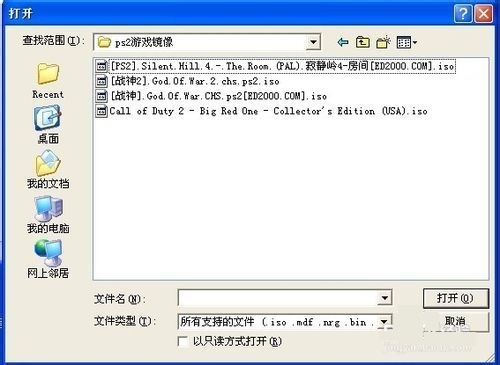
5. Select the iso image game we downloaded before, select and load the game.
How to use PCSX2 simulator
1.How to set buttons in PCSX2 emulator?
1. Double-click to open the picture of PCSX2 SP, and a dialog box will appear, which is a wallpaper of the Grim Reaper.
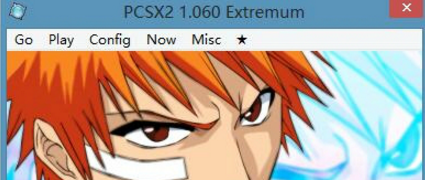
2. Click the configuration tab
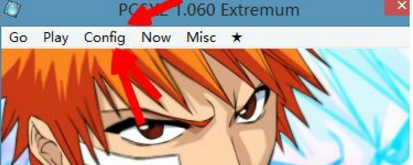
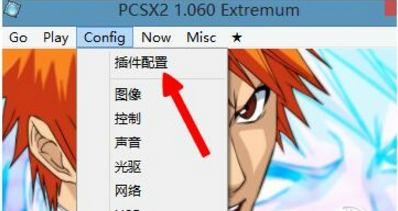
3. The first option you find is the plug-in configuration option.
4. Find the position of my red circle. This is control one and control two, which are the host and negative machines. We click on the configuration of control one.
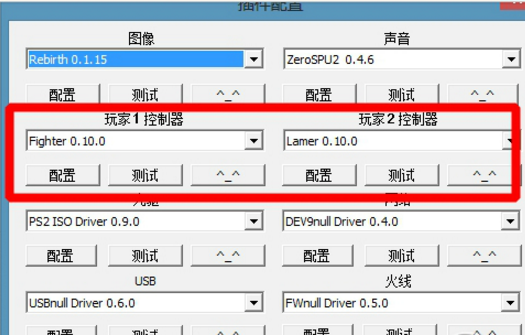
5. Find player one above
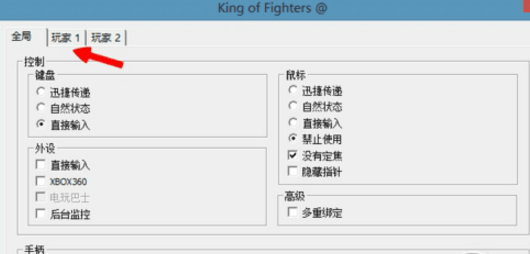
6. We can set it up. We click the setting button on the right and install the keys you need to set on the keyboard. For example, up, down, left, and right correspond to WASD. You can set it as you like, and it will be fine.
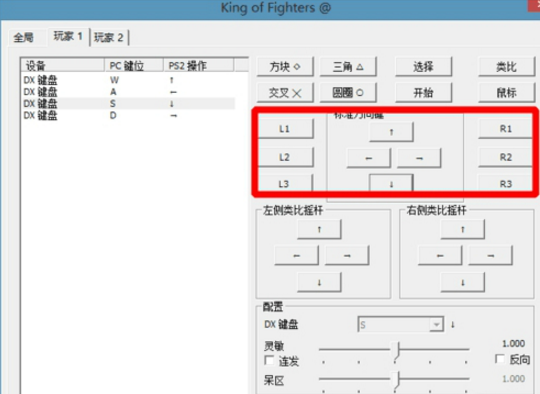
2.How to set the controller in pcsx2 simulator?
1. First open the handle plug-in setting interface:
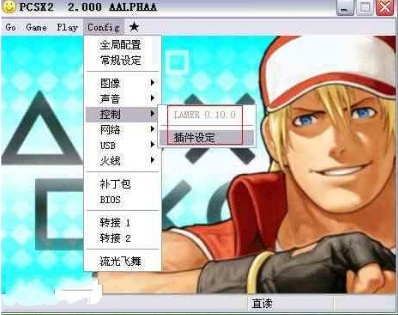
2. When opening, the default is the "Global" option, check Peripherals-Direct Input, and then check Controller-Port 1 Connection; Joysick should appear at the frame number, always use analog mode, do not select it, as shown below:
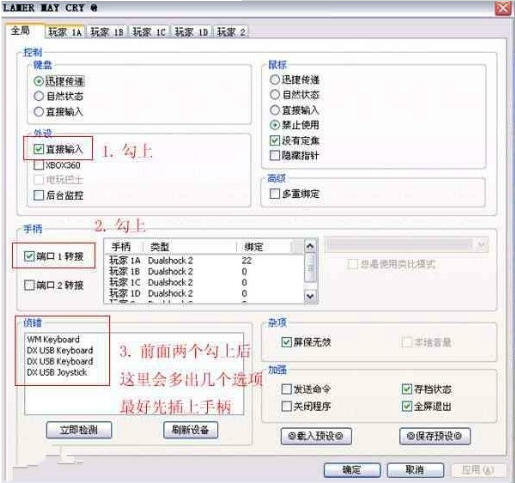
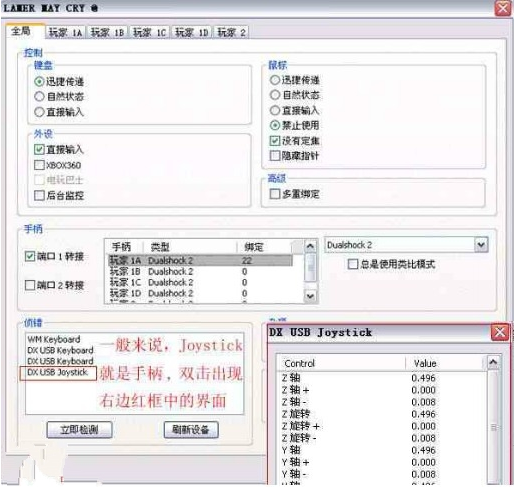
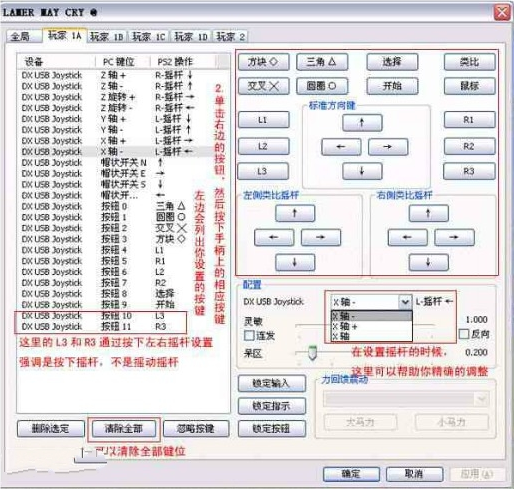
3. Select "Player 1A", in the PS2 key mode of the handle (use the mod key on the handle to adjust), set the corresponding keys on the handle, including four additional keys (L1, L2, R1, R2) and eight main keys ( Up, down, left, right, tip, frame, fork, circle), two joysticks (press the joystick to press the L3 and R3 keys), one "Start" and one "Select" by clicking a button and pressing the corresponding key on the handle, as shown in the figure below.
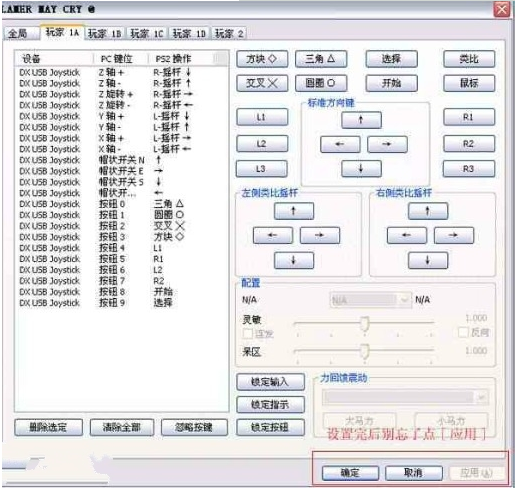
4. After setting up, don’t forget to click “Apply”.
3.How to set up PCSX2 emulator?
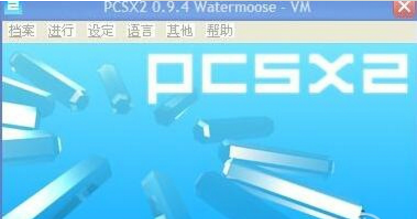
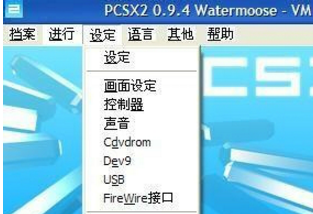
1. Let us first take a look at the opening interface of the ps2 emulator (PCSX2) software
2. We see the setting interface.
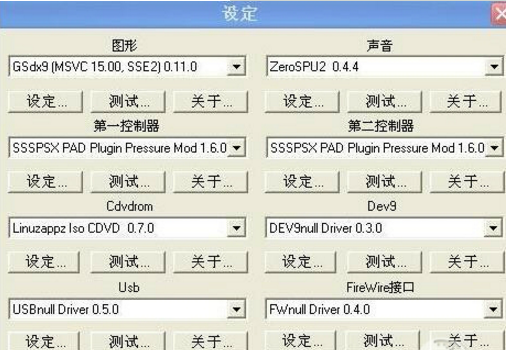
3. Let’s take a look at the top overall settings.
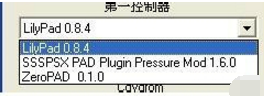
4. The controller device can choose LilvPad0.84 or SSSPSX
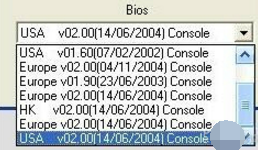
5. Finally, there is the BIOS setting interface.
PCSX2 Emulator FAQ
1.How to solve the problem of playing ps2 game card with PCSX2 emulator?
1. The plug-in configuration is as shown in the picture (preferably the same as in the picture)
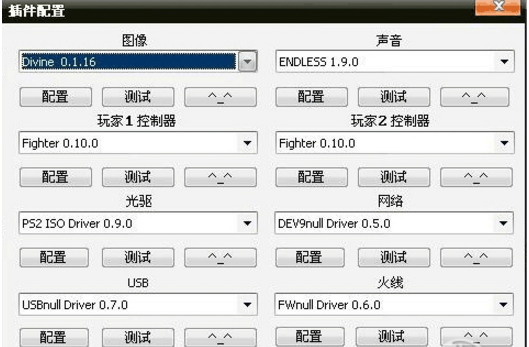
2. For image settings, please refer to the settings below.

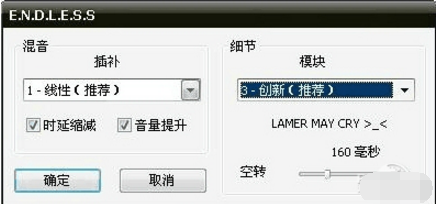
3. As for the voice, just use the recommended ones, there will be no changes.
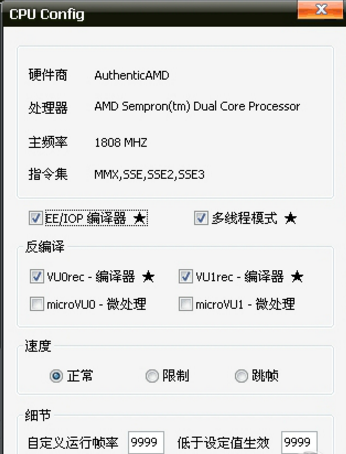
4. When setting the CPU, please pay attention to the check mark in the picture.
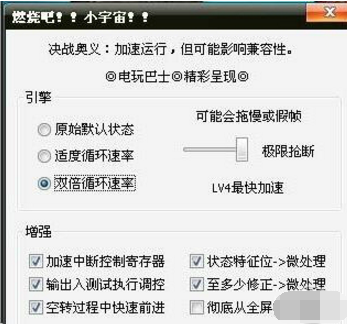
5. Burn it. The setting here is to adjust the running speed of the game, using double cycle rate. In order to prevent the game from freezing
6. After running, the following interface will appear. Of course, different versions of the simulator have different startup screens.

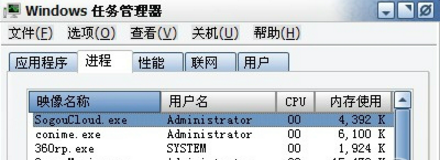
2.How to solve the problem of PCSX2 simulator optical drive plug-in error?
1. Open the task manager
2. It is found that the process of the PCSX2 emulator simulator is running. Then everyone ends the simulator process. Just restart the game
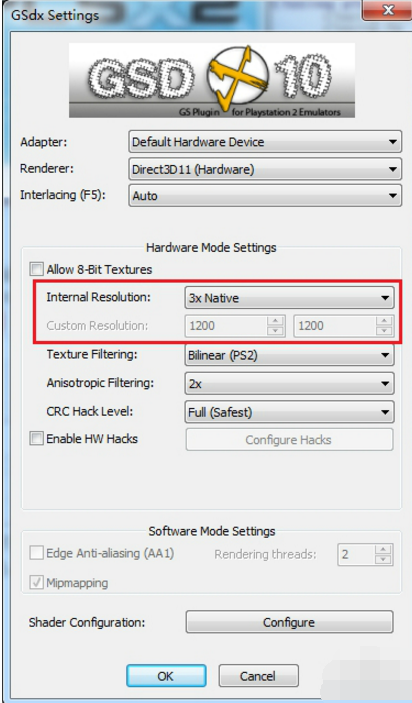
3.How to improve picture quality and clarity in PCSX2 simulator?
1. I set it to 3X rendering here, which means rendering at three times the original resolution of PS2. As the name suggests, the clarity is immediately increased by 3 times.
Comparison of PCSX2 simulator similar software
PCSX2 emulator withPPSSPP emulatorContrast
The PCSX2 emulator is a free, open source software. The PCSX2 emulator supports the vast majority of PS2 games. It is currently the most stable PS2 emulator and the first choice for playing PS2 emulator games.
ppsSPP is an Android PSP emulator written in C++. Currently "PSP Emulator PPSSPP" only supports a few games and requires Android devices to provide sufficient performance.
The PCSX2 emulator has great advantages over other emulators. If you want to play ps2 games, choose the pcsx2 emulator. You won't be disappointed.
PCSX2 emulator update log
The latest version of the PCSX2 emulator download has added the ADMA function, more PS2 games support the playback function, more games support the simulation effects of sounds and background sounds, and the crash problem of many games during simulation has been corrected.
The latest version of the PCSX2 simulator download has been optimized to enhance the stability of MTGS/DC and supports Dual Core CPUs.
IPU has been improved to support the simulation of more PS2 games. VIF has been corrected to simulate more PS2 games better.
The latest version of PCSX2 emulator download has fixed VUrec and improved more PS2 game graphics display. It also supports the new zeroGS plugin to optimize the screen display.
PCSX2 knows that everyone likes the game "Final Fantasy X", so PCSX2 has improved in two aspects:
1) The latest version of the PCSX2 simulator download supports the use of the PEOPS CDVD plugin.
2) MTGS can cause some crash problems, so it is currently being improved.
Due to copyright and manufacturer requirements, Huajun Software Park provides the official download package of PCSX2 simulator software.
Huajun editor recommends:
The PCSX2 simulator is a very good software that can solve a lot of troubles. This site also provides Gens, Pingxiang City Game Hall, Aola Star Modifier, etc. for you to download.
Version: 1.7.0.1450 | Update time: 2025-10-23
Similar recommendations







Latest updates




PCSX2 Emulator Review
-
1st floor Huajun netizen 2022-01-22 07:21:48PCSX2 emulator is so fun, highly recommended!
-
2nd floor Huajun netizen 2022-02-01 16:42:25I love the PCSX2 simulator, it downloads very quickly! !
-
3rd floor Huajun netizen 2022-03-16 01:29:02The PCSX2 simulator must be praised first! ! !
Recommended products










- Diablo game tool collection
- Group purchasing software collection area
- p2p seed search artifact download-P2P seed search artifact special topic
- adobe software encyclopedia - adobe full range of software downloads - adobe software downloads
- Safe Internet Encyclopedia
- Browser PC version download-browser download collection
- Diablo 3 game collection
- Anxin Quote Software
- Which Key Wizard software is better? Key Wizard software collection




