
-
China Merchants Bank Personal Banking Professional Edition (China Merchants Bank Online Banking Professional Edition)
- Size: 80.88M
- Language: Simplified Chinese
- Category: Network assistance
- System: Win All







China Merchants Bank Personal Banking Professional EditionIt is an online banking software officially developed by China Merchants Bank to serve users. With the Professional Edition of China Merchants Bank Personal Banking, friends who want to transfer accounts, remit money or other banking services to friends can all do so on the Professional Edition of China Merchants Bank Personal Banking. It saves us the time of running back and forth (sometimes the problem may not be solved at one time, it may be that we have forgotten the documents required for certain procedures, etc.). China Merchants Bank Personal Banking Professional Edition (China Merchants Bank Online Banking Professional Edition) 2024 free download.
Features of China Merchants Bank Online Banking Professional Edition Software
Provides functional navigation map for easier search
Brand new interface style
Multiple features
More convenient and safer
Introduction to the functions of China Merchants Bank Online Banking Professional Edition
basic business
credit card
Transfer and remittance
Yidaitong
Forex trading
Treasury bond buying and selling
stock fund
e-commerce
financial analysis
Function application
Installation steps of China Merchants Bank Online Banking Professional Edition
How to download and install China Merchants Bank Professional Edition Online Banking?
1. First find the "Download Address" on this page and select any address to start selecting. Download the [China Merchants Bank Personal Banking Professional Edition] software package locally and double-click to unzip it to find the .exe format program and double-click to run it. As shown below: We need to read the installation agreement before installation. If you want to install the software, you must agree to the agreement, so it is better for us to understand it.
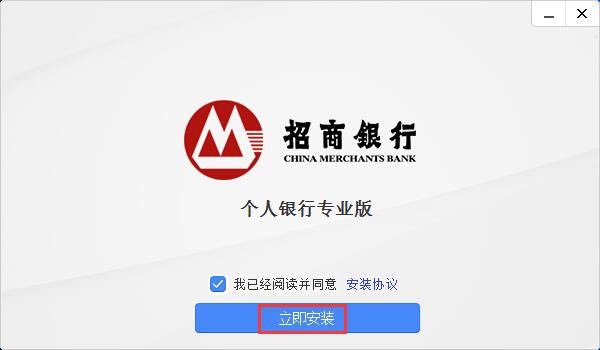
2. After agreeing to the agreement, you can choose to install it. Click [Install Now] to enter the installation interface of China Merchants Bank Personal Banking Professional Edition.
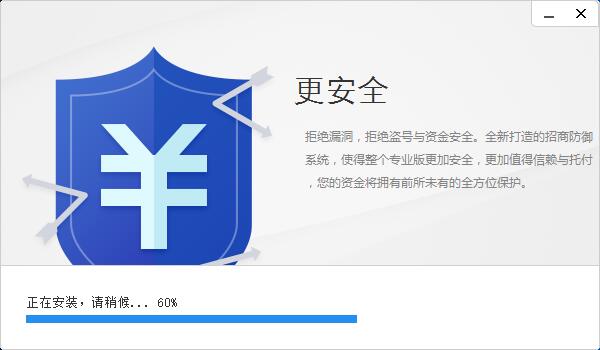
3. The above software screenshots are screenshots of the installation process of China Merchants Bank Personal Banking Professional Edition. At this point, we can wait patiently for it to be installed by itself.
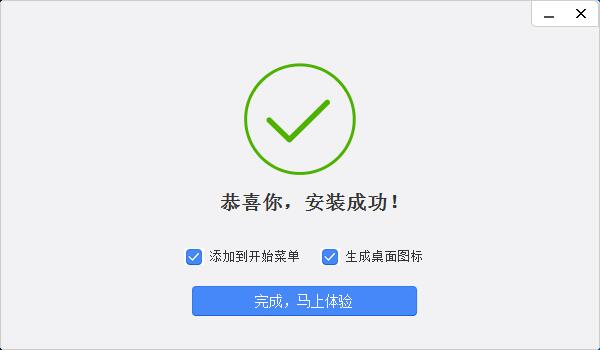
4. Finally, the installation of China Merchants Bank Personal Banking Professional Edition is completed. We can directly click [Finish, try it now] to close the interface. Friends, you have noticed the two options above the completion button. Although these two options are set to facilitate us to open the software, you can leave them unchecked if you do not need them.
Tips for using China Merchants Bank Online Banking Professional Edition
How to update the professional version of China Merchants Bank Online Banking
Please open your China Merchants Bank Online Banking Professional Edition first, and then find [Professional Edition Management] - [System Management] - [Professional Edition Upgrade]. If it has not been updated to the latest version, you can click here to update and upgrade.
China Merchants Bank Online Banking Professional Edition changes the daily transfer amount
Please log in to the professional version of China Merchants Bank Online Banking and then select [Function Application] in the upper right corner - [Professional version transfer function application and limit setting]. Please choose to activate the professional version transfer and remittance and professional version payment functions. The limit is also determined by yourself.
First time login and activation process:
1. First, please double-click to open the installed China Merchants Bank Personal Banking Professional Edition, as shown below: This is the quick opening shortcut on the desktop of the China Merchants Bank Personal Banking Professional Edition. Double-click to open it.

2. After opening the Professional Edition of China Merchants Bank Personal Banking, we first connect the "You KEY" to the USB port of the computer according to the prompts. After connecting, you will be prompted to select your "You KEY" model. You can select the corresponding model according to the key's shell. After selection, the system automatically enters the login interface:
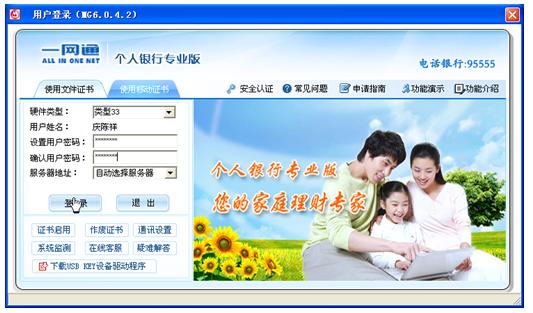
3. After entering the login interface of China Merchants Bank Personal Banking Professional Edition, we need to register an account. You can set your own login user password: The account password of China Merchants Bank Personal Banking Professional Edition requires 6-8 digits or letters. Please set it according to the requirements. After setting, write down the password and click [Login]
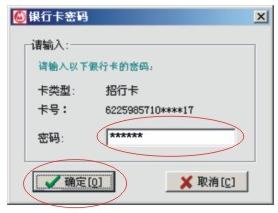
4. After logging in, there will be a prompt asking us to set up the associated bank card. You can directly enter the password there to use the China Merchants Bank Personal Banking Professional Edition.
Frequently Asked Questions about China Merchants Bank Online Banking Professional Edition
How to solve the problem of unsuccessful installation of China Merchants Bank Online Banking Professional Edition?
1. Restart your computer and turn off other anti-virus, firewall or other programs when installing the professional version of China Merchants Bank Online Banking.
2. Select the installed China Merchants Bank Online Banking Professional Edition, right-click and select Run as administrator.
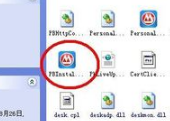
3. Find the new version of China Merchants Bank Online Banking Professional Edition, unzip it, find the CMBProtector.dat file and copy and paste it into the C:WINDOWSSYSTEM32drivers folder. Install PBinstall again and open it, as follows:
4. If you are prompted to copy again when copying the CMBProtector.dat file, please delete the original CMBProtector.dat or right-click to rename it and restart the computer again before installing.
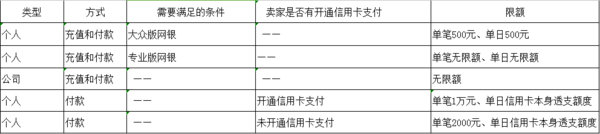
What is the transfer limit for China Merchants Bank Personal Banking Professional Edition?
Friends, please refer to the following screenshot information. If you have any questions, you can call China Merchants Bank Personal Banking Professional Edition for consultation: there is no single limit when individuals choose to recharge or pay, and there is no daily limit.
Where is the mobile certificate of China Merchants Bank Online Banking Professional Edition after it is updated?
Please log in to the professional version of China Merchants Bank Online Banking first, and then find [Professional Edition Management] → [Certificate Query], where you can find the validity period of your certificate.
China Merchants Bank Online Banking Professional Edition Update Log
1. A complete certificate mechanism is adopted for transaction authentication, which complies with international standards.
2. Added remittance and transfer functions
|
Huajun editor recommends: Editor Hua Jun recommends China Merchants Bank Personal Banking Professional Edition to everyone. China Merchants Bank Personal Banking Professional Edition online banking is developed based on the Internet platform and is suitable for China Merchants Bank users. Friends do not need to worry about the risk of leakage when using China Merchants Bank Personal Banking Professional Edition for transactions. China Merchants Bank Personal Banking Professional Edition adopts the dual protection of "digital certificate + client". You only need to apply for an authorization certificate at a China Merchants Bank outlet, and you can use it on your computer with confidence. In addition, the editor of Huajun has also collected and compiled other [online banking] clients for you to choose and download, such as: Industrial and Commercial Bank of China Internet Banking, Dongguan Bank Online Banking, etc. |
Version: 7.7.6 official version | Update time: 2025-10-23
Similar recommendations






Latest updates





How to choose file association in Video Pioneer? - How to select file associations for Video Pioneer
How to download movies from Video Pioneer? - How to download movies from Video Pioneer
How to search for videos on Video Pioneer? - How to search for videos by Video Pioneer
How to delete history in Video Pioneer? -How to delete history records by Video Pioneer
How to set the skin for Video Pioneer? -How to set skin for Video Pioneer
Comments on China Merchants Bank Personal Banking Professional Edition (China Merchants Bank Online Banking Professional Edition)
-
1st floor Huajun netizen 2022-02-03 02:26:35China Merchants Bank Personal Banking Professional Edition (China Merchants Bank Online Banking Professional Edition) is very useful, thank you! !
-
2nd floor Huajun netizen 2022-03-14 19:01:08The interface design of China Merchants Bank Personal Banking Professional Edition (China Merchants Bank Online Banking Professional Edition) is easy to use and has rich functions. I highly recommend it!
-
3rd floor Huajun netizen 2022-03-21 19:41:26China Merchants Bank Personal Banking Professional Edition (China Merchants Bank Online Banking Professional Edition) is great! 100 million likes! ! !
Recommended products
-

Tianyifei young campus client
-

P2P terminator
-

Baidu Shangqiao
-

578010wifi password viewer
-

Yiyiyun mobile phone verification software
-

Agricultural Bank of China Online Banking Assistant
-
Agricultural Bank of China Online Banking Assistant
-
Agricultural Bank of China Online Banking Assistant
-

inSSIDer
-

Cheetah free WIFI
- Diablo game tool collection
- Group purchasing software collection area
- p2p seed search artifact download-P2P seed search artifact special topic
- adobe software encyclopedia - adobe full range of software downloads - adobe software downloads
- Safe Internet Encyclopedia
- Browser PC version download-browser download collection
- Diablo 3 game collection
- Anxin Quote Software
- Which Key Wizard software is better? Key Wizard software collection




