
-
Google Chrome
- Size: 10.29M
- Language: Simplified Chinese
- Category: web browsing
- System:winall








Google Chrome for PCIt is a simple and convenient web browsing tool officially developed by Google.Google Chrome for PCIt can help you search for the content you need quickly and safely. It is powerful and can ensure that the browser runs quickly and stably when users open multiple web pages.Google Chrome for PCBringing everyone an efficient and convenient experience. Provided by Huajun Software ParkGoogle Chrome for PCOfficial version download service, everyone is welcome to download and use it!

Google Chrome PC version features:
Chrome DevTools (Developer Tools)
Code debugging: edit HTML/CSS in real time and view the DOM structure; execute JavaScript code through the Console panel and debug error logs.
Performance analysis: The Performance panel analyzes page loading time, the Memory panel detects memory leaks, and the Network panel monitors network requests.
Mobile Device Simulation: Simulate the screen sizes and user agents of different devices (e.g. iPhone, iPad) to test responsive designs.
Modern web standards support
It is the first to support new technologies such as HTML5, CSS3, and WebAssembly, promote the development of PWA (Progressive Web Application), and make web applications close to the native experience.
Example: Chrome is the first browser to support WebXR (Immersive Web Experiences) for running AR/VR apps.
Experimental Features (Chrome Flags)
Users can enable beta features (such as tab thumbnail previews, scrolling screenshots), experience innovative features in advance and provide feedback to promote browser iteration.
Highlights of Google Chrome for PC
Omnibox
The address bar and search bar are two-in-one: support direct input of URLs, search keywords, calculation of math problems (such as "25*4"), weather query (such as "Beijing weather"), etc.
Intelligent matching of bookmarks and history: Enter part of the title or URL to quickly locate saved pages.
Tab Management Master
Tab Groups: Classify tabs by topic (such as work, entertainment), support color marking and folding/expanding to reduce visual clutter.
Pinned tab: Pin frequently used websites (such as email) to the left side of the tab bar and keep them permanently.
Tab preview: Display page thumbnails when hovering the mouse to quickly locate the target.
Reading and learning mode
Reading mode: Automatically removes web page advertisements and cluttered elements to provide a pure reading experience. It supports adjusting fonts, background color and brightness.
Real-time subtitles: Add AI-generated real-time subtitles (supports 10+ languages) to video playback, suitable for people with hearing impairments or foreign language learning.
Theme and extension customization
Chrome Web Store: Offers tens of thousands of extensions (such as ad blocker uBlock Origin, password manager Bitwarden) and themes (such as dark mode, anime style) to meet personalized needs.
Shortcut key customization: Modify commonly used shortcut keys (such as Ctrl+T to create a new tab) to adapt to different operating habits.
Google Chrome for PCInstallation steps:
1. Double-click to open the ChromeSetup.exe file downloaded from Huajun Software Park.
2. If prompted by the system, click "Install Anyway" and "Yes" in the system dialog box.
3. Wait for the installation to complete. Chrome will open automatically after installation is complete.
Google Chrome for PCHow to use:
1. How to select the homepage in Chrome browser?
1. You can control the web page that is displayed after you click the "Home" icon to open the home page.
2. Open the chrome browser on your computer.
3. Click the "More" icon in the upper right corner, and then set it.

4. Under "Appearance", turn on the Show "Home" button.
Under "Show Home button," select Use new tab or custom page.
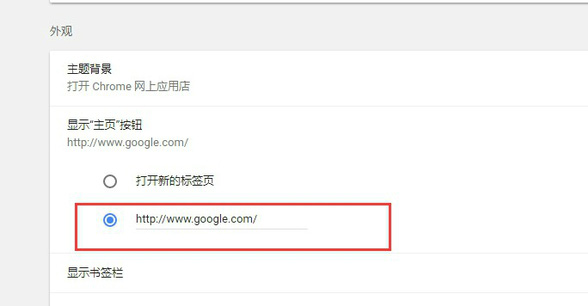
5. At this time, the "Home" button will be displayed on the left side of the address bar.

Google Chrome for PCFAQ:
1. How to set the homepage of Chrome browser?
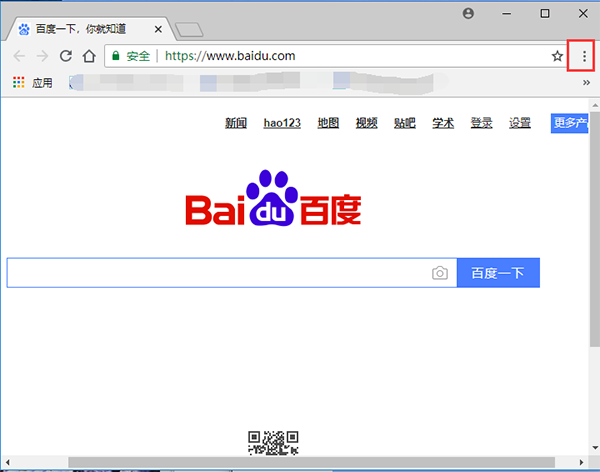
1. First, we need to download and install the Chrome browser on this site. Then we find the shortcut of the software on the desktop and double-click it to open the main interface of the software. Next, we click on the three-dot mark in the upper right corner of the interface, as shown in the figure below.
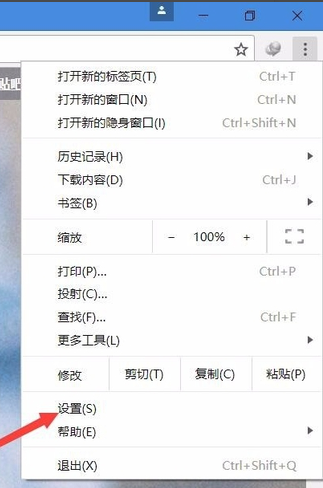
2. After clicking the three-dot sign, the menu bar will pop up. We find the "Settings" option and click to open it to enter the setting interface. As shown below.
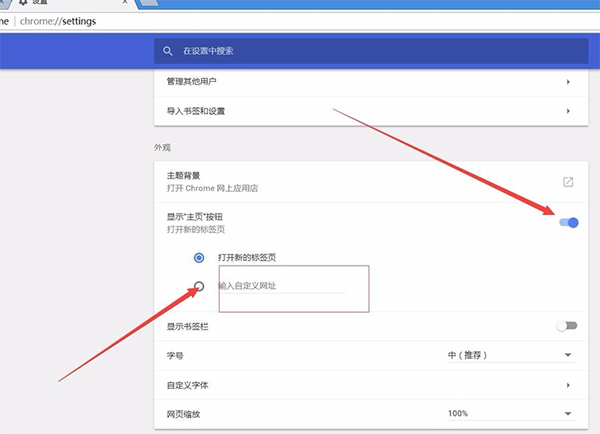
3. After we enter the settings interface, we can find the "Show home button" option in the interface. We check the "Enter a custom URL" option in the options below, and then enter the web link you want to set.
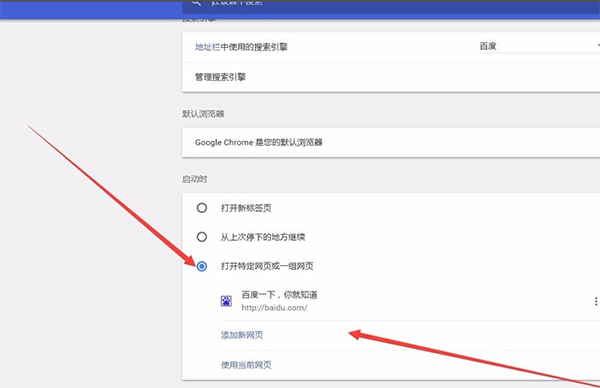
4. Next, scroll down with the mouse wheel to find the "At startup" option, then click "Open a specific web page or a group of web pages" in the options below, and then enter the homepage you want to set, and the setting will be successful.
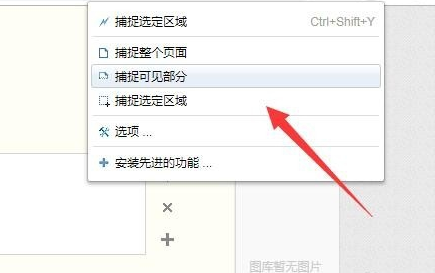
2. How to take a screenshot in Chrome browser?
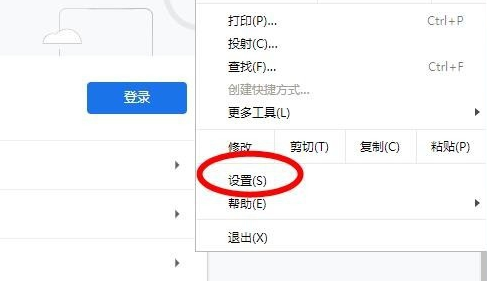
1. Open "Settings" in the menu
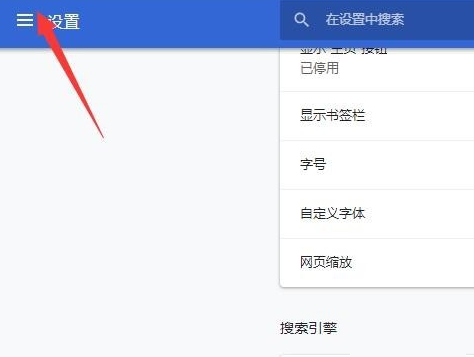
2. Enter the settings interface and click to open the "Settings" menu in the upper left corner.
3. Open "Extensions" in the pop-up menu

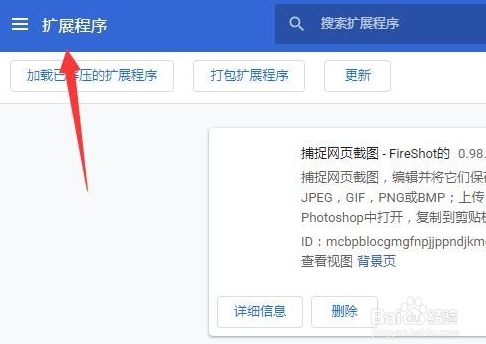
4. Enter the extension management interface and click the "Extensions" menu icon in the upper left corner
5. Open the browser online app store

6. Search for "Screenshot" in the application, select a suitable one and click "Add to..."

7. After successful installation, you can use the screenshot function
How does Google Chrome translate English web pages?
1. First we open the web page and find that the page is in English.
2. Then we click the "Convert Icon" above.
3. Select "Simplified Chinese".
4. Finally, we can find that it has been successfully converted into Chinese.
How to set compatibility mode in Google Chrome?
1. Open Google Chrome and click "Settings";
2. Turn on "Allow website reloading in Internet Explorer mode" and click Restart;
3. After restarting Google Chrome, select "Option to reload in Internet Explorer mode" to open the current interface in compatibility mode.
Google Chrome for PCWhich one is better compared to Huawei Browser?
The Chrome browser has strong stability and is not easy to crash. Moreover, the Chrome browser has many unique features and features, which can bring you an efficient and convenient usage experience and is welcomed by many users.
Huawei Browser has ultra-fast kernel integration, leading the mainstream browsers in the industry, and web pages slide more smoothly. Huawei Browser gathers massive amounts of information for collective reading. 24/7 current affairs hot spots, all at your fingertips.
In comparison, both softwares have their own advantages. You can just choose the one you like and download it.
Huawei browser download address:http://softwaredownload4.com/soft/78167.htm
Google Chrome update log:
1. Fixed several bugs;
2. Optimize details;
Huajun editor recommends:
Looking around, there are software similar to this software everywhere on the Internet. If you are not used to this software, you might as well try Firefox, Firefox Enterprise, Google Chrome and other software. I hope you like it!
Version: 141.0.7376.0 | Update time: 2025-11-28
Similar recommendations


Latest updates






How to set compatibility mode on Google Chrome - How to set compatibility mode on Google Chrome
How to save web pages in Google Chrome - How to save web pages in Google Chrome
How to import bookmarks into Google Chrome - How to import bookmarks into Google Chrome
How to open the Task Manager in Google Chrome - How to open the Task Manager in Google Chrome
How to customize fonts in Google Chrome - How to customize fonts in Google Chrome
How to translate on Google Chrome - How to translate on Google Chrome
Google Chrome Review
-
1st floor Huajun netizen 2021-08-01 05:12:51Google Chrome browser is very easy to use, thank you! !
-
2nd floor Huajun netizen 2022-01-21 21:36:02Google Chrome browser software is very easy to use, downloads quickly and is very convenient!
-
3rd floor Huajun netizen 2022-02-16 22:17:06Google chrome browser is awesome! 100 million likes! ! !
Recommended products










- Diablo game tool collection
- Group purchasing software collection area
- p2p seed search artifact download-P2P seed search artifact special topic
- adobe software encyclopedia - adobe full range of software downloads - adobe software downloads
- Safe Internet Encyclopedia
- Browser PC version download-browser download collection
- Diablo 3 game collection
- Anxin Quote Software
- Which Key Wizard software is better? Key Wizard software collection




