MTDriver foreign exchange review software is a foreign exchange review software based on MT4 for professional traders. It can reproduce the market conditions at any time in the past 12 years, simulate transactions and graphically display historical transaction records on MT4.
Traditional foreign exchange market software only displays real-time data. If a trader wants to verify his own trading system, he must download historical data. However, the historical data in MT4 is incomplete. Generally, foreign exchange merchants only retain the most recent year or less. At the same time, the data is static, and the dynamic display interaction process of multiple periods cannot be seen. At the same time, the MT4 window cannot display the data of one minute one year ago. These shortcomings have brought great inconvenience to the review. In view of the need for review, MTDriver came into being, dynamically displaying the market conditions at any time in history, and displaying them in front of you as dynamically as the smallest 1-minute market data and real dynamic market prices, helping you to effectively and quickly verify your system. It continues to help more and more traders enter the realm of stable profitability.
Since its launch, MTDriver foreign exchange review expert has been unanimously recognized and praised by everyone, especially professional foreign exchange traders.
Introduction to the main functions of MTDriver:
1. An intensive training tool for traders specially developed for professional foreign exchange trading.
The best way to quickly improve your trading skills and mature your trading psychology is to complete the simulated trading test of the trading model with 13 years of data in the shortest possible time. Review training anytime, anywhere, even on weekends. The historical data cloud server provides free downloads 24 hours a day.
The types that can be reviewed include foreign exchange, stock index futures, commodity futures, Shanghai and Shenzhen A shares, and warrants.
2. Dynamically display the entire trading process of the trader
You can import the trader's transaction records (HTM format account files saved from MT4 historical records). After importing, you can intuitively and dynamically display the trader's opening, closing, or order cancellation and stop-loss and stop-profit triggering processes on the MT4 graphics. The WYSIWYG method allows you to hold a magnifying glass to observe the thinking processes of other traders, or to reflect on your own trading process. It is a powerful assistant for your rapid growth.
3. Synchronous review of multiple varieties and multiple cycles
It is unique and can be displayed on the MT4 software at the same time across varieties and multiple cycles, completely interpreting the market quotation template that is consistent with the actual market. At the same time, you can close a certain window at will, or add a certain period window. For example, five windows such as EURUSD's H1, D1 and XAUUSD's M5, H1, D1 can start synchronized review on January 3, 2012. Can be used to observe the differences between different varieties. Test solutions to meet your needs from various angles. The supported periods are M1, M5, M15, M30, H1, H4, D1, W1, MN. It can support everything from the smallest 1 minute to the largest monthly K-line. The market trend is exactly the same as the real offer.
4. Completely based on MT4 and compatible with all indicators and templates on MT4.
The MT4 indicators you are currently using can be 100% continued to be used, eliminating the trouble of rewriting indicators. For example, MACD, SMA, EMA, Guppy Moving Average, Bollinger Bands, KDJ, Pivot Pionts, ADX, ATR, CCI, RSI, ZigZag, etc., as well as any MT4 indicators written by yourself.
5. Powerful strategy programming platform
It adopts the most powerful and efficient MQL language with C-like syntax, supports arrays, and allows you to program almost any functional strategy without resorting to dll. It has a complete programming language style and also supports high-level language features such as import dll. The MQL language is also the most resourceful trading programming language on the Internet. You can use Baidu to access thousands of source codes as a programming reference, and there are also rich tutorials for you to learn.
6. Massive historical data for more than 13 years
13 years of historical data can be downloaded online to facilitate testing of various trading strategies. You can selectively download the required data according to your needs. Efficient data compression allows you to download faster.
7.18 mainstream currency pairs, IF300 futures index continuous, broad market
Supports major currency pairs XAGUSD, XAUUSD, AUDUSD, EURUSD, GBPUSD, NZDUSD, directly priced currency pairs USDCHF, USDJPY, USDCAD
, as well as crosses AUDJPY, CHFJPY, EURCAD, EURCHF, EURGBP, EURJPY, GBPCHF, GBPJPY, NZDJPY. As well as domestic market and stock index futures, etc., more varieties are continuing to expand.
8. The speed of review can be manually fine-tuned to meet the best review needs.
Adjust the review speed as you like according to review needs.
9. Favorites function
For the classification and induction of various trends, catalogs and classifications can be established without restrictions, providing maximum convenience for data collection before the establishment of a trading system.
10.More step size options
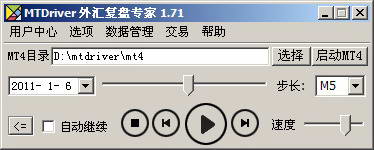
The default software step size is M1, which is 1 minute. At the same time, in order to facilitate the review of large periods and improve efficiency, the software allows the selection of more step sizes. Including M1, M5, M15, M30, H1, H4, D1, W1, MN.
11.Hotkey support
Add shortcut keys. Allowing you to more flexibly control the start, pause, fast forward, rewind and other operations of the market.
12. Simulated trading
You can create a new demo account or import the history of real transactions. Realize the opening and closing of positions in a completely real environment, and display the transaction and historical records.
13. The software operation is simple, convenient and user-friendly
The software is pure green and requires no installation, so you can get started quickly. You can select any day through the calendar, and the system automatically filters non-trading days. The software review operation is like a player, starting, pausing, stopping, fast forwarding to the next trading day, and the previous trading day, etc. You can also drag the mouse anywhere 24 hours a day. The start time required for relocation.
14.Use environment
The software can be used online on two computers at the same time, and the computer can be replaced and the system can be reinstalled without being affected. The software can run on Windows 2000, XP, Windows Vista, Windows 7, Windows 8 32-bit or 64-bit systems.