
-
dbc2000
- Size: 8.02M
- Language: Simplified Chinese
- Category: Webmaster Tools
- System: Winxp/vista/win7/2000/2003
"Due to policy adjustments, downloading of this software is temporarily closed"






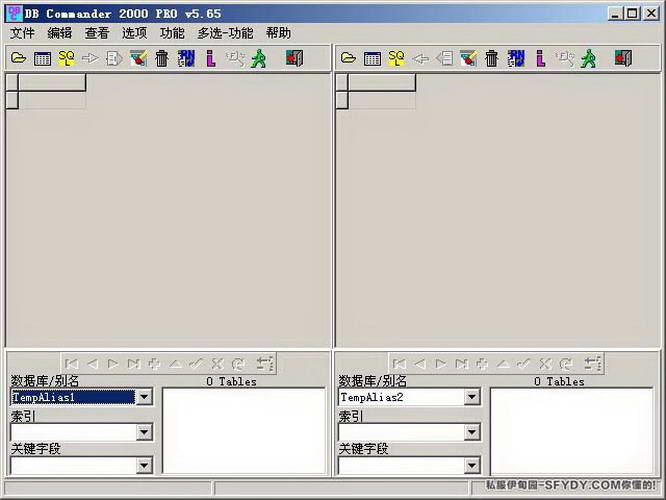
dbc2000The official version is a database program with strong functionality. In the official version of dbc2000, users can add and modify equipment attributes, modify the appearance of game equipment and other functions. anddbc2000It can help players better manage the game's database files, thereby playing the game more efficiently and achieving better results. Huajun Software Park provides dbc2000 software download service. To download other versions of dbc2000 software, please go to Huajun Software Park!
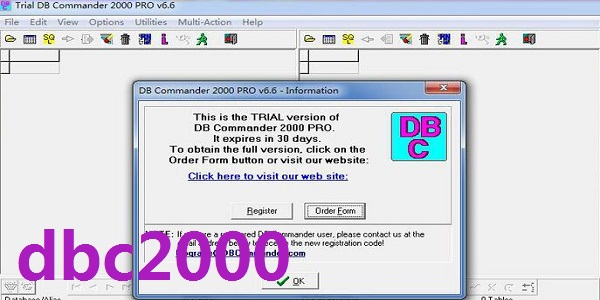
dbc2000 software functions
1. It comes with a corresponding registration machine, which can successfully activate the software. It is perfectly suitable for 32-bit and 64-bit win7 systems and winxp systems, and can help users manage legendary database files better and more easily.
2. After actual testing, this software can help players better manage the database files of the game, thereby playing the game more efficiently and achieving better results.
dbc2000 software features
1. You can easily import and export database files in different formats
2. Support various commonly used database file formats such as Oracle, Sybase, MS SQL, Interbase, Informix, etc.
3. Allows you to directly operate the database by using SQL statements
4. Supports the use of 64-bit and 32-bit Windows XP, Windows 7, and Windows Vista operating systems
5. It is simple and efficient to use, with a simple and user-friendly interface. It is the best database management tool
dbc2000 installation steps
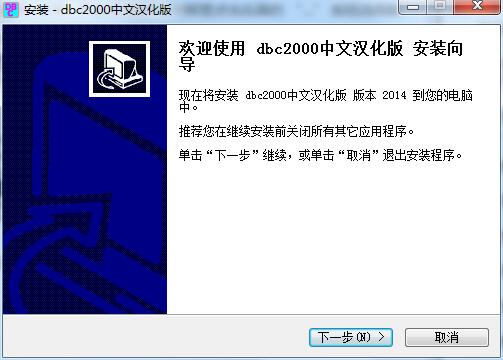
1. Download dbc2000 from Huajun Software Park and extract it to the current folder. Click on the setup.exe application to enter the installation wizard interface, and then click Next.
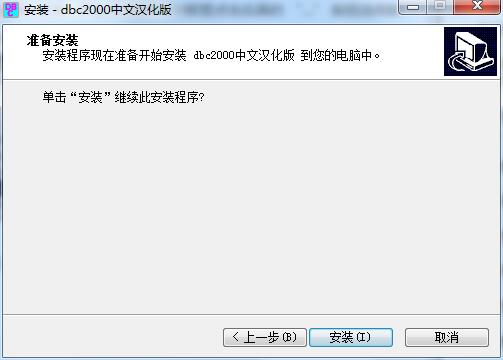
2. At this time we come to the installation interface, users need to click to install.
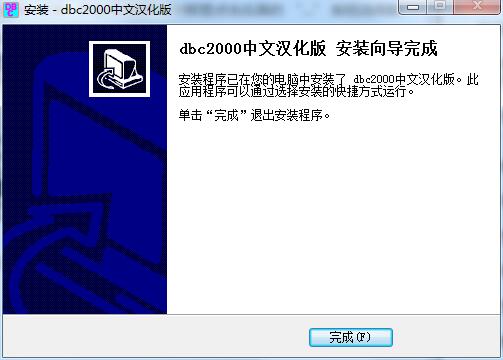
3. The installation of dbc2000 is completed, click Finish.
How to use dbc2000
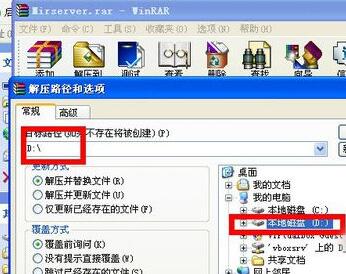
1. You also need to configure the database to play Legendary stand-alone. I won’t talk about the installation of DBC2000. The main thing is to talk about the configuration. There are many configurations. The path configuration is incorrect and the game will go wrong. Unzip Mirserver to the root directory of drive D
2. Unzip Mirserver to the root directory of drive D and select the path
3. After decompression, it will be in the D drive directory.
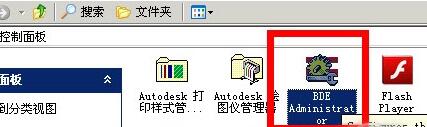
4. Double-click BDE administrator in the control panel
5. Click object------new-STANDARD-OK
6. Rename: Rename: HeroDB
7. After changing the name to HeroDB, configure the data path
8. This is the configured path D:/Mirserver/Mud2/DB. If this path is not set correctly, the server cannot start.
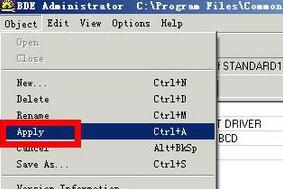
9. Click Apply ---OK DBC2000 configuration is completed
10. Click OK to complete the configuration. Go to mirserver to start the game server.
dbc2000 usage instructions
1: Install dbc2000
2: Set the database name and path of dbc
ctrl+n pop up dialog box
ctrl+s save
ctrl+v paste
ctrl+c copy
Find bde administrator in the control panel and click to open
Press ctrl+n to pop up a dialog box. If it is standard, just click OK.
Then find the standard1 you created on the left and change its name to herodb
3: Then click on it and look at the right side and change the path, which is path:, to the legendary server path you installed.
For example, if I install the legend to the d drive (mirserver is in the d drive directory), then I should set d:mirservermud2db
Press ctrl+a to pop up a dialog box, just click OK
4: Install the legendary server
5: Set up the game controller
6: Check whether our legendary gateway can create an account
7: Check the version numbers of m2 and lander
8: Enter the game
9: Set gm number
10: gm command to view
11: Explosion rate modification
dbc2000 FAQ
Question: How to configure dbc200?
Answer: 1. Open dbc2000, click Start Menu--Settings--Control Panel-DBEadministrator to start creating the database;
2. Click Object in the window directly above the software and select New;
3. After creating a new project, rename STANDARD to HeroDB, and click the “…” in the PATH on the right. button to select the path of the data, generally the default is D: MirserverMud2DB;
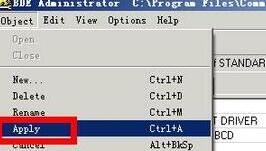
4. After setting up DBC, return to the desktop, open the DBC icon, and in the lower left corner, open HeroDB under the database/alias name. If the data appears, the installation is successful.
Question: What should I do if the control panel is not installed after dbc2000 is installed?
Answer: 1. Download DBC2000 again. After installing it, find BDEADMINISTRATOR in the control panel and click to open it.
2. Don’t worry about what is inside, press ctrl+N to pop up a dialog box. If it is STANDARD, just click OK, then find the STANDARD you created on the left (STANDARD1 is displayed on the left) and change the name to HeroDB, then click it and look at the path on the right, which is PATH: Change it to the legendary server path you installed. For example, I installed Legend to D disk (mirserver is in the D drive directory), then I should set D:/mirserver/Mud2/DB to be the other disk, which is X:/mirserver/Mud2/DB. It’s that simple. Don’t think so much, then click on the HeroDB that was renamed by you and press ctrl+A to pop up a dialog box and click OK. Then close it without worrying about DBC2000.
Question: What should I do if DBC2000 cannot be installed?
Answer: 1. Occasionally, DBC2000 cannot be installed on some machines. When you click it, the installation interface does not pop up at all, but there is a process in the task manager.
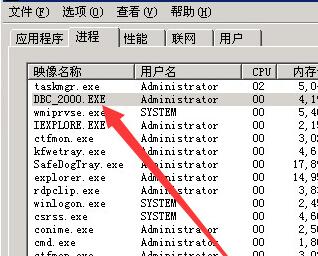
2. When encountering this situation, I have tried many ideas, but restarting the machine and shutting down certain services have not worked.
3. Finally, update the machine driver and you can install it normally.
4. We can use the driver wizard or download the appropriate driver ourselves to process it. The machine I encountered has an Intel motherboard. After updating the sound card driver, it can be installed normally.
5. After upgrading the sound card driver, restart the machine, and then you can install DBC2000 normally.
6. I hope I can tell you that some time machine drivers will also affect the software's abnormality. You can try to update the machine's driver.
Comparison of similar software
Alibaba cloud alisql databaseThe official version is an efficient, professional and practical new database. Alibaba Cloud Alisql database official version software also provides very personalized solutions and is the first choice to help small and medium-sized enterprises and various developers improve their data operation capabilities. The latest version of Alibaba Cloud alisql database supports lock scanning: read the latest information, read updated information, NDB The ODBC optimizer uses ordered indexes for equality, and the MySQL optimizer uses ordered indexes for equality and ranges.
DBeaverIt is a well-known universal database management client. It provides you with the 64-bit Chinese version of dbeaver, which supports MySQL, PostgreSQL, Oracle, DB2, mssql, Sybase and any database. It has a JDBC driver that can view the structure of the database, export the database or execute corresponding scripts and other operations.
Huajun editor recommends:
dbc2000In the official version, users can add, modify equipment attributes, modify the appearance of game equipment and other functions. A very good dbc2000, easy to use and powerful, don’t miss it if you need it.
Version: Official version | Update time: 2024-12-23
Similar recommendations



Latest updates





How to install dbc2000-dbc2000 installation tutorial
How to use dbc2000-How to use dbc2000 to import items in batches
How to use dbc2000 - How to use dbc2000 to export data and display it in excel
How to use dbc2000 - How to use dbc2000 to set up herodb
How to use dbc2000 - How to use dbc2000 to export a database
How to use dbc2000 to set up legend - dbc2000 to set up legend tutorial
How to install dbc2000-dbc2000 installation tutorial
dbc2000 comments
-
1st floor Huajun netizen 2022-01-31 03:21:03dbc2000 is awesome! 100 million likes! ! !
-
2nd floor Huajun netizen 2022-01-03 11:57:03dbc2000 is convenient, practical and powerful. The software is very easy to use!
-
3rd floor Huajun netizen 2021-12-14 12:57:22dbc2000 has comprehensive functions and is very convenient to use.
Recommended products
-

Taobao Assistant
-
Rainbow Island Grass Official Forum
-

Website data collection software CherGet
-
AwwwB.com website cloner
-

Feitian article originality detection tool
-
Shuimiao·Original article generator
-

Taobao Assistant
-
Intelligent pseudo-original tool
-
Taobao Assistant (Tmall version)
-

PageAdmin website management system
- Diablo game tool collection
- Group purchasing software collection area
- p2p seed search artifact download-P2P seed search artifact special topic
- adobe software encyclopedia - adobe full range of software downloads - adobe software downloads
- Safe Internet Encyclopedia
- Browser PC version download-browser download collection
- Diablo 3 game collection
- Anxin Quote Software
- Which Key Wizard software is better? Key Wizard software collection




