
-
Drive CEO
- Size: 26.47M
- Language: Simplified Chinese
- Category: hardware tools
- System: win7 and above







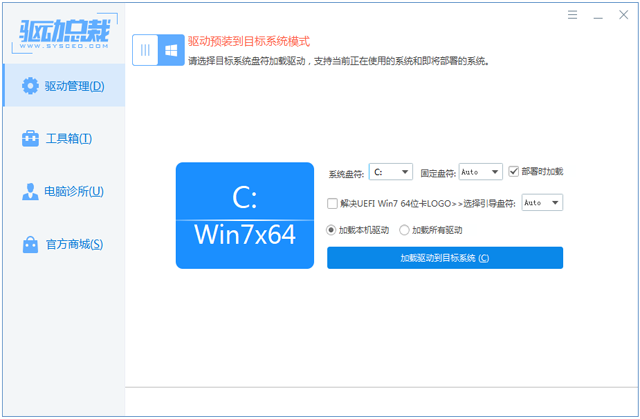

Driver President is a driver management tool developed based on microservice architecture and dynamic algorithms. It solves the contradiction between driver package size and coverage through "offline + online" hybrid mode. Its core functions include intelligent driver matching, cross-platform compatibility optimization, multi-format driver package support, etc. It is suitable for enterprise-level system packaging, hardware manufacturer testing and technical personnel in-depth customization scenarios.

SoftwareFunction
Hybrid driver installation mechanism:
Priority is given to using the local offline driver package. If there is no match, the latest version from the cloud will be automatically downloaded to ensure driver compatibility and timeliness.
Supports driver version rollback and multi-version coexistence to solve compatibility issues during the transition period between old and new hardware.
In-depth technical optimization:
Precise hardware ID recognition algorithm improves driver matching accuracy (error rate is less than 0.5%).
Driver installation conflict detection, automatically skip duplicate or incompatible drivers.
Advanced customization features:
The driver package DIY tool supports users to add customized drivers and generate exclusive installation packages.
The command line interface (CLI) supports batch deployment and is suitable for enterprise-level automated installation processes.
Multi-scene adaptation:
The driver is pre-installed in the PE environment and supports system deployment from Windows 7 to Windows 11.
Automatic recognition and installation of Apple Windows system drivers (if supported by BootCamp).
Software features
Technical architecture innovation:
Using distributed driver library storage, it supports fast retrieval and download of millions of driver files.
Performance optimization:
Hardware acceleration technology (such as NVIDIA CUDA) speeds up driver installation, and multi-core CPU utilization reaches over 90%.
Security enhancement measures:
Driver hash verification and sandbox installation mechanism prevent malicious code injection.
Multi-language support:
Provides Chinese, English, Japanese and other interface languages to adapt to the needs of global users.
Software features
High technical barriers:
Support niche hardware protocols (such as Thunderbolt 4, NVMe over Fabrics) to fill market gaps.
Strong scalability:
Open API interface allows third-party tools to integrate driver management functions.
Low resource usage:
The memory usage is less than 50MB, suitable for old devices and embedded systems.
Industry compatibility:
In-depth linkage with system packaging tools (such as SGI, SC) to improve enterprise-level deployment efficiency.
Driver President update log:
1. Program update:
1.1. [Fix] The problem that the ssl library file is not copied when using the peload parameter;
1.2. [Update] Hidden devices are not installed by default;
2. Offline driver update [the cloud driver library is updated in real time, if the driver is missing offline, please connect to the Internet to install it]:
2.1. [Graphics Card] Win10/11 x64 updates Nvidia graphics card driver 581.15 (driver file version: 32.0.15.8115);
2.2. [Graphics Card] Win10/11 x64 updates AMD graphics card driver 25.9.1 (driver file version: 32.0.21025.10016);
2.3. [Graphics Card] Win10/11 x64 updates Intel graphics card driver 101.7026 (driver file version: 32.0.101.7026);
2.4. [Graphics Card] Win10/11 x64 adds Innosilicon graphics card driver;
2.5. [Sound Card] Win11/10 x64 updates Realtek HAD sound card driver (driver file version: 6.0.9273.1);
2.6. [Sound Card] Win11/10 x64 updates Realtek USB sound card driver (driver file version: 13.0.6000.1168);
2.7. [Sound Card] Win11/10 x64 updates Intel sound card driver (driver file version: 20.42.11988.0);
2.8. [Sound Card] Win11/10 x64 delete Realtek UAD sound card driver;
2.9. [Bluetooth] Win11/10 x64 updates intel Bluetooth driver 23.140.0;
2.10. [Chipset] Win10/11 x64 updates Intel chipset driver (driver file version: 10.1.20266.8668);
2.11. [Chipset] Win10/11 x64 adds AMD chipset driver (driver file version: 7.06.02.123);
2.12. [Network Card] Win11 x64 upgrades MediaTek wireless network card driver (driver file version: 5.5.0.3498);
2.13. [Network Card] Win10/11/7 upgrade Realtek wireless network card driver (driver file version: 6102.24.131.0);
2.14. [Network Card] Win10/11 x64 adds Realtek USB network card driver (driver file version: 1030.52.0325.2025);
2.15. [Network Card] Win10/11 x64 supplements Intel wireless network card driver version 18-20x;
2.16. [Network Card] Win7/10/11 x64 adds Motorcomm network card driver;
2.17. [Network Card] Win10/11 x64 updates Realtek network card driver (driver file version: 10.075.0324.2025);
2.18. [Network Card] Win11 x64 updates qualcomm wireless network card driver (driver file version: 3.1.0.1453);
2.19. [Network Card] Win10/11 x64 updates Realtek network card driver (driver file version: 10.076.50.2025);
2.20. [Network Card] Win10/11 x64 updates MediaTek wireless network card driver (driver file version: 25.040.2.0579);
2.21. [Network Card] Win10/11 x64 updates intel network card driver 30.2;
2.22. [Network Card] Win10/11 x64 updates intel wireless network card driver 23.140.0;
2.23. [Disk Controller] Win11/10 x64 optimizes AMD Sata driver;
Huajun editor recommends:
The editor guarantees that as long as you use the driver president, if you don't like it, you can come and hit me! The editor has also prepared Epson LQ-630KII printer driver, Aerospace Information Aisino SK-600ii printer driver, and Cloud Machine Manager for you
Version: 2.20.0.3 | Update time: 2025-12-01
Similar recommendations




Latest updates




Drive President Comments
Recommended products









- Diablo game tool collection
- Group purchasing software collection area
- p2p seed search artifact download-P2P seed search artifact special topic
- adobe software encyclopedia - adobe full range of software downloads - adobe software downloads
- Safe Internet Encyclopedia
- Browser PC version download-browser download collection
- Diablo 3 game collection
- Anxin Quote Software
- Which Key Wizard software is better? Key Wizard software collection




