
-
Maintenance Master Internet Cafe Client
- Size: 4.12M
- Language: Simplified Chinese
- Category: Internet cafe management
- System: winall







The official version of the Maintenance Master Internet Cafe Client is a client software designed for users who have installed the Maintenance Master Server. The latest version of the Maintenance Master Internet Cafe Client software can facilitate maintenance master server and remote management. In addition, the Maintenance Master Internet Cafe Client also supports Internet cafe account theft prevention, anti-plug-in and other functions to achieve efficient management and maintenance.
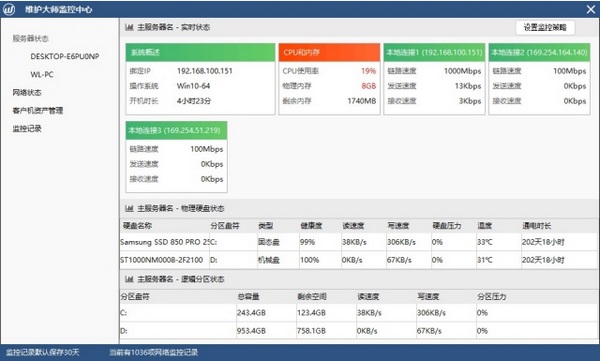
Maintenance Master Internet Cafe Client Software Introduction
Hangzhou Yunzhi Internet Technology Co., Ltd. was established in 2015. The company is based in the Internet cafe industry and is committed to redefining Internet cafe maintenance. Through the power of technology and people, it helps Internet cafe maintenance personnel to achieve more efficient, easier, and more dignified work for everyone.
The company is composed of a group of industry elites with rich experience in various fields. The team members complement each other and share common values and ideals.
The first product incubated by the company, "Maintenance Master", is a product with independent intellectual property rights and customized for Internet cafe maintenance personnel. It innovatively solves the problem of centralized management of multiple Internet cafes, multiple network types, and mobility in the industry. It is supplemented by various security solutions such as operation records, login SMS verification, and mobile APP verification, which greatly improves the safety and advancement of maintenance work. In just six months after the product was launched, it has been recognized and widely used by nearly 2,000 network maintenance companies.
Maintenance Master Internet Cafe Client Function Introduction
Installed on the client computer of the Internet cafe;
Installation version: supports super installation on the client machine;
Green version: Supports two installation methods: third-party channel calling and disk-mounted installation on a diskless server.
Maintenance Master Internet Cafe Client Software Features
Mobile maintenance anytime, anywhere
Supports Android & iOS dual platforms, the signal is continuously transmitted remotely
· Through your mobile device equipped with Android/iOS system, use the Maintenance Master APP to remotely manage it anytime and anywhere.
· · Centralized management within a small area, with a clear view of Internet cafe information
· · Support the main functions of the monitoring center, so that problems can be delivered to you in time
·Support dynamic password login, convenient and safe
· · Support remote router
Remote control, so efficient
The user experience is more suitable for the application scenarios of network maintenance technical teams and individuals.
· Perfectly meets the remote needs of environments where ports cannot be mapped (ADSL residential broadband/metropolitan area network)
· · Support dynamic analysis of Internet cafe IP
Supports management of IP and port information of two mainstream remote tools, 3389 and Radmin (port mapping required)
·Zero conflict with other similar products
Security center, active defense
Gives you the ability to nip in the bud all security risks that may lead to the stability of the client system
· Edit policies independently to intercept various malicious process startups, file creation, driver/dynamic library loading, network access, registry modification, etc.
Supports multiple methods to identify interception targets by file name, md5, and Hash feature code, allowing precise strikes to avoid the embarrassment of mistaken interceptions
· Driver-level active defense, seize the opportunity and achieve better interception effect
· Through debugging mode, you can see the parent-child relationship and Hash feature information of all programs since booting on the client computer, making it easier to troubleshoot problems.
· Note ①: Internet cafe server/Internet cafe client must be version 5.0 or above to support this function
· Note ②: The client must be installed through a mount or super installation, otherwise this function will be invalid
Centralized management, panoramic view
Perfectly meets the permission requirements of maintenance companies/maintenance teams/maintenance individuals in various scenarios
· Centrally manage all servers and all clients of all Internet cafes
· View platform operation logs in a centralized manner, and account activities are clear at a glance
· Sub-account permission system supports two roles: employee and owner
· A good memory is not as good as cloud notes. Cloud notes are a convenient way to record information.
· ·Each internet cafe ID has a cloud note
· You can record in your notes the registration numbers of various software, broadband account and password, fixed IP IP of Internet cafes, subnet masks, gateway information, and some special issues of Internet cafes.
· · All content is encrypted and stored, so there is no need to worry about information leakage
How to use Maintenance Master Internet Cafe Client
Prerequisites:
1. Please upgrade the Maintenance Master server to version 7.0 first;
2. Please make sure that the Maintenance Master Internet Cafe server is running before running this tool.
Listing steps:
1. On the diskless server, mount the client system disk, for example, mount it as X disk;
2. Copy the wzBarClient in the compressed package to the mounted drive letter (note that it must be in the root directory, and the folder name cannot be modified);
3. Run the "Maintenance Master Client Mounting Tool.exe" in the wzBarClient directory on the diskless server, fill in the Maintenance Master main server IP, and then click Execute to perform the greening operation;
4. After the greening is completed, a message indicating that the greening is successful will be displayed in the log area;
5. After the greening is completed, just save the modifications to the hanging disk, and the client can be started after the client is turned on;
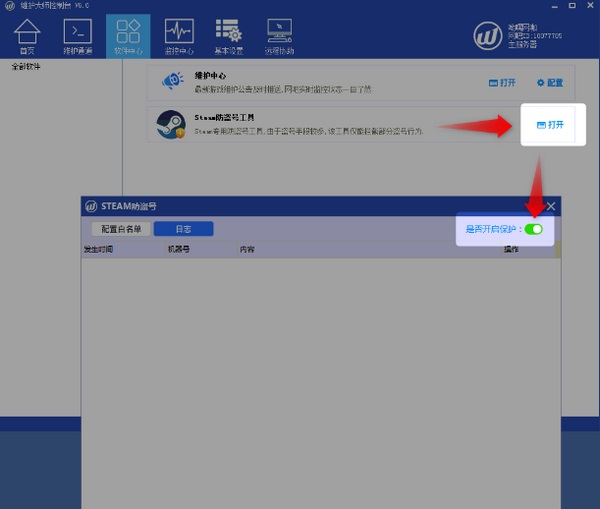
Green version:
1. Modify the wzconfig.ini configuration file in the directory, and fill in the ip item with the IP address of the main server of the maintenance master.
The contents of the configuration file are as follows:
[server]
ip=
Port=19680
2. Start wzTaskRun.exe
Maintenance Master Internet Cafe Client Installation Steps
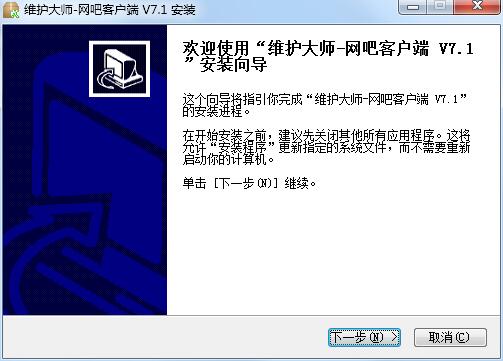
1. Download the Maintenance Master Internet Cafe Client official version installation package from Huajun Software Park. After unzipping, double-click the exe program to enter the installation wizard and click Next
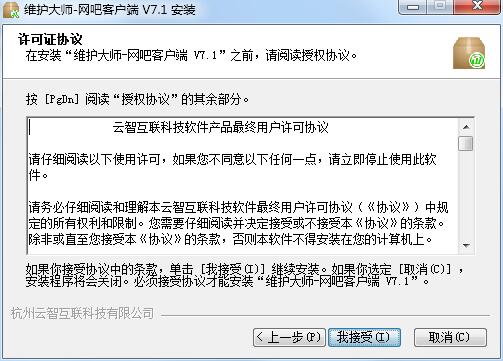
2. Read the following license agreement carefully and click I accept.
3. The Maintenance Master Internet Cafe client is being installed, please wait patiently.
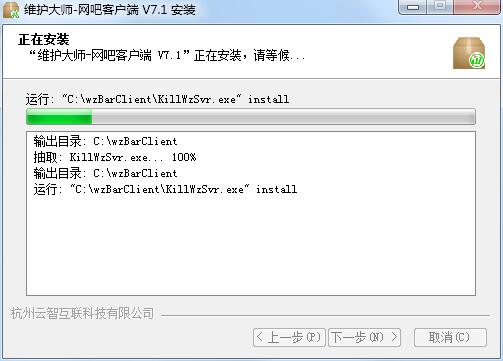
4. The Maintenance Master Internet Cafe client is installed, click Finish to exit the installation wizard
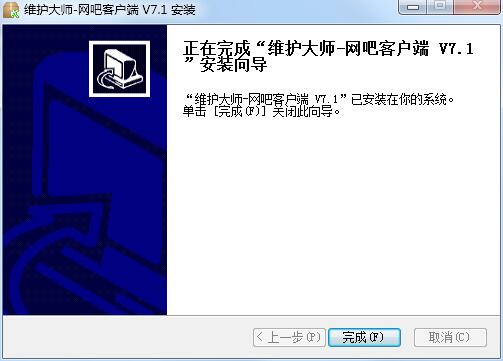
Maintenance Master Internet Cafe Client Update Log
1. Optimized some functions
2. Solved many unbearable bugs
Special instructions:
Hello, the software you are about to use is an auxiliary tool and may be intercepted and checked by major anti-virus software. This software may have risks, please pay attention to avoid it. If you want to continue using it, it is recommended to close various anti-virus software before use.
Attached is the software package decompression password: softwaredownload4.com
Huajun editor recommends:
After continuous official improvements, the Maintenance Master Internet Cafe Client can meet all your needs. Come download and experience it. Of course, this site has also carefully prepared for you the Hongtian Internet Cafe computer export system, batch small butler, and cloud machine butler.
Version: 2020.7.8.1 Official version | Update time: 2024-12-30
Similar recommendations





Latest updates


How to choose file association in Video Pioneer? - How to select file associations for Video Pioneer
How to download movies from Video Pioneer? - How to download movies from Video Pioneer
How to search for videos on Video Pioneer? - How to search for videos by Video Pioneer
How to delete history in Video Pioneer? -How to delete history records by Video Pioneer
How to set the skin for Video Pioneer? -How to set skin for Video Pioneer
Maintenance Master Internet Cafe Client Reviews
-
1st floor Huajun netizen 2022-03-13 20:51:51The Maintenance Master Internet Cafe client is very useful, thank you! !
-
2nd floor Huajun netizen 2021-01-04 06:46:51Maintenance Master Internet Cafe client software is very easy to use, the download speed is very fast, and it is very convenient!
-
3rd floor Huajun netizen 2021-06-30 19:50:13Maintenance Master Internet Cafe Client is awesome! 100 million likes! ! !
Recommended products






- Diablo game tool collection
- Group purchasing software collection area
- p2p seed search artifact download-P2P seed search artifact special topic
- adobe software encyclopedia - adobe full range of software downloads - adobe software downloads
- Safe Internet Encyclopedia
- Browser PC version download-browser download collection
- Diablo 3 game collection
- Anxin Quote Software
- Which Key Wizard software is better? Key Wizard software collection




