
-
Computer maintenance management system
- Size: 46.3M
- Language: Simplified Chinese
- Category: Source code download
- System: WinAll






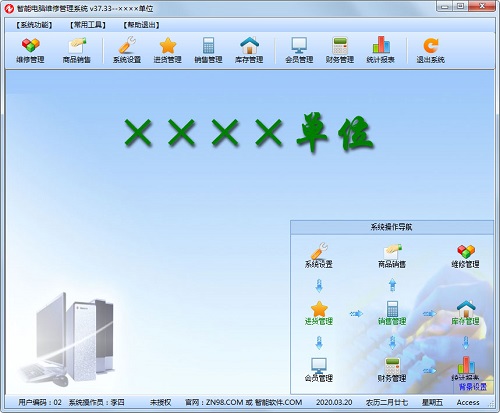
Computer maintenance management systemThe latest version is a commercial trade management tool with relatively complete functions. The latest version of the computer maintenance management system has rich functions and provides users with sub-modules such as sales management system, inventory management system (warehouse management system) and report system. andComputer maintenance management systemIt also supports barcode scanning, receipt printing, cash box control, customer display screen, electronic scale, membership card, and bank card. Huajun Software Park provides download services for computer maintenance management systems. Everyone is welcome to download and use it!
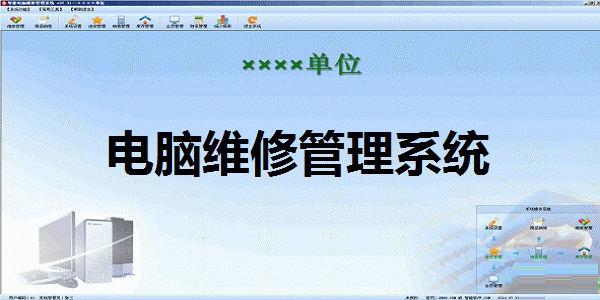
Computer maintenance management system software functions
1. The software interface is beautiful and friendly, easy to learn and use.
2. Supports barcode scanning, receipt printing, cash box control, customer display screen, electronic scale, membership card, and bank card.
3. Supports multiple barcodes for the same product (one product with multiple codes), and the same barcode corresponds to multiple products (one code with multiple products).
4. Support analysis and statistics of product retail sales, sales rankings, cost prices, average selling prices, gross profits, gross profit rankings, gross profit margins, gross profit margin rankings, and salesperson commission amounts, allowing you to have a clear understanding of operating profits.
5. Support users to conveniently and intuitively design personalized cashier receipts.
6. The software integrates functions such as retail cashier, wholesale, purchasing, warehouse, finance, personnel, commodity management, inquiry and reporting, system maintenance, etc. to assist you in business management.
7. Supports input operations such as mouse, keyboard, and barcode scanner, making retail cashier operations convenient and fast.
8. Support fuzzy query of goods based on barcode, product number, product name, common product name, product pinyin code, product Wubi code, mnemonic code and other conditions for retail cashier.
9. For products without barcodes, the software can automatically generate a product barcode.
10. Supports fuzzy query of members based on membership card number, name, mnemonic code (Pinyin abbreviation code), ID number and other conditions for retail cashier.
11. Support placing orders and taking orders during sales cashier.
12. Support customers to pay by cash, bank card, membership card, voucher, etc. during sales checkout.
13. Support free bundled sales, split sales, buy one get one free and other sales activities.
14. Support flexible and diverse membership classification, points, consumption accumulation, member consumption reports, etc.
15. The account management mode is adopted for cashier funds. Each cashier sets a corresponding account to facilitate real-time viewing of cashier funds.
16. Support tracking the production date and expiration date of goods to avoid losses due to scrapped goods.
17. The sales price (wholesale price, retail price, member price, member price, one to five) can be set according to the product category. The sales price can be automatically generated, reducing the workload of pricing.
18. For goods with multiple units, the software supports automatic conversion during procurement, retail, and wholesale.
19. Support the retail sale of designated products at promotional prices within a limited time period, and automatically sell them at ordinary retail prices outside the limited time period to improve retail flexibility.
20. Support the automatic implementation of different wholesale prices for customers of different levels to facilitate your management of wholesale sales.
21. Support the implementation of credit limit management for customers and reduce the risk of wholesale sales.
22. Support warehouse operations such as assembly/disassembly of goods, transfer of goods between different warehouses, manual adjustment of commodity inventory, commodity inventory counting, commodity damage (scrap), adjustment of commodity inventory cost price, etc.
23. Supports financial operations such as sales settlement inquiry, sales settlement, income category maintenance, other income maintenance, purchase settlement inquiry, purchase settlement, expenditure category maintenance, other expenditure maintenance, account information maintenance, fund deposits and withdrawals (allocation) between different accounts, payment methods, etc.
24. Supports self-designed queries and reports, allowing you to freely analyze business conditions.
25. Support granting different operation permissions to different users.
26. Supports automatic recording of software operation logs, allowing you to check the status of each operation at any time.
27. Support the address book function to save the contact information of customers, suppliers, friends, etc. Users can quickly query by name, mobile phone number and other conditions.
28. Support memo function, save memo information, and the software will automatically remind designated users regularly.
29. Supports the memo calendar function, which is convenient for viewing memo information by specified dates, and supports the perpetual calendar (lunar calendar) function.
30. The software automatically backs up data regularly or reminds you to back up data to ensure data security.
31. It has a professional front-end POS sales function, supporting barcodes, receipt printing, cash boxes, customer display screens, membership cards, etc. You can design various unique printing formats according to your own preferences. The printing format can be switched at any time during sales, and the shortcut keys are abundant. The keyboard can be used to replace the mouse operation.
32. All documents and reports can be previewed before printing, and can be exported to Excel files, and then specially arranged and processed according to your actual needs.
33. Support automatic backup of data.
34. Supports single warehouse/multiple warehouses or head office/branch management system, and can manage any warehouse or branch and any variety of inventory.
35. The online version has a flexible network construction method. The head office and branches can share data through telephone dialing, DDN dedicated lines and the Internet, without the need for cumbersome network settings and server configuration.
36. Upgrade intelligence. You can upgrade the software through the Internet with just a click of the mouse, eliminating the pain of upgrading.
37. Maintenance management includes order registration, repair product failure, work dispatch records, repair products, return to factory records, settlement management, and return visit feedback management;
Computer maintenance management system software features
1. It can solve the cumbersomeness of manual accounting.
2. It allows the boss to know the specific inventory situation at any time.
3. You can understand the company's operating performance at any time.
4. The inventory work is easier and faster, and it does not even affect the operation.
5. Performance commission calculation is more convenient, the system automatically calculates it, and there is no need to worry about errors.
6. Bosses, financial and management personnel are no longer trapped in specific numerical work.
7. Maintenance management includes order registration, repair product failure, work dispatch records, repair product maintenance, factory return records, settlement management, and return visit feedback management.
Computer maintenance management system installation steps
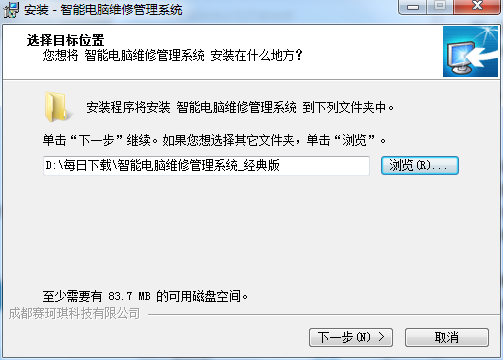
1. Download the computer maintenance management system from Huajun Software Park and unzip it to the current folder. Click on the exe application and select the software installation location interface. The editor of Huajun Software Park recommends that users install it in the D drive, select the installation location and click to install.
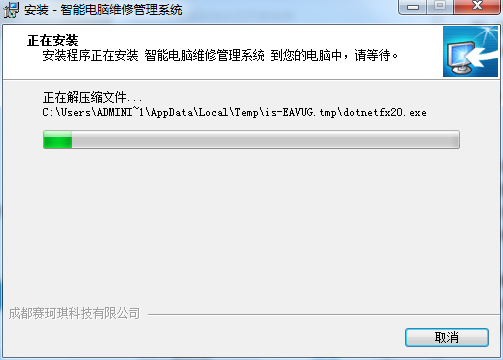
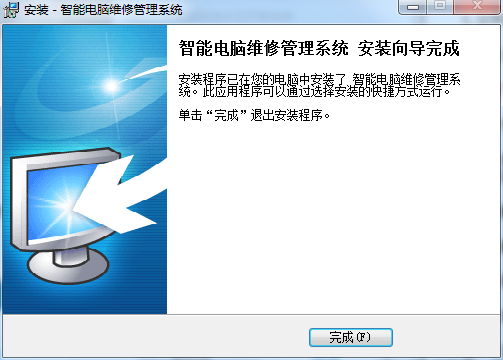
2. The computer maintenance management system is being installed, users will wait patiently for a while.
3. The computer maintenance management system installation is completed, click Finish.
Frequently Asked Questions about Computer Maintenance Management System
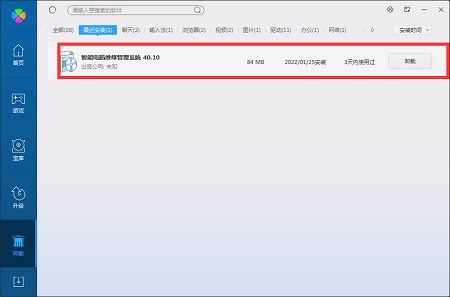
Question: How to uninstall the computer maintenance management system software?
Answer: Method 1: Install and open the computer manager software, select the software management option, click the uninstall option, find the computer maintenance management system software in the list, and click uninstall
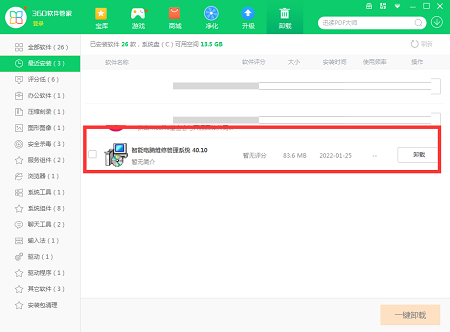
Method 2: Install and open 360 Software Manager, find the computer maintenance management system software in the list of uninstall options, and click to uninstall.
Comparison of similar software
Cloud ladder terminal computer maintenance management systemIt has various management functions such as procurement management, sales management, recycling/dismantling, warehouse management, and personnel management.
Jiefeng Maintenance Management SystemIt includes seven subsystems including authority management, basic settings, daily office, customer management, inventory management, maintenance management, and report center.
Huajun editor recommends:
Computer maintenance management systemThe latest version has rich functions and provides users with sub-modules such as sales management system, inventory management system (warehouse management system) and report system. Computer maintenance management system has always been the most commonly used software by most netizens. You can download it from Huajun Software Park!
Version: 40.10 latest version | Update time: 2024-12-30
Similar recommendations






Latest updates



Computer Maintenance Management System Review
-
1st floor Huajun netizen 2022-02-13 13:49:45The computer maintenance management system software is very easy to use, the download speed is very fast, and it is very convenient!
-
2nd floor Huajun netizen 2022-03-25 16:33:13Computer maintenance management system is awesome! 100 million likes! ! !
-
3rd floor Huajun netizen 2022-02-09 15:39:32The overall computer maintenance management system feels good and I am quite satisfied with it. The installation and operation are very smooth! It went very smoothly following the installation step-by-step guide!
Recommended products
-

Jian Daoyun
-

barcode generator
-
PHPExcel
-

Universal website backend management system (php version)
-

UFIDA Huabiao CELL plug-in
-

Yunbo search magnetic search
-

Picture thief of Piao Piao Art Museum
-

IK Analyzer open source Chinese word segmentation
-

CKEditor (FCKeditor) rich text editor
-
Card alliance whole site program source code php version
- Diablo game tool collection
- Group purchasing software collection area
- p2p seed search artifact download-P2P seed search artifact special topic
- adobe software encyclopedia - adobe full range of software downloads - adobe software downloads
- Safe Internet Encyclopedia
- Browser PC version download-browser download collection
- Diablo 3 game collection
- Anxin Quote Software
- Which Key Wizard software is better? Key Wizard software collection




