
-
seewo class optimization master
- Size: 143.88M
- Language: Simplified Chinese
- Category: Educational Management
- System: WinAll






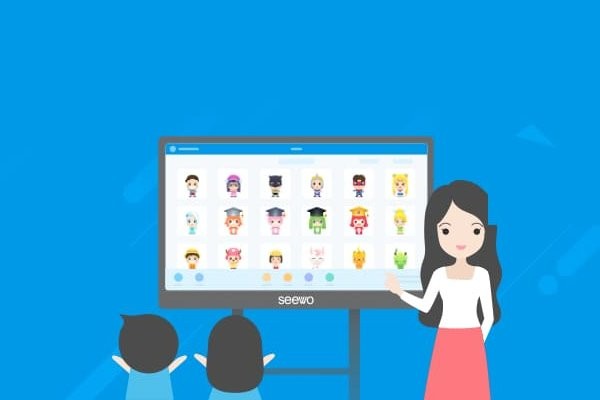
Class Optimization Master PC versionIt is a product launched by Guangzhou Shirui Electronic Technology Co., Ltd.classroommanagement software. The computer version of Class Optimization Master provides convenience for online classroom teaching and management. It creates a new classroom management model, improves students' learning enthusiasm, and creates a good learning atmosphere. Friends who like the computer version of Class Optimization Master, come to Huajun Software Park to download and experience it!

Features of the PC version of Class Optimization Master
Random selection and multiple evaluation
Breaking the traditional roll call: supporting single/multiple players, one-by-one/solo selection, combined with the group selection mode to achieve diversified evaluation. For example, teachers can randomly select students to answer questions or comment on the performance of multiple students to enhance classroom participation.
Customized evaluation system: 48 preset standards (such as "Listen carefully +5" and "Disrupt discipline -3"), and support customized characteristic evaluation items (such as "Creative problem solving" and "Collaboration pacesetter"). All evaluation data generates visual reports such as radar charts and trend curves in real time to help teachers accurately locate students' weak links.
Gamification incentive mechanism
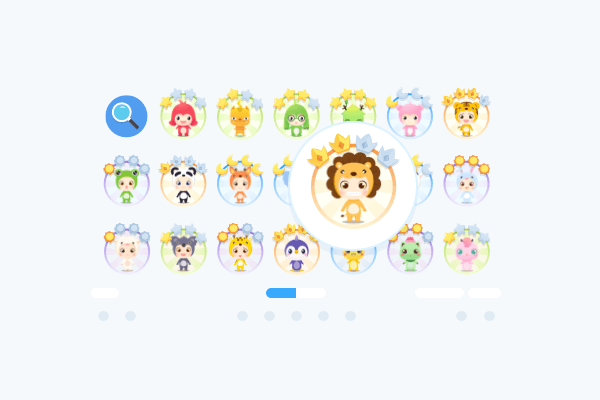
Cartoon character development: Students initially have a basic animal image, and can unlock 52 kinds of dressing accessories (such as doctor's hats and lab coats) through points. The avatar upgrade follows the "caterpillar → butterfly" advancement path to stimulate a competitive spirit.
Multi-dimensional honor display: Dynamically update 12-dimensional honor lists such as "Weekly Progress Star" and "Discipline Expert", support individual/group mode display, and create a competitive atmosphere.
Situational reward mechanism: Points can be redeemed for physical prizes (such as stationery exchange coupons) or virtual privileges (such as the right to request songs between classes). Practical data from a primary school in Hangzhou shows that this mechanism increased classroom participation by 37%.
Highlights of Class Optimization Master PC Version
Class reports and analysis
Behavioral data visualization: Detailed records of the behavior of all students in the class, and generation of radar charts, trend curves and other reports to help teachers discover management blind spots. For example, through the data tracing function, teachers can analyze the reasons for periodic performance fluctuations of students and adjust teaching strategies accordingly.
Student growth files: Based on daily evaluation data, an electronic file is generated for each student to visually display the growth trajectory.
AI intelligent auxiliary tools
AI comment generation: One-click generation of personalized and instructive comments based on student performance, reducing the burden of teachers' final evaluation.
Potential assessment model: Combining student behavior at school and parent assessment, a comprehensive quality assessment model is constructed based on the Little Five personality theory to provide scientific suggestions for personalized development.
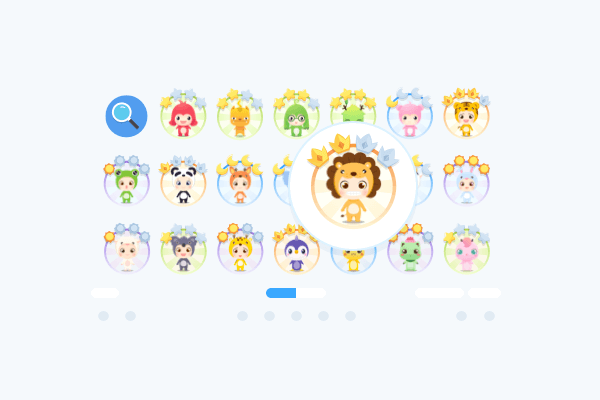
Class Optimization Master PC version features
Real-time synchronization of classroom performance
Parent-side visualization: Parents can view the "Class Performance Report" containing 45 indicators through the mobile phone, such as the number of active speeches and ratings of knowledge point mastery, reducing the teacher's burden of frequent communication.
Homework management system: Supports submission of homework in text, picture, and video formats. Teachers can use 12 types of annotation symbols to mark homework. Parents can check homework completion status and teacher feedback.
Targeted communication mechanism
Notifications must reach: After the class notice is released, the system will automatically count the viewing status of parents, and those who have not viewed it can be reminded with one click to ensure that no information is missed.
Voice/video comments: Teachers can send personalized comments to avoid information overload in the home-school group. Research by the Beijing Haidian District Teaching Research Institute shows that this feature improves home-school communication efficiency by 60%.
Check-in and co-education platform
Task template library: Provides check-in templates such as "daily reading, exercise, and calligraphy". Teachers can customize tasks. Parents and students can return results through video, audio, and text. The system automatically generates comparison reports to help develop habits.
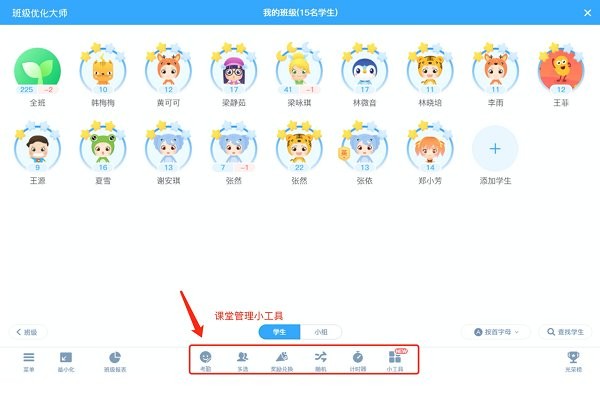
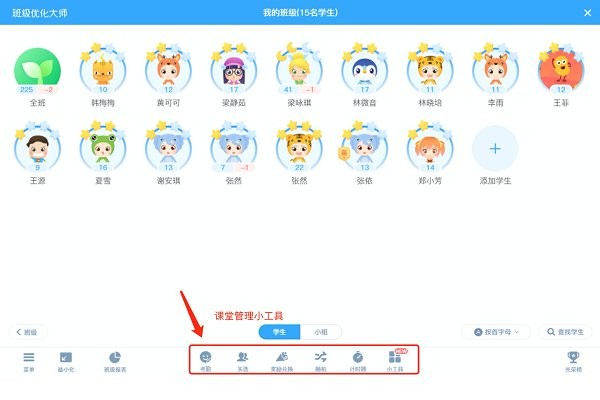
Classroom Toolset
Electronic attendance: quickly record student attendance and reduce manual statistics time.
Group teaching: Supports subject grouping and project group coexistence management mode to improve collaboration efficiency.
Timer: Control the time of classroom activities to ensure a tight teaching rhythm.
Classroom Toolset
Electronic attendance: quickly record student attendance and reduce manual statistics time.
Group teaching: Supports subject grouping and project group coexistence management mode to improve collaboration efficiency.
Timer: Control the time of classroom activities to ensure a tight teaching rhythm.
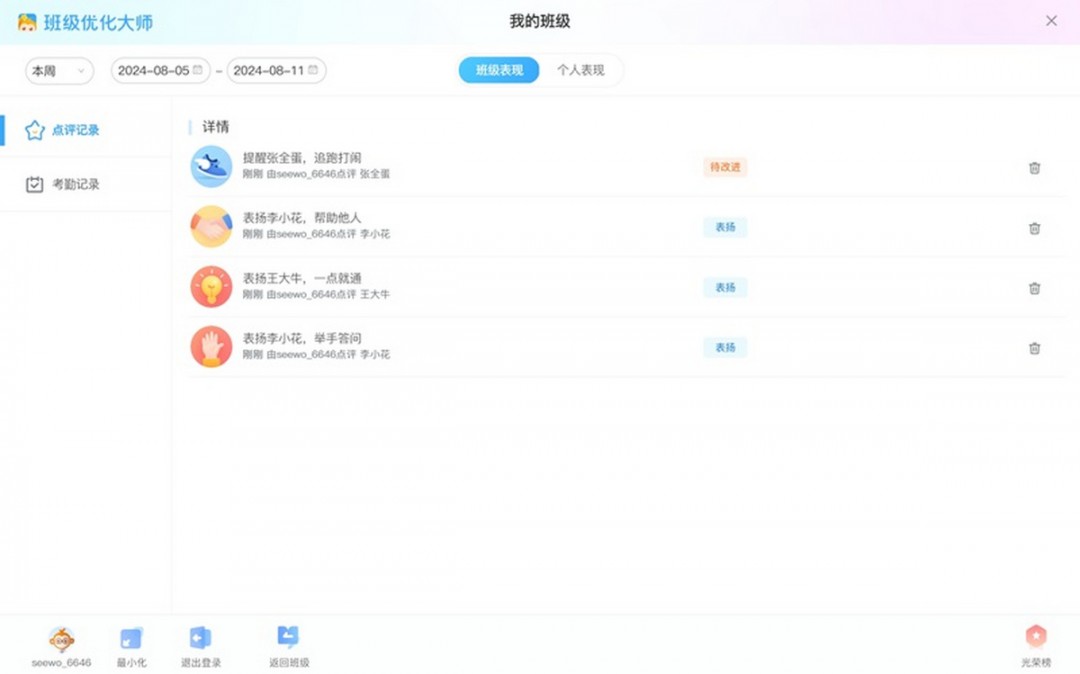
Tips for using the PC version of Class Optimization Master
Class creation
When a teacher uses this software, the most important thing is to create a class. Here is how to create a class:
1. OpenClass Optimization Master PC version,After entering classroom management, click [Create Class]

2. Enter subject, grade, and class related information, and fill in a class nickname, and click [OK] to complete the creation.

3. If you want to join a class, click [Join Class], enter your Xixi number, and you can join the class after the class creator has approved it. (Xixi number can be obtained from the class creator)
Students grouping
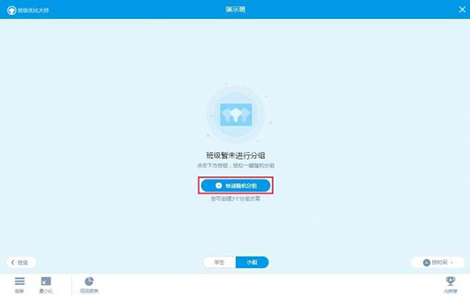
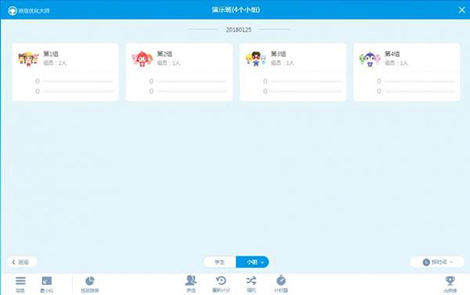
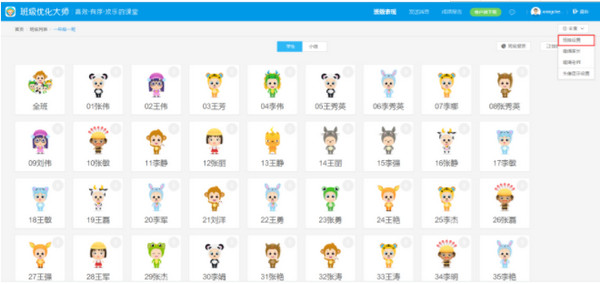
First, open the Seewo Class Optimization Master class list interface and select a class. After entering the class, click the [Group] tab above and click [Quick Random Group].
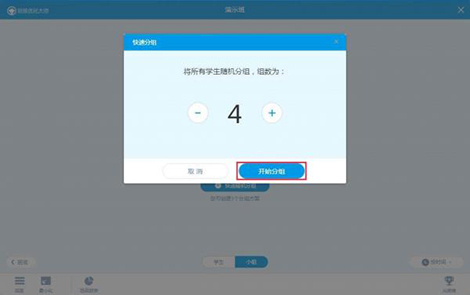
Then, you can customize the students into several groups. After selecting, click [Start Grouping], and the background will randomly group the students.
Drag the student’s name to the corresponding group, and then click [Save] to save the current grouping plan.

Finally, wait a moment and the grouping will be completed.
Class Optimization Master Quick Start Tutorial
To quickly activate the class with Class Optimization Master, do the following:
Download the computer version: Download the installation package adapted to the all-in-one machine/whiteboard system from official channels.
Install software: Use a USB flash drive to copy the installation package to the classroom device, double-click and follow the wizard to complete the installation.
Register and log in: New users register an account, existing accounts log in directly.
Class comments: You can comment on students after logging in; if there are no classes/students, they need to be created and added on the web page first.
Class Optimization Master Login Account Tutorial
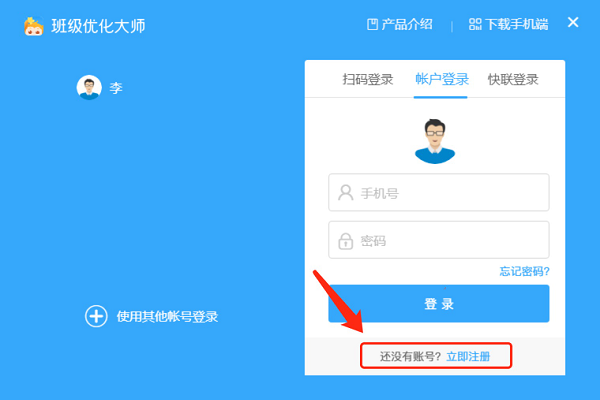
Double-click to open the software and click [Register a new account];
Fill in the mobile phone number, receive the verification code and fill it in;
Set an 8-16 digit password (letters + numbers) and click [Register];
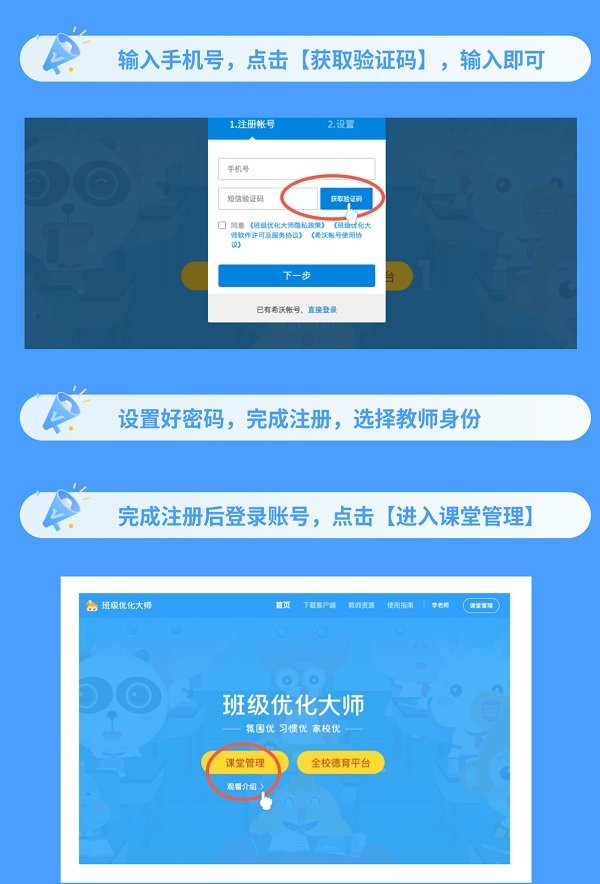
After successful registration, click [Return to login] and enter your account and password to log in.
Class Optimization Master Registration Detailed Steps
Start the software and enter the login interface;
Click [Register a new account] to jump to the registration page;
Fill in your mobile phone number, click [Get Verification Code] and fill it in;
Set a password, confirm that the information is correct and click [Register];
After successful registration, return to the login interface and enter your account and password to log in.
Seewo Class Optimization Master FAQ
1. Seewo Class Optimization MasterRegisterHow do you choose your identity?
Each person’s account only supports one identity, so you should choose carefully when registering. Once the identity is confirmed, it cannot be changed.
If you are a teacher, choose the teacher status; if you are a parent, choose the parent status. If you are both a parent and a teacher, still choose the teacher status.
2. How many students can each class accommodate?
The current version supports up to 20 students joining a class.
3. Can parents see the performance of other students besides their own children?
No, in order to prevent blind comparisons between students, parents in Seewo Class Optimization Master can only see their own children's situation. This is also to protect the privacy of other students.
4.How to dissolve a class?
Open the class management interface and there is an option to dissolve the class in the upper right corner. Note: Please choose carefully, once disbanded, all information will be deleted!
Recommended software similar to Class Optimization Master PC version
seewo teaching assistantIt is a classroom also launched by seewo GroupAuxiliary softwarepieces. It has strong teaching interactivity. Its slogan is "Education is more exciting because of interaction." Seewo Teaching Assistant supports functions such as photo uploading of incorrect questions, courseware demonstration, mobile phone and computer screen synchronization demonstration, etc., providing great convenience for micro-class teaching. Recommended for everyone to download and experience:http://softwaredownload4.com/soft/1107048.htm
Seewo Class Optimization Master PC Version Update Log
1. Launch the shining point function to encourage the discovery of children’s shining points!
2. Optimize experience and fix known issues.
Huajun editor recommends:
Seewo Class Optimization Master PC version, as a software that is continuously updated and iterated, has been revamped in version updates to better meet user needs and bring users a very high user experience. The editor of Huajun Software Park recommends everyone to download and use it. In addition, there are other related software such as Bertso Cloud Academy Student App, Seewo Class Optimization Master, and Writing Words 2017, which are also good and can be downloaded and used.
Version: 2.1.0.3239 | Update time: 2025-12-01
Similar recommendations




Latest updates




Seewo Class Optimization Master Reviews
-
1st floor Huajun netizen 2021-10-05 21:22:26Seewo Class Optimization Master PC version overall feels good and I am quite satisfied with it. The installation and operation are very smooth! It went very smoothly following the installation step-by-step instructions!
-
2nd floor Huajun netizen 2022-01-17 16:27:37The computer version of Seewo Class Optimization Master is pretty good and downloads very quickly. I give you a good review!
-
3rd floor Huajun netizen 2021-08-24 23:10:05Seewo Class Optimization Master PC version has comprehensive functions and is very convenient to use.
Recommended products
-

Yida school textbook management software
-

Class scheduling system for primary and secondary schools
-

Yukeyun Home School 2017 (Statistical Analysis of Score Management WeChat Home School)
-

Intelligent broadcast bell system (campus version)
-
Yijie question bank management and examination system
-

Future Education Level 2 MS Office paperless exam simulation software
-
seewo class optimization master
-

Student performance management system
-

Yida student admission ticket printing system software
-

Primary and secondary school library management system
- Diablo game tool collection
- Group purchasing software collection area
- p2p seed search artifact download-P2P seed search artifact special topic
- adobe software encyclopedia - adobe full range of software downloads - adobe software downloads
- Safe Internet Encyclopedia
- Browser PC version download-browser download collection
- Diablo 3 game collection
- Anxin Quote Software
- Which Key Wizard software is better? Key Wizard software collection




