-
word to pdf converter
- Size: 42.04M
- Language: Simplified Chinese
- Category: Office software
- System: Win






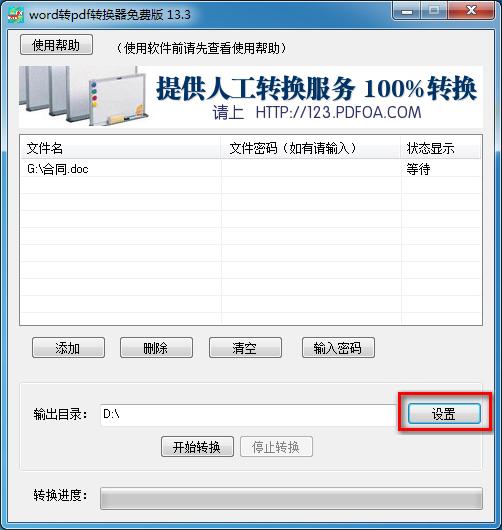

The word to pdf converter can quickly convert single documents or multiple documents to PDF. It saves a lot of time and improves work efficiency for batch conversion users. It is a very practical tool. The word to pdf converter software is compact and easy to operate. Even if you are a novice, you can easily get started without any other knowledge. If you need a word to pdf converter tool, hurry up and download it from Huajun Software Park.

word to pdf converter software instructions
The word to pdf converter is a powerful and easy-to-use word to pdf software tool. It has a simple interface, stable functions, supports batch conversion, and is very convenient to operate. The free version of the word to pdf converter can convert offi with one click. ceWORD2000, 2003, 2007, 2010, 2013, 2016, office365, wps and other word files are converted to PDF, word to pdf free converter, WORD to PDF has good effect and fast speed. The word to pdf converter perfectly supports converting word documents into pdf documents. There is no need to install Adobe when using the word to pdf converter. Acrobat, Acrobat Reader pdf software. With this software, you no longer need to ask how to use the converter to convert word to pdf, how to convert word to pdf, and how to convert word to pdf. The software is simple and easy to use, and you can use it at a glance.
Features of word to pdf converter
The word to pdf tool can help you convert word documents into pdf document format without rearrangement. It supports mixed layout of images and text. Before using the word to pdf converter, please confirm whether the word file has a password. If there is, remove it first and then convert it for better results.
This software works like installing a pdf virtual printer on your computer, which can quickly convert word files stored on your computer into pdf files.
This is a stand-alone software that does not require an Internet connection. The web version of word to pdf online conversion for free has poor security. You must upload files to convert. This software is a stand-alone software that converts files on your own computer. The files will not be seen by others and the security is very good.
The picture will not be blurry after converting word to pdf. I often hear netizens say what to do if the format of converting word to pdf has changed. The formula for converting word to pdf is misplaced, and a blank page appears when converting word to pdf. Please feel free to use it. This software conversion has not found this situation.
Word to PDF converter installation steps
1. First download the word to pdf converter from this site and get the compressed package in rar format.

2. Right-click the rar format compressed package and select to extract it to the current folder to get the exe installation file, as shown in the figure below:

3. Then we double-click the word to pdf converter exe file to enter the installation wizard interface, click "Next" to continue the installation; click "Cancel" to exit the installation program.

4. After clicking Next, we will enter the word to pdf converter license agreement interface. After reading the installation agreement, click "I agree to this agreement". You can only continue the installation if you agree to the agreement. Click "Next" to continue;

5. Enter the target location selection interface, you can choose to install to the c drive by default, and then click Next. This can quickly install the WORD to PDF converter, but it will occupy system disk resources after installation. The editor recommends that you install it on a non-system disk.

6. Customized installation: You can also click to browse. In the window that opens, you can select the installation location of the word to pdf converter, select and click "OK" to complete. Then click "Next" to continue.


7. Enter and select the Start Menu folder. When the program is installed successfully, this folder will be automatically created in the Start Menu for easy search and management. Here you can just choose the default one, and then click "Next" to continue; of course, you can also choose to check the "Do not create a start menu folder" option. In this way, this folder will not be created in the start menu. Just choose according to your own needs.

8. Enter the additional task interface for selecting the word to pdf converter. There are two additional tasks: creating a desktop shortcut and creating a quick run bar shortcut. These two items are checked by default, just select the default here. Click "Next" to continue.

9. Enter to prepare to install the word to pdf converter. Here you can see the settings of the software installation location, the settings of the start menu folder and the settings of the attachment tasks in the previous steps. After confirming that the information is correct, we click "Install" to start the installation.

10. The word to pdf converter is being installed, please wait patiently for the installation progress bar to be completed.

11. The installation of the word to pdf converter is complete, click Finish to start using it. The option "Run word to pdf converter" will be checked by default. If the installation is successful, it will automatically run and open the program for use. Of course, you can also choose not to check it. You can also double-click the desktop shortcut when starting next time.

How to use word to pdf converter
1. Double-click to open the word to pdf converter software. After opening the software, click "Add", select the document you want to convert in the window that opens, and click [Open].

2. Then set the output directory: The output directory is where you want the converted PDF files to be saved. Click "Settings" to select the path.

3. After the settings are completed, select Start Conversion and wait for the conversion. After a while, you will be able to successfully convert word to pdf format. You can view the conversion progress of a single item in the status display column, or you can view the conversion progress below the software. (If the file has a password, select the file that has been added to the software, click "Enter Password", enter the password, click OK, and then click to start conversion.

Frequently asked questions about word to pdf converter
1. When using the word to pdf converter to convert files, it prompts "Control loading error, please reinstall the program!" What's going on?
Answer: If this happens when you use the wordl to pdf converter, you can try to reinstall the software. If reinstalling the software still doesn't work, please contact customer service and we will solve it for you as soon as possible after receiving the message.
2. What should I do if the file conversion error occurs or garbled characters appear when converting word to pdf?
Answer: If a file conversion error occurs, please check whether Microsoft Office is installed on your computer. Word. Confirm that the installation is correct and double-click to open the document to be converted. If it opens normally, there will be no problem with the conversion. One thing to note here is that if this document is version 07 and the version installed on your computer is version 03, then you need to first Upgrade Microsoft Office Word first, and then use this tool to convert it without any problem.
3. Does the word to pdf converter have a limit on the size of the converted document?
Answer: This word to pdf converter has no limit on document size. However, when the converted files are too large or too many, the conversion may take longer. This is a normal phenomenon and you can use it with confidence.
What is the difference between word to pdf converter and fast PDF converter?
Word to PDF converter is a software specially designed for converting WORD to PDF. To put it simply, it means that the conversion is one-way. It can only convert WORD to PDF, but not PDF to WORD. This is somewhat restrictive. If you simply convert PDF to Word, this tool is enough.
The difference between Swift PDF Converter and word to pdf converter is that it can support the conversion of multiple formats, such as ppt, excel, word, pictures and other formats to PDF. For users who often convert to different formats, this is more convenient to use and can be done with just one software.
Both word to pdf converter and quick format converter can convert word to PDF, and the operation is relatively simple. Both softwares have their own characteristics, and you can choose to download them according to your own needs.
Click to download the fast PDF converter: http://softwaredownload4.com/soft/569684.htm
word to pdf converter update log
1. Word to PDF converter improves software conversion speed
2. Solve the problem of lagging in large file conversion
3. Word to PDF converter improves software conversion effect
Huajun editor recommends:
As a widely used and powerful free office software, word to pdf converter has received unanimous praise from many netizens for its functions. It is strongly recommended that everyone download and use it. In addition, Aimo Brain Map, Hanwang attendance management system, and .NET are also recommended for everyone to download and use.
Version: 13.3 Free version | Update time: 2024-12-23
Similar recommendations





Latest updates





How to delete history in Video Pioneer? -How to delete history records by Video Pioneer
How to set the skin for Video Pioneer? -How to set skin for Video Pioneer
How to upgrade software in 360 Software Manager? -How to upgrade software in 360 Software Manager
How to draw a lottery in 360 Software Butler - How to draw a lottery in 360 Software Butler
word to pdf converter review
-
1st floor Huajun netizen 2022-01-20 04:48:52The word to pdf converter is very useful, thank you! !
-
2nd floor Huajun netizen 2021-09-06 07:22:13The interface design of the word to pdf converter is very easy to use and has rich functions. I highly recommend it!
-
3rd floor Huajun netizen 2021-11-25 08:08:01The word to pdf converter is awesome! 100 million likes! ! !
Recommended products







- Diablo game tool collection
- Group purchasing software collection area
- p2p seed search artifact download-P2P seed search artifact special topic
- adobe software encyclopedia - adobe full range of software downloads - adobe software downloads
- Safe Internet Encyclopedia
- Browser PC version download-browser download collection
- Diablo 3 game collection
- Anxin Quote Software
- Which Key Wizard software is better? Key Wizard software collection




