
-
National karaoke
- Size: 83.02M
- Language: Simplified Chinese
- Category: Karaoke software
- System: Win All











National Karaoke is an entertaining singing software and Tencent’s first K-song social software. Users can jump to the QQ music platform in real time when using National Karaoke. National Karaoke has various personalized scoring systems and social circles. Users can have fun interactions with friends, share Karaoke songs, etc. Let your friends sing karaoke whenever and wherever they want. Huajun Software Park provides download services for National Karaoke. To download other versions of National Karaoke, please go to Huajun Software Park!
Download and install karaoke for all:
1. First, download the [National Karaoke Computer Version] software package locally in the Huajun Software Park, double-click to unzip it, find the .exe format program, and double-click to run it.

2. Select custom installation and click the [Custom Installation] button to enter the setting interface.

3. After selecting the customized installation, enter the customized installation interface of the computer version of National Karaoke. In this interface, we click [Browse...] and check according to your needs: after everything is set, click the [Install Now] button.
Create a desktop icon: Create a quick start entry on the computer desktop
Add to quick launch bar: Create a quick launch entry in the quick launch bar
Automatically start at boot: Checking this option will automatically run the National Karaoke PC version every time you restart your computer. Please operate with caution.
4. Finally, the computer version of National Karaoke will enter the installation progress bar interface. In this interface, we can wait patiently for the installation to be completed.
National karaoke usage tutorial
National karaoke accompaniment export
1. First we need to connect the mobile device to the computer with a USB data cable, as shown below: After the connection, a disk will be displayed on the computer. We double-click to enter the disk content.

2. After entering the disk, select Android -> data -> com.tencent.karaoke folder and enter the folder.

3. Finally, we choose to move the video resources in this folder to a folder on another computer.
National karaoke upload accompaniment
1. Open the computer version of National Karaoke and click the [Upload Accompaniment] button. As follows:

2. After selecting to upload accompaniment, enter the upload interface. First select the [Click here] button, and then [Select File]. After entering the file selection interface, we will complete the uploaded song information according to the prompt settings.
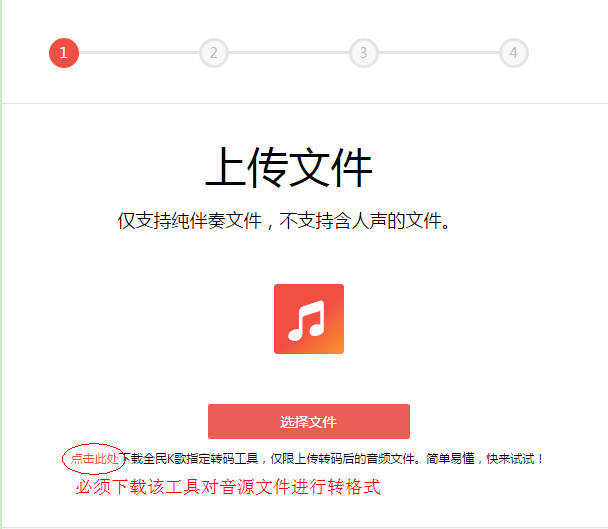
3. Finally, National Karaoke uploaded the accompaniment successfully
Frequently Asked Questions about National Karaoke Computer Version
How to cancel your account on National Karaoke?
National Karaoke currently does not support the account cancellation function. If users want to cancel their account, they can contact National Karaoke customer service to apply for account cancellation.
1. Open National Karaoke, click "My", and click the settings icon in the upper left corner;
2. Enter the settings panel, click "FAQ" in "Help and Feedback", you can find questions related to account cancellation or directly enter "logout" in the search bar;
3. Click to enter the relevant questions, click "Feedback" at the bottom, fill in the reason for user cancellation and account number, then submit feedback and wait for customer service processing. National Karaoke customer service will complete the application review within 5 working days.
Where are the local recording files of National Karaoke?
Mobile version:
1. Open the phone file management and open Android in all files.
2. Select the data folder. Select the directory com.tencent.karaoke.
3. Then select files, and finally open localsong to see the local recording.
Computer side: First open my computer and search for the wesingCache folder. After opening it, click on the wesingDL folder and find the Output folder inside. After clicking it, you can see the local recording files of National Karaoke.
How to sing along in the computer version of National Karaoke?
1. First open the computer version of National Karaoke, select [I want songs] on the left function bar and select any song [K Song] to enter the Karaoke interface.
2. After finishing the song, select the [Chorus] option, then merge the two recordings and save them. Currently, the computer version of National Karaoke does not support the function of double chorus, and can only use synthesis mode to achieve chorus.
How to export the recording of National Karaoke?
Some friends don’t know how to export the sound after recording it with karaoke. Next, the editor will share with you the tutorial on exporting the recording of karaoke:http://softwaredownload4.com/sbdm/news/tutorial/8362.html
1. Account management
1. Cancel account
Path: Open National K Song → "My" in the lower right corner → "Settings" in the upper right corner → "Help and Feedback" at the bottom → Search "Cancel Account" → Read the agreement and submit the application.
Note: The account cannot be restored after logging out. You need to back up your works in advance and clear your K coin account.
2. Cancel automatic renewal
Operation within the APP: Enter "My" → "VIP Center" → "Management" in the upper right corner → turn off the "Auto-Renewal" switch.
Third-party payment channels:
WeChat: Enter WeChat "Me" → "Payment" → "..." in the upper right corner → "Deduction Service" → Close National Karaoke.
Alipay: Enter Alipay "My" → "Settings" → "Payment Settings" → "Password-free Payment/Automatic Deduction" → Close National Karaoke.
2. Making money and profits
1. Ways to make money
Live broadcast rewards: After the live broadcast is started, the virtual gifts given by fans can be exchanged for cash, with a share ratio of about 30%-40%.
Copyright income: Upload original songs or cover works and make profits through platform advertising sharing or copyright authorization.
Business cooperation: cooperate with brands to promote, or participate in platform activities to win bonuses.
Signed host: Sign with a platform or guild to enjoy traffic support and guaranteed income.
2. Withdrawal process
Path: Enter "My" → "K Coin Account" → click "Withdraw" → bind bank card or WeChat wallet → enter the amount and submit.
Arrival time: daily settlement or monthly settlement, usually within 7 working days.
Note: Real-name authentication needs to be completed, and the cash withdrawal amount must be ≥ 10 yuan (except for some activities).
3. Content Creation and Publishing
1. Record songs
Steps:
Click "K Songs" on the homepage → search for songs → select "Record Songs".
Adjust sound effects (reverb, equalizer) → record with headphones → post-edit (noise reduction, voice change) → publish.
Tips:
Use anti-blowout microphone covers to reduce noise and choose a quiet environment for recording.
Turn on the "ear-return" function to monitor your own voice in real time.
2. Upload video
Path: Click "+" on the homepage → Select "Upload Video" → Import MP4/MOV files from the album (≤500MB) → Edit cover, title, tags → Publish.
Format requirements: supports horizontal or vertical screen, recommended resolution is 1080P or above.
4. Cross-platform and social functions
1. Move to Douyin Live
Method one:
National K-song "Live Broadcast" → Select "Douyin Live Broadcast" → Authorize the account.
Douyin automatically jumps to authorization → Return to National Karaoke to start live broadcast, and the content is synchronized to Douyin.
Method two:
Douyin "Me" → "Settings" → "Third-party account binding" → Authorize everyone to sing karaoke.
Check "Sync to Douyin" when the national karaoke is launched, and the audience can watch it on Douyin.
2. Open a singing room
Steps:
Click "Singing Room" on the home page → "Create" in the upper right corner → select the type (such as multi-person chorus, private room).
Set name, cover, permissions → Invite friends or publicly recruit members.
Permissions: Some advanced functions require VIP membership (such as customizing the song room theme).
3. Add friends
Method:
Search for nickname/QQ number → Enter personal homepage → Click "Follow".
Connect WeChat/QQ account → Automatically synchronize friend list.
Interaction: comment under the work, send gifts, or initiate a chorus invitation.
5. Live broadcast and interaction
1. Live broadcast
Broadcasting conditions:
Complete real-name authentication, account level ≥5.
Some functions (such as wheat connection and PK) require VIP activation.
Operation:
Click "Live Broadcast" on the home page → select a theme and cover → turn on the camera/microphone.
Interact with the audience (lottery, Q&A) → You can check the earnings after the live broadcast.
2. Turn off monitoring
Path: "Listen" button in the lower left corner of the live broadcast interface → click to close (to prevent the audience from hearing your own voice).
6. Frequently Asked Questions
Version compatibility: Some functions (such as Douyin synchronization) require National Karaoke V8.20 and above.
Audit rules: Live broadcast content must comply with the "National Karaoke Live Broadcast Service Agreement", and violations such as vulgarity and advertising are prohibited.
Equipment recommendations:
Recording songs: condenser microphone (such as Audio-Technica AT2020) + independent sound card (such as Focusrite Scarlett).
Live broadcast: ring fill light + anti-blowout muff + stabilizer.
Which one is better, national karaoke or singing bar?
The login methods of both Changba and National Karaoke software can support quick login with QQ account, but the official version of National Karaoke can also support login with WeChat account in addition to QQ account login, while Changba also supports login with Sina Weibo account. In terms of login methods, the two are about the same.
However, National Karaoke is a product of Tencent after all, and it can also cooperate with other products of Tencent. For example, in QQ Music, friends can directly switch to National Karaoke for karaoke with one click after discovering good songs in QQ Music. It also supports searching for corresponding songs directly in the software for karaoke.
As for Changba, you can only search for corresponding songs in your own software interface for karaoke. Both karaoke software can support functions such as fan interaction, leaving messages, sending flowers or sharing.
If you also like to sing, you can get the link address here:http://http://softwaredownload4.com/soft/637576.htm
National Karaoke PC version update log:
[Tencent’s official singing and dating platform, the first choice of 800 million people]
- Easily create anytime, anywhere, and let your stage be seen by the world
- Massive high-quality accompaniment library, including new and popular songs, everything you want to sing is available here
- Chorus: Sing the same song with friends from all over the world, and even star in the same frame with celebrities
- Live broadcast: People who are good to watch, listen to, and have fun are all here, and you can also be the host to compete across rooms
- Fast singing, reciting, a cappella... there is always your favorite performance method
[Group chat in the singing room: chat about singing and making friends online]
- Song Room: Sing, make friends and play games, real-time interaction is more fun
- Group chat: exchange works, like each other, and easily meet new singer friends
- Grab the mic: Sing the songs and compete with your hand speed to see who has the best song library
- Family: It is fate to make friends through singing, and all the singers in the world are like one family.
- Acoustic chorus: two people can sing in real time by matching each other, and they can sing unlimitedly by lighting up each other's lights.
Huajun editor recommends:
The editor promises that as long as you use National Karaoke, if you don't like it, you can come and hit me! The editor has also prepared Keynote Queryer, Adobe Audition CC, and Batch Butler for you.
Version: 5.0.0.2 | Update time: 2025-06-26
Similar recommendations


Latest updates





How to sing high scores in national karaoke? National karaoke high score tutorial
How to open a singing room in National K-Sing? -How to open a karaoke room for everyone’s karaoke
How to increase the number and level of flowers in National Karaoke? National karaoke brush tutorial
How to cancel your account on National Karaoke? -How to cancel the account of National Karaoke
How to export audio files from National Karaoke? -How to export audio files from National Karaoke
Singing can also beautify, the magic tool for national karaoke is released
How to export the recording of National Karaoke? How to export song files
National Karaoke Review
Recommended products







- Diablo game tool collection
- Group purchasing software collection area
- p2p seed search artifact download-P2P seed search artifact special topic
- adobe software encyclopedia - adobe full range of software downloads - adobe software downloads
- Safe Internet Encyclopedia
- Browser PC version download-browser download collection
- Diablo 3 game collection
- Anxin Quote Software
- Which Key Wizard software is better? Key Wizard software collection




