
-
BlackBerry Desktop Manager
- Size: 113.99M
- Language: English
- Category: communication network
- System: Blackberry






Blackberry Desktop ManagerIt is a software that runs on PC and is used to manage information and data on BlackBerry phones. After installation and connecting the Blackberry to USB, the system will automatically identify the Blackberry hardware and install the corresponding driver. Through the BlackBerry Desktop Manager, you can easily and conveniently load and delete programs on the phone, back up and restore data, transfer data to and from the computer, synchronize information, etc.
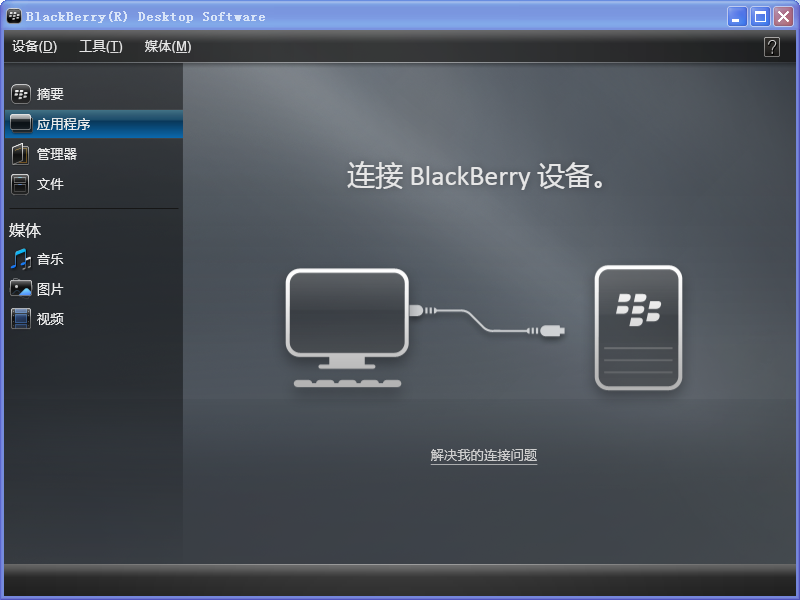
A basic introduction to BlackBerry Desktop Manager
BlackBerry Desktop Manager enables synchronization of email and organizer information (calendar, contacts, notes and tasks) between BlackBerry smartphones and PCs. Back up information from smartphone to PC or restore previously saved files.
BlackBerry Desktop Manager Function Introduction
Easily transfer files, music, data and programs
Use Roxio®, Media Manager to easily manage video and music files when transferring files between your computer and your BlackBerry smartphone's built-in storage or an optional media card. Migrate data from a BlackBerry smartphone, Palm®, Treo, or Windows Mobile®-based device to a new BlackBerry smartphone.
Add new software and upgrades
Load new apps and upgrades from your PC to your BlackBerry smartphone
Create automatic signature
Create an automatic signature to be included in the body of outgoing emails
Manage business email
Filter emails you receive on your BlackBerry smartphone by keywords and message fields
How to use BlackBerry Desktop Manager
Backup and restore functionality
1. Open the BlackBerry Desktop Manager, double-click the "Backup and Restore" icon to enter the following page:
Backup function: The mobile phone has a lot of information, including address book, short messages, various settings, AutoText, etc. The backup function is to package the entire user information from the mobile phone into a backup file, transfer it to the computer and save it. It is recommended to perform regular backups. The operation is quite simple and very safe;
Method: After entering the backup and recovery page, click the "Backup" button, then select the directory where the file is saved on the computer, and then click "Save"; that's it;
Restore function: The same as the backup function, but it is a reverse operation, that is: transfer the backup files saved on the computer to the mobile phone, and overwrite the existing files on the mobile phone;
Method: Open the desktop manager, enter the backup and recovery page, click "Restore", then point to the directory where the files are saved on the computer, select the corresponding file and click "Restore";
Clicking the "Advanced" button on the above interface will enter the advanced options interface: On this page, you can individually select the columns to be backed up, such as only backing up the address book: address book;
Method: Click the title of the column you want to back up. The arrow pointing to the right in the middle will change from gray to black. Click the arrow to back up the address book separately.
2. You can overwrite the existing files on your computer with the backup files of separate columns that already exist on your computer.
Method: Click "Open" in the upper left corner of the dialog box and point to the directory where the file is stored on the computer. After selecting the file, you will return to the dialog box. The name and size information of the file will appear in the list on the left. If you stand-alone the file, the arrow pointing to the right will turn black. Click the arrow to replace the existing file (in the right box) on the phone with the file on the computer (the file in the left box);
Application loading
In addition to ringtones and pictures, other software with cod as the suffix, such as e-books, games, application software, etc., are all transferred to the phone through this function.
1. Double-click the application loading icon to enter the corresponding page: If the software has been installed on the local computer before, the list of software will be displayed. If it has been installed on other computers, it will not be displayed on the local computer;
2. Click the "Add" button and point to the directory where the cod file and alx file are stored.
BlackBerry Desktop Manager version information
Blackberry Desktop Manager 4.6.0
Publishing company:Research In Motion Limited
Authorization method:Shared version
Operating system:WindowsAll
Software language:Simplified Chinese
Software size:245 MB
Version: 7.1.0.41 | Update time: 2024-12-23
Similar recommendations






Latest updates




Pixel Naruto online play entrance-Pixel Naruto web version online play-Huajun Software Park
How to add background music in python-How to add background music in python
How to configure environment variables in python - How to configure environment variables in python
How to run python - How to run python
How to create a project in python - How to create a project in python
How to make a blue sky background with scratch-How to make a blue sky background with scratch
BlackBerry Desktop Manager Review
-
1st floor Huajun netizen 2022-02-20 15:05:56BlackBerry Desktop Manager is awesome! 100 million likes! ! !
-
2nd floor Huajun netizen 2022-03-15 11:53:36BlackBerry Desktop Manager is convenient, practical and powerful. The software is very easy to use!
-
3rd floor Huajun netizen 2022-01-25 01:34:23BlackBerry Desktop Manager is comprehensive and easy to use.
Recommended products







- Diablo game tool collection
- Group purchasing software collection area
- p2p seed search artifact download-P2P seed search artifact special topic
- adobe software encyclopedia - adobe full range of software downloads - adobe software downloads
- Safe Internet Encyclopedia
- Browser PC version download-browser download collection
- Diablo 3 game collection
- Anxin Quote Software
- Which Key Wizard software is better? Key Wizard software collection




