
-
TTPlayer
- Size: 50.70M
- Language: Simplified Chinese
- Category: audio playback
- System: Winall






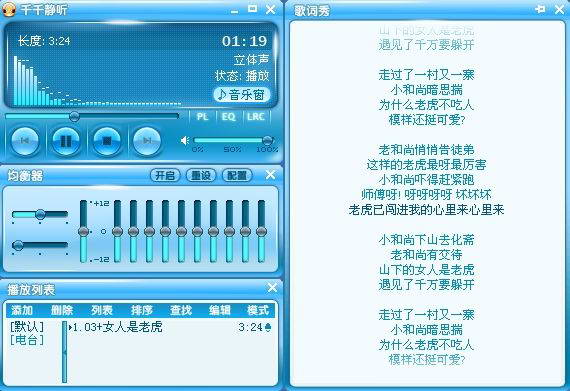
TTPlayerThe latest version is one with massive excellent resourcesmusic playbackTools. TTPlayer has excellent playback quality, rich music resources, and changeable interfaceskin, deep user base. And Qianqianjingting (TTPlayer) integrates playback, sound effects, conversion,LyricsIt has many functions in one, is compact and exquisite, and easy to operate. Huajun Software Park provides the download service of Qianqianjingting (TTPlayer). To download other versions of Qianqianjingting, please go to Huajun Software Park!

Qianqianjingting(TTPlayer) FAQ
Q: How to replaceQianqian listens quietlyPlayer skin?
Answer: 1. Openplayer, find the settings.
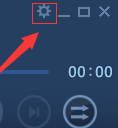
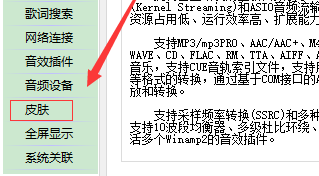
2. Find the skin option in settings and click on it.
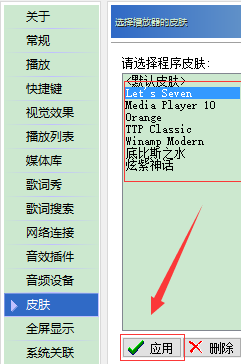
3. Now you can choose the skin you like.
Question: I want to compress CD into MP3 or WMA. Can I use Qianqianjingting to do it?
Answer: Yes, you can drag all the audio track files on the CD into the playlist by adding files or directories. Because audio tracks captured digitally are accessed exclusively, if you are playing files or audio tracks on the CD, please stop playing first, and then select the files to be transferred in the playlist. (Multiple selections can be used for batch conversion). Click the "Convert Format" command in the right-click menu to convert. If MP3 or WMA is not found in the compression format list, please reinstall Qianqianjingting. In the same way, you can convert any file that Qianqianjingting can play.
Q: How to uninstallQianqian listens quietlySoftware?
Answer: Method 1: Install and open the computer manager software, select the software management option, click the uninstall option, find the Qianqian Listening software in the list, and click to uninstall.
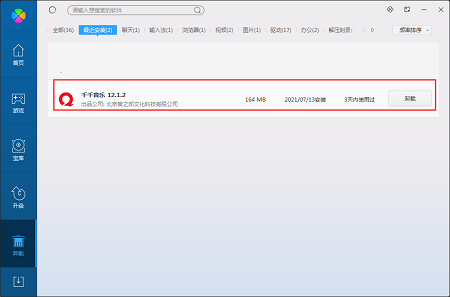
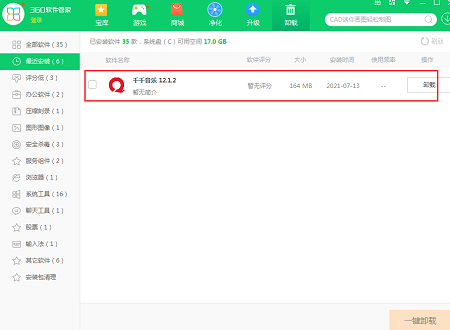
Method 2: Install and open 360 Software Manager, find Qianqianjingting software in the list of uninstall options, and click to uninstall.
Why can’t Qianqianjingting connect to the Internet?
Network setting problems: Check whether the network connection is normal. You can try to open the web page to verify. If you use a proxy, check whether the proxy configuration is correct in "Options" - "Network Settings" in Qianqianjingting.
Firewall or security software restrictions: A firewall or security software may be blocking Qianqianjingting from connecting to the Internet. Add Qianqianjingting as a trusted program in its settings, or allow it to access the network.
Software version problem: The old version may have networking defects. Go to the official website to download and install the latest version.
How to convert Qianqianjingting to mp3 format
Open Qianqianjingting and add the audio files you want to convert.
Right-click the file and select "Convert Format".
Select "MP3 Encoder" in "Output Format".
Parameters such as output path and audio quality can be set.
Click "Convert Now".
How to change the song title in Qianqianjingting
Method 1: In the playlist, right-click the song, select "File Properties", and modify the "Title" column in the "Tag" tab.
Method 2: Find the song file in the computer explorer, right-click and select "Rename" to directly modify the file name.
How to add music to Qianqianjingting
Single addition: Click "Add" - "File" in the upper left corner of the interface, find the music file you want to add, and select OK.
Batch add: Click "Add" - "Folder" and select a folder containing multiple music files to add.
Playlist addition: You can directly drag local music files to Qianqianjingting’s playlist.
How to set loop playback on Qianqianjingting
Single Loop: Click the play mode icon at the bottom of the interface until the "Single Loop" sign is displayed.
List Loop: Click the play mode icon multiple times until the "List Loop" sign is displayed.
How to log in to Qianqianjingting
The old version of Qianqianjingting generally does not require login. If the current version requires login, after opening the software, enter the registered account and password on the login interface, and click "Login"; if you forget your password, you can click "Retrieve Password" and follow the prompts.
How to connect to the Internet with Qianqianjingting
Make sure the network connection is normal. If you cannot connect to the Internet due to firewall restrictions, allow Qianqianjingting to access the network in the firewall or security software. If using a proxy, configure the correct proxy information in the software "Options" - "Network Settings".
How to download songs from Qianqianjingting
The old version of Qianqianjingting had an online music search and download function, but this function may have stopped serving. You can search and download songs through other formal music platforms (such as QQ Music, Kugou Music, etc.), and then add them to Qianqianjingting for playback.
TTPlayer software functions
Extensive audio format support: Qianqianjingting is compatible with MP3, MP3PRO, AAC, AAC+, M4A, MP4, WMA, APE, MPC, OGG, WAVE, CD, FLAC, RM, TTA, AIFF, AU and other audio formats, as well as MOD and MIDI music, and even supports CUE track index files, ensuring that users can play almost all types of audio files.
Powerful audio engine: The software is equipped with a self-developed audio engine that supports advanced audio stream output technologies such as DirectSound, Kernel Streaming, and ASIO. Combined with 64-bit mixing and AddIn plug-in expansion capabilities, it achieves a perfect balance of low resource usage, high operating efficiency, and strong scalability.
Rich sound effect processing options: Qianqianjingting provides functions such as sampling frequency conversion, playback gain, 10-band equalizer, multi-level Dolby surround, and fade-in and fade-out sound effects. It is also compatible with multiple Winamp2 sound effect plug-ins, allowing users to freely adjust sound effects according to personal preferences and create an exclusive music experience.
Complete lyrics function: The software supports synchronous scrolling display and dragging and positioning of lyrics, and also provides online lyrics search and editing functions. Users can not only edit lyrics freely, but also upload homemade or modified synchronized lyrics to the server to share with music lovers around the world.
Convenient format conversion tool: Qianqianjingting has a built-in audio format conversion function. Users only need to right-click the track in the playlist and select "Convert Format" to easily convert between multiple audio formats to meet the music sharing needs between different devices.
Personalized setting options: The software provides a variety of personalized skins for users to choose from, and supports self-made skin replacement. In addition, personalized settings such as magnetic windows, translucent/fade windows, window shadows, taskbar icons, custom shortcut keys, information scrolling and menu function prompts make the user's music playback experience more unique.
Intelligent music management function: Qianqianjingting is equipped with a music media library to facilitate users to organize and search local music files. At the same time, its powerful audio file search function allows users to quickly locate the required audio files through keywords.

Features of TTPlayer software
Lightweight design: The software is small in size, runs quickly, and does not occupy too many system resources, ensuring that users can enjoy music smoothly.
Easy to operate: The interface is simple and intuitive, easy to use, even novices of music playing software can quickly master various functions.
Comprehensive functions: It integrates playback, sound effect adjustment, format conversion, lyrics synchronization and other functions to meet the diverse music needs of users.
Rich resources: It has a huge music library, covering all kinds of music resources such as new songs and hot songs, allowing users to easily find their favorite songs.
Excellent sound quality: Supports high-quality music downloads, providing users with a delicate and realistic listening experience, making music more moving.
TTPlayer installation steps
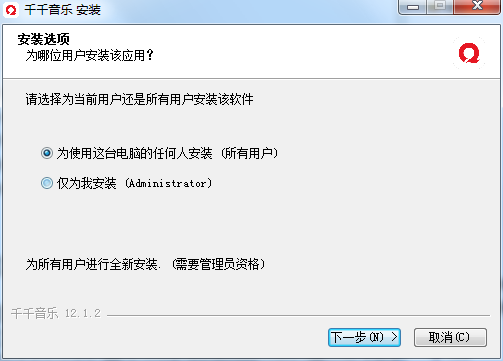
1. Download Qianqianjingting (TTPlayer) in Huajun Software Park, unzip it to the current folder, and click Qianqian Music Setup 12.1.2.exe application, enter the installation wizard interface, select the type of installation, and click Next.
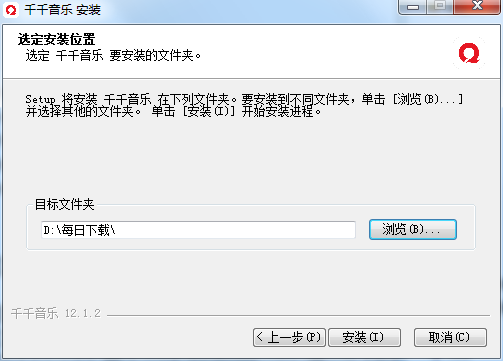
2. Select the software installation location interface. Huajun editor recommends that users install it in the D drive, select the installation location and click Next.
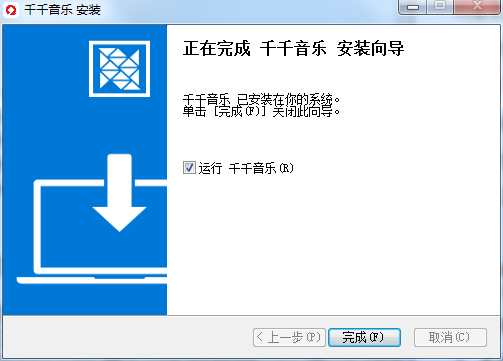
3. The installation of TTPlayer is completed, click Finish.
How to use TTPlayer
1. First click onQianqian listens quietly
2. There will be some recommended lists on the right
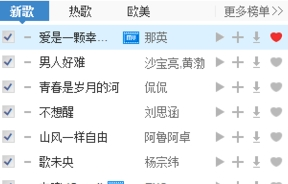
3. Take the first song as an example, click the small downward arrow
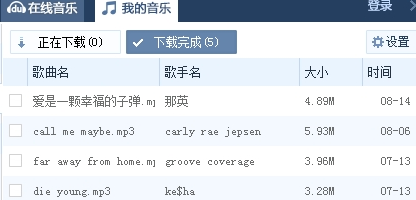
4. An interface like this will appear

5. Then select a sound quality and click OK. The "My Music" above will flash continuously.

6. Then click to see the download status, and it will be saved in the specified folder.
Comparison of similar software
NetEase Cloud MusicIt is a music player focused on discovery and sharing. NetEase Cloud Music PC version is simple and convenient to operate. You can use it to listen to your favorite high-quality music. NetEase Cloud Music has many special functions, providing everyone with personalized recommendations, song synchronization, following favorite celebrities, etc., with an efficient and convenient experience.
Baidu Music (now renamed Qianqian Music)It is a very popular and professional audio player that not only allows you to listen to songs but also supports various format conversions so that you can experience different sound effects. It has authoritative music lists, popular songs and theme radio stations. The most distinctive feature is the user-friendly song search, which allows us to find our favorite music faster.
TTPlayer update log:
1. The details are more outstanding!
2. BUG gone without a trace
Huajun editor recommends:
Qianqianjingting (TTPlayer) is a high-performance software that meets everyone's requirements. The software is free, non-toxic, and has absolutely positive reviews. Our Huajun Software Park has the most authoritative software, green and free, officially authorized, and also has products like Pitcher pitch changer, CD to MP3 format converter, and silencer magician. I hope everyone will come and download it!
Version: 12.2.8 | Update time: 2025-12-03
Similar recommendations







Latest updates





Comments on TTPlayer
Recommended products









- Diablo game tool collection
- Group purchasing software collection area
- p2p seed search artifact download-P2P seed search artifact special topic
- adobe software encyclopedia - adobe full range of software downloads - adobe software downloads
- Safe Internet Encyclopedia
- Browser PC version download-browser download collection
- Diablo 3 game collection
- Anxin Quote Software
- Which Key Wizard software is better? Key Wizard software collection




